Video timing can be a source of misinterpretation and, often, frustration. In this guide to video timing in Amped FIVE, we will look at the various timing sources frequently encountered during Forensic Video Analysis.
Forensic Video Analysis must start with the establishment of two key facts.
Integrity
Data integrity differs from evidential integrity. For video data, establishing if and how it has changed since it was first created is a vital first step. Evidential integrity, however, refers to the chain of custody and the identification of changes since it was acquired.
Incorrect acquisition and subsequent processing before exhibiting can not only change the image but, more commonly, the associated timing data. Many of the challenges in ensuring data integrity were examined during the Amped Blog series on CCTV Acquisition. The preservation of the native data is integral to ensuring data integrity and the reliability of the timing data.
Authenticity
We must establish if the video is a true and accurate representation of the scene, object, or event. This is not simply for identifying malicious manipulation. The purpose is to identify the reliability of the captured event.
For a single moment in time, we have the individual video frame. This snapshot of an event may need to be referenced to a specific date and time. The accuracy required of that information will depend on the question being asked and the nature of the investigation.
However, a video is more than a single image. It is a series of images captured as consecutive moments in time that, when presented, will give the viewer the perception of motion.
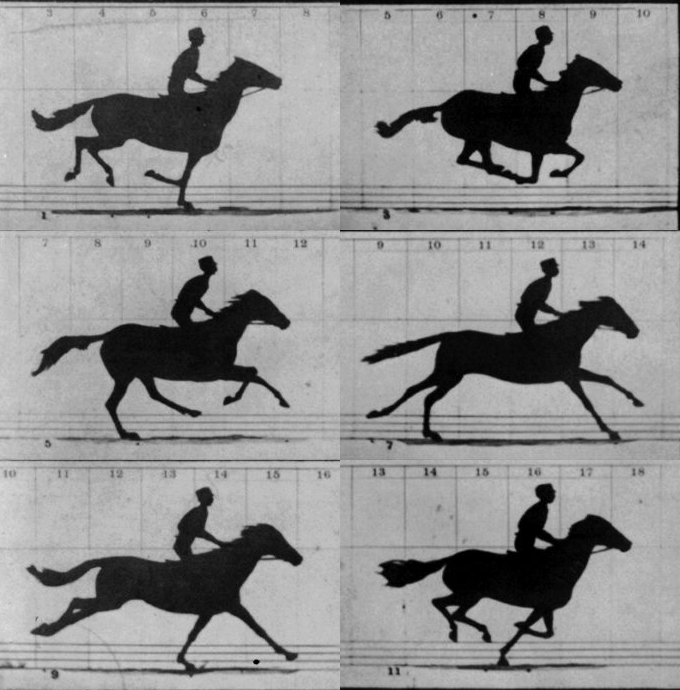
Play those images too fast or too slow, and the video is not authentic.
When video frames are decoded and presented to a viewer, each frame will be displayed for a certain duration. Some videos have a constant frame duration, whereas many are now variable. If the individual frame deltas are not taken into consideration during analysis, then the interpretation of the decoded video could be incorrect.
The last point in this section is the CCTV Time Offset.
If there is data relating to a date and time, is it authentic?
Is it real?
Or is it out by a few minutes, hours, or days?
If footage must be linked to a specific day or time, any offset between what is displayed and what is real must be calculated and verified. Any adjustment may then require an uncertainty value. Even when synchronising two cameras together from the same system, there will be some uncertainty.
In the world of Forensic Video Analysis, time and speed are linked. We may not have video timing data, but we have a date and time. We may not have all the dates and times, but we have validated speed. To use all the information correctly, we must identify what timing controls are available, their reliability, and report on uncertainty.
For the rest of the article, we’ll use “date and time” to refer to the information about when a video or video frame was captured, as recorded by the surveillance system. We will instead use “video speed” to refer to the information about when frames should be displayed to ensure a playback loyal to the recorded footage.
Timing Sources
With CCTV and proprietary video, we do not live in a world of standards or documentation. It is therefore important to evaluate the video timing, establish the timing sources, and then report on their reliability.
Sources can be separated into time and speed.
Time
- Filename
Date and time text that is used to form the filename, often containing either just the start time or both start and end times. - Encoded Date and Time
The date and time are set by the encoder during standard formatting and found in the metadata of common container formats. - Pixel-Embedded Timestamp
A date and time formed of pixels and hard-encoded into the visual data of a video frame. - Subtitle Stream
This is most commonly a standard text stream displaying a date and time. - Data-Timestamp
This is data, linked to a frame or position in running time, that corresponds to a date and time.
Speed
- Average Frames Per Second (FPS)
This is the value of the total number of frames divided by the duration. - Container Frame Rate
This is the value of the timebase divided by the packet duration of the frames. - Timecode
A timing reference for Non-Linear Editing (NLE) applications, calculated from the duration and the Base Frame Rate. - Decoding Timestamp (DTS)
The position in running time to decode the video frame information ready for presentation or to enable the decoding of bi-directional frames in modern video compression systems. - Presentation Timestamp (PTS)
The position in running time to present each frame as an image. - Delta Rate
This is the value of the total number of frames divided by the sum of all the PTS deltas. - Visual
Recorded timing information. Either a stopwatch, clock, timer, or LED lightboard.
Let’s look at each one and how Amped FIVE can use the information.
Filename
An easy one to start with, but one that is often overlooked.

Filenames are most commonly generated automatically at the time of export.
It could be the date and time of the start of the footage, but may be the date and time that the export was completed. It may be a range, with both start and end times.
Knowing the acquisition method, the data they input, and when the process was completed will help in identifying what the filename relates to.
The filename may also appear to be a random set of numbers. This could be time data in another form, such as clip duration in seconds, or a decimal representation of time.
Identifying and validating the filename information is an important initial step in the analysis, as it can be used to either manually create a timestamp or validate other date and time sources. Due to the importance of filenames, it is vital that automated data handling or digital evidence management processes never change them.
Encoded Date and Time
The dates and times found in metadata may be considered for use or cross-validation purposes. However, they often come with their own set of headaches.
In this first example, the video has an encoded date and time of 2007-08-12 at 19:02:20 UTC, as seen in the MediaInfo tab of Advanced File Info within FIVE.
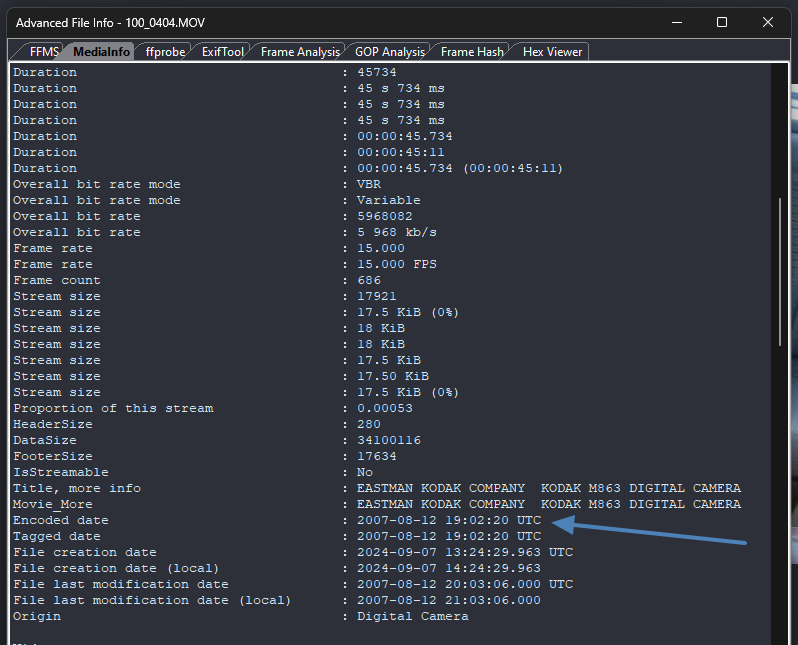
Created does not mean “made”. This is the time it was first read by that computer at that location. It is for this reason that data must always be handled forensically. This data can be inadvertently changed when extracting data from SD cards, or moving files from location to location.
Now that we understand this, what about the date and time last modified?
It says 2007-08-12 20:03:06.000 UTC. This is the time that is often useful for validating the Encoded Time reliability.
If we have an encoded time of 19:02:20 and a duration of 45.734 seconds, that would be 19:03:06.000 UTC (rounded up to the first full second). Where has the extra hour come from in the modified time?
It gets even more confusing when we look at ExifTools analysis.
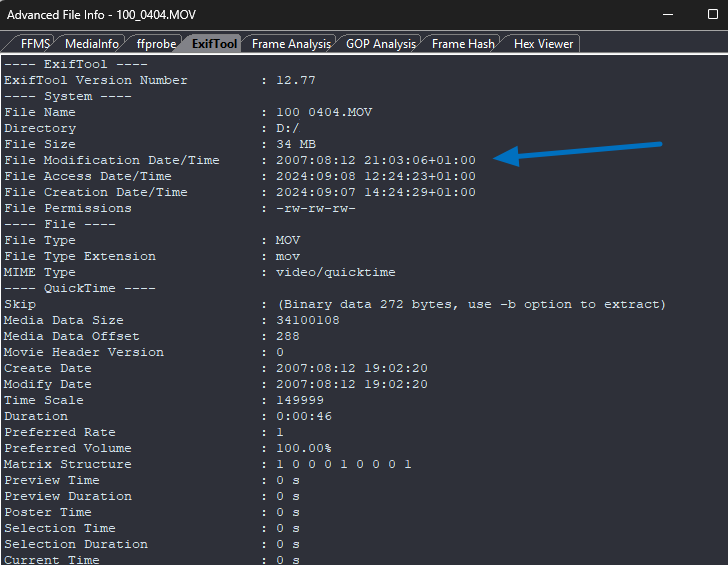
This is mysteriously adding another hour, and then adding +1 to that!
Knowing the file’s history or the system architecture and ensuring forensic control of the data helps so much when we observe issues like this. We know, in this case, that the file was created first on an SD card. How was that SD card formatted? FAT32 deals with times differently than NTFS.
In this case, it appears that the encoded date and time are set to the start of the video. We know the duration, so from that, we can calculate the end time. Putting aside the extra hours for timezone/UTC unknowns, the seconds do result in a logical time.
If you have the device, then you can create some test recordings to establish how the times are dealt with, but this is not often possible.
How about this next example from a cyclist’s helmet camera?
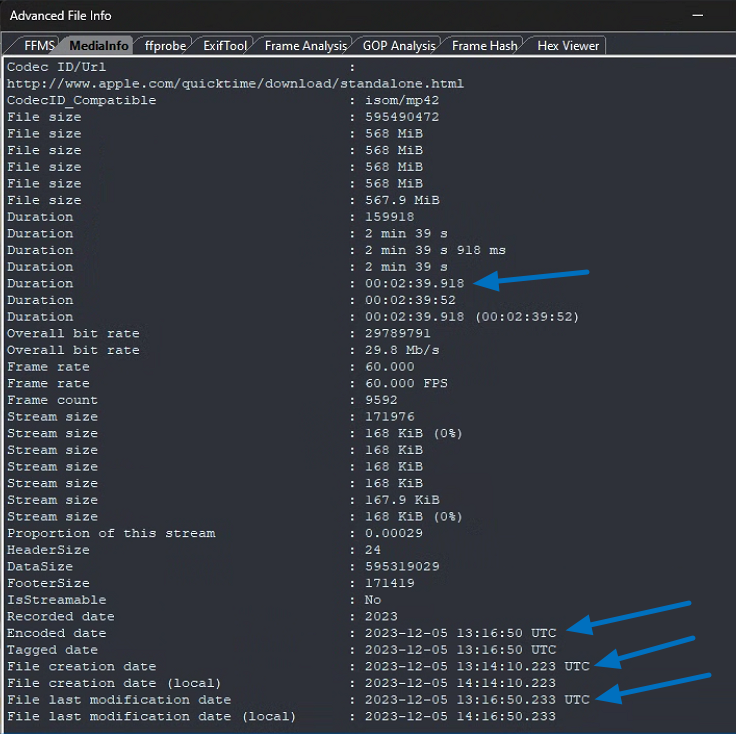
In this example, we have an encoded time using the data obtained at the end of the recording, and not the start.
Creation Time: 13:14:10.223
Last Modified Time: 13:16:50.233
Encoded Time: 13:16:50
Duration: 00:02:39.918
Therefore, after analysis of this data, using the encoded date and time as a start point for a timestamp would be incorrect.
One last common example.
When a CCTV system records the video stream for the first time, it is stored along with date and time references within a storage device such as a hard drive. It is becoming common for that data to be previewed and then acquired using network protocols through the use of a computer or cellphone.
The data did not start as a file. The file gets newly created on the attached network device after receiving the video stream. The frames will often be the same, but the video timing may not be. Along with the new speed control is a new encoded date and time.
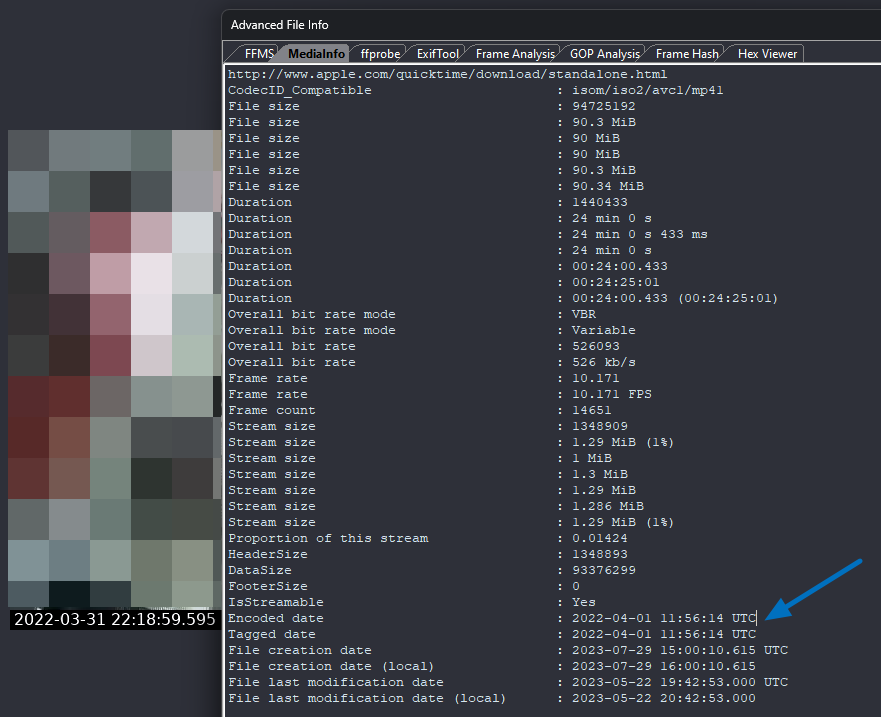
The CCTV time, as shown by the pixel-embedded timestamp, is during the evening of 31st March. The encoded date is the following morning, at the time that the footage was streamed from the CCTV device to the manager’s computer.
The encoded date and time is a good resource for information, but its reliability must be cross-referenced and validated if it is to be relied upon.
Pixel-Embedded Timestamp

We do not have milliseconds, and each timestamp is held for a series of frames. Is the time correct, though? It is daylight, but 00 Hrs usually references midnight. There is no indicator of AM or PM within the pixel data, so this will need to be validated.
In this next example, we have a mixture of data. At the end of the time, we have the number of frames presented in that second (17) and then milliseconds (891).
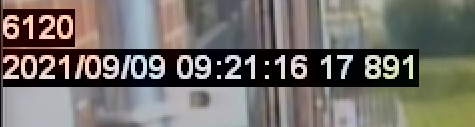
This appears to be very accurate, but when was this data added to the visual information?
Was it added at the time of image creation, or was it overlaid onto the footage by a proprietary player that has then exported another version of the video?
Digital video streams are commonly ingested into a device or decoded by an application, and the date and time are added at a transcoding stage.
This will mean that the imagery data will have changed since it was first created.
So, has this timing data come from the original video, or has it been added within a processing stage? If the latter, is it reliable? Did the first video have variable timing, but the second has now been “evened out” and made constant? Do the deltas between the displayed milliseconds match those in the file’s Presentation Time Stamps?
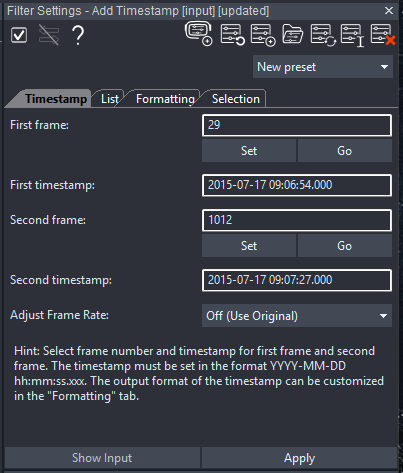
In Amped FIVE, we can add the information from the 3 previous sources by using the Add Timestamp filter. This not only allows you to visualize that data on the video, but it also becomes a frame rate control source or data to be used with filters such as Speed Estimation 2d.
Subtitle Stream
Embedded or associated subtitle streams usually comply with a known and documented standard.
Embedded streams are included inside the media container, whereas associated streams have the same filename but with a different file extension.
Using the Advanced File Info in Amped FIVE, it is possible to quickly identify that this standard MP4 file has three streams. One video, one audio, and then one subtitle.
Most subtitle streams are not frame-accurate and display a date and time according to the video file’s running time.
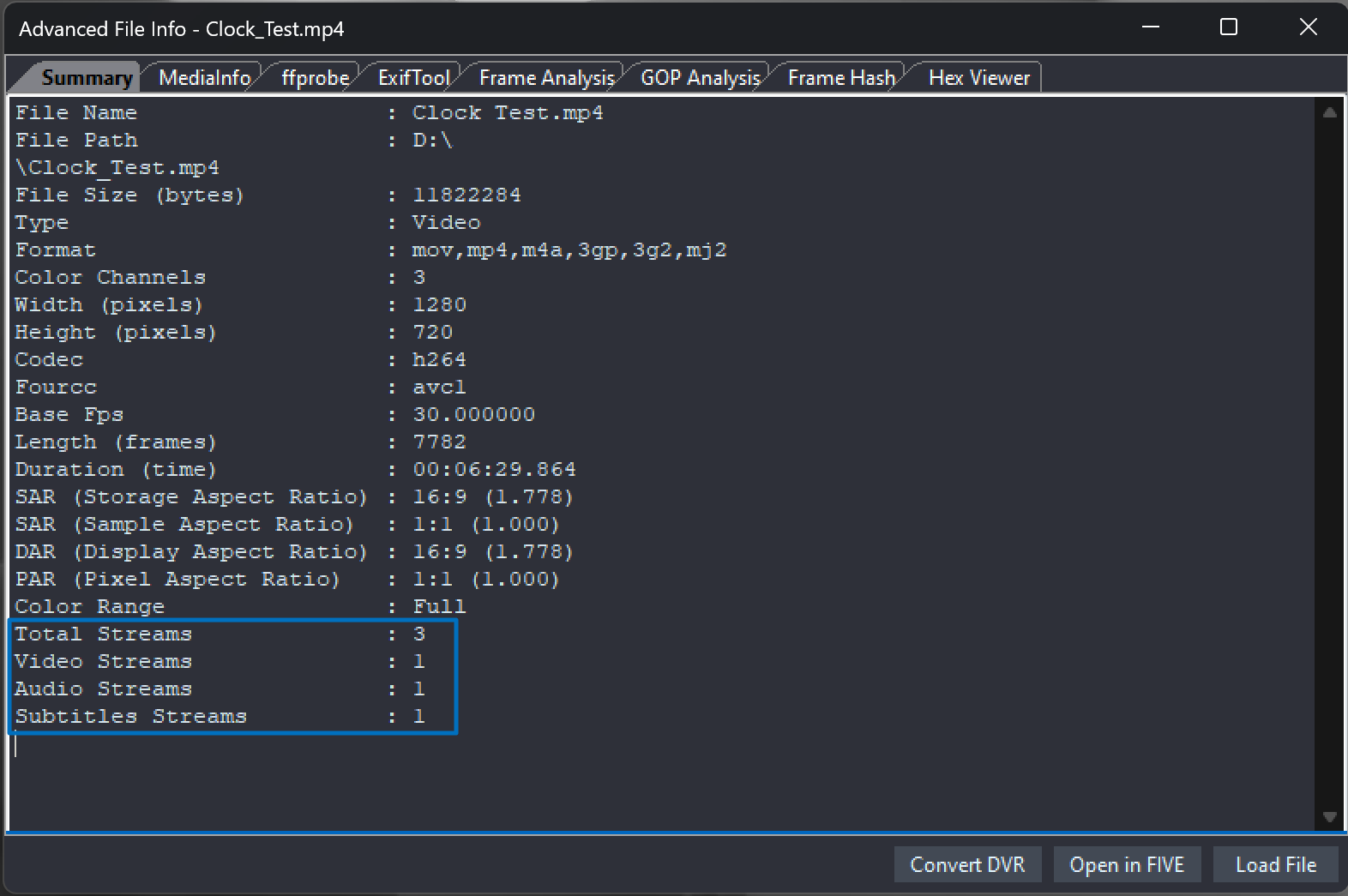
When using Amped FIVE, you have control over how to present the subtitle information, as it can override any position controls. The presentation is only one part, though, as Amped FIVE will read this data and make it available for calculations and video timing control.
Data-Timestamp
Data timestamps reference a frame, rather than a position in running time. They could reference a single frame, a certain frame type, or every frame within a video stream.
Whereas most subtitle streams conform to a known standard, most frame-based data timestamps do not. As such, the data will require analysis and decoding before it can be presented in a human-readable way.
In the following diagram, we have a common example of how the date and time information on the original CCTV hard drive gets moved around during the native file export.
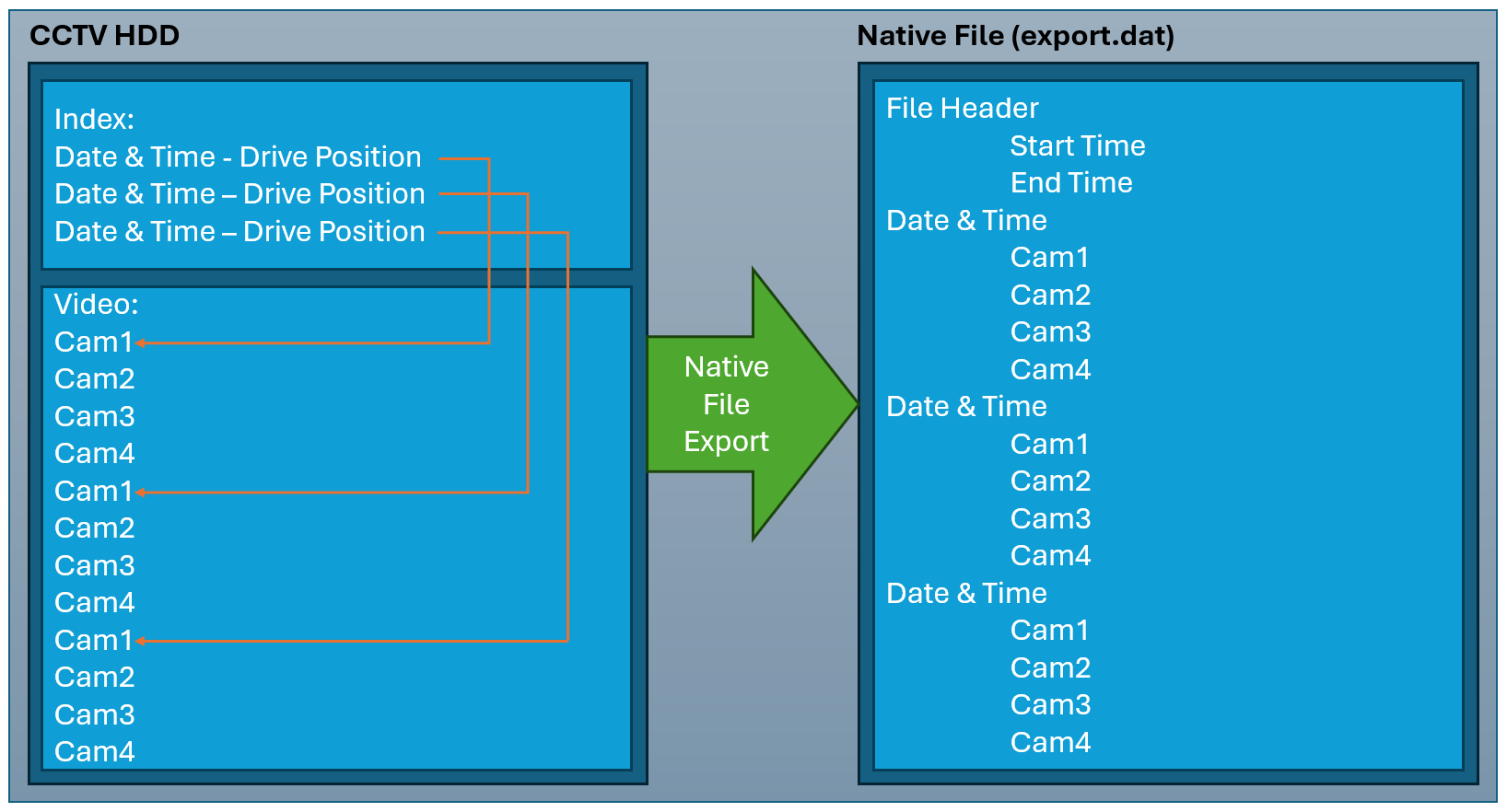
The index system in this example gives a date and time to the position on the Hard Disk Drive (HDD) where that video data is. This is how you can use the device interface to navigate to a specific time of interest. It also shows you that if you attempted to manually carve video data from the HD, you could be successful with video, but may miss the date and time, as it was elsewhere on the drive.
When using the DVR to conduct an evidential export in the native format, the data is restructured to allow the searching and scrubbing of the video file in the proprietary player. It’s the same data, just written differently.
In our diagram above, we have the start and end time of the footage, along with the date and time for every frame. Some may only store date and time with I-frames. Some may simply have a start and end time, and any intermediary times shown in a proprietary player are interpolated during playback.
Although there is no standard, you could be lucky. In this example below, the time and date information is stored with the video frame using the UNIX time standard.
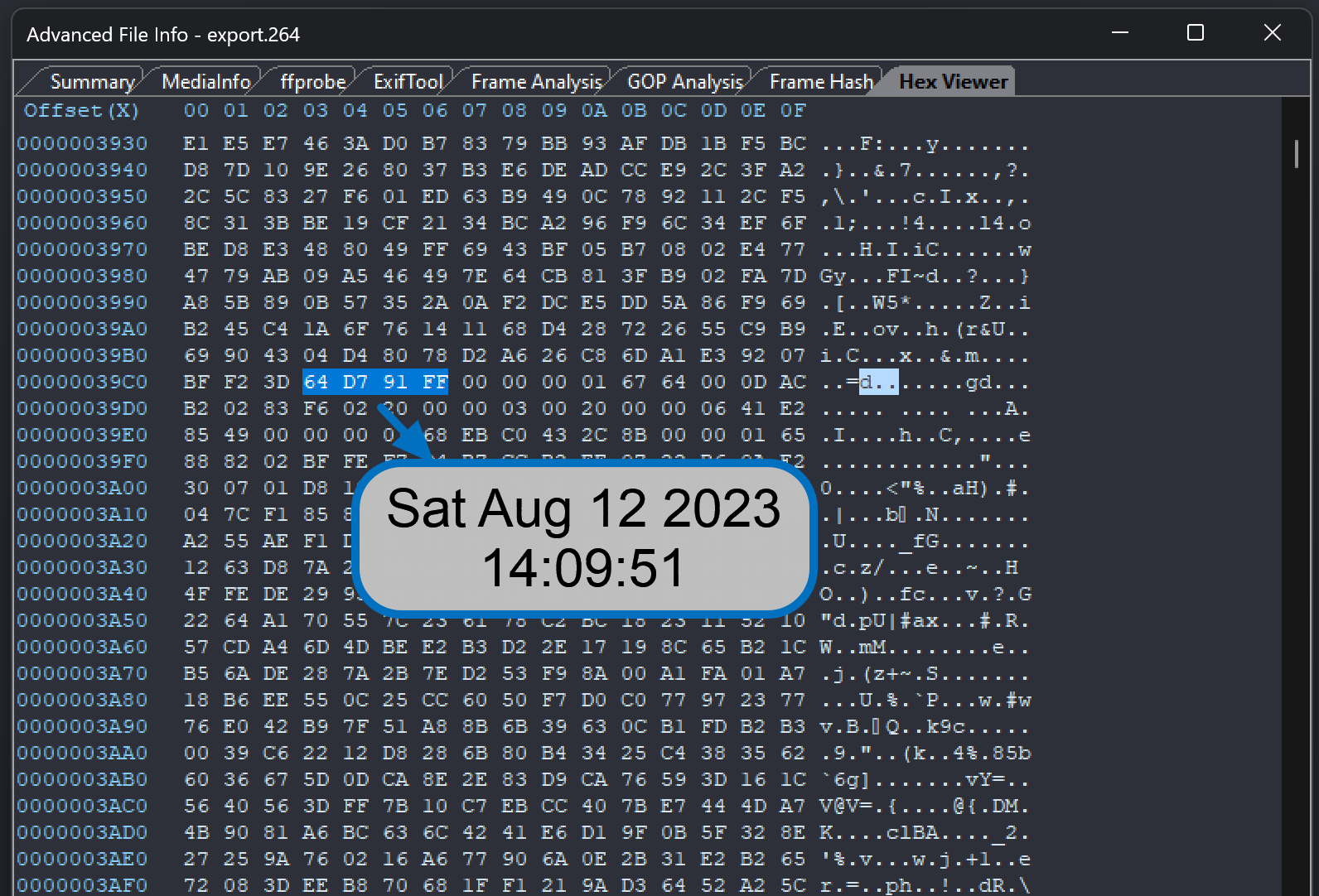
Having proprietary timing data in between video data like this can cause video decoding errors if the two are not separated before standard formatting. A proprietary player, designed for that specific format, will have been built to handle the muxed data. Standards-based multimedia frameworks will not. Dropped frames and visual errors are the common results of such processing.
The adjustment of timestamps is often required, regardless of the data source.
It could be that you just have the start time of the footage and need to interpolate using the video timing, or that you have data timestamps for every I-frame.
Due to the various reasons for adjustment, there is a dedicated filter in FIVE: the Adjust Timestamp filter.
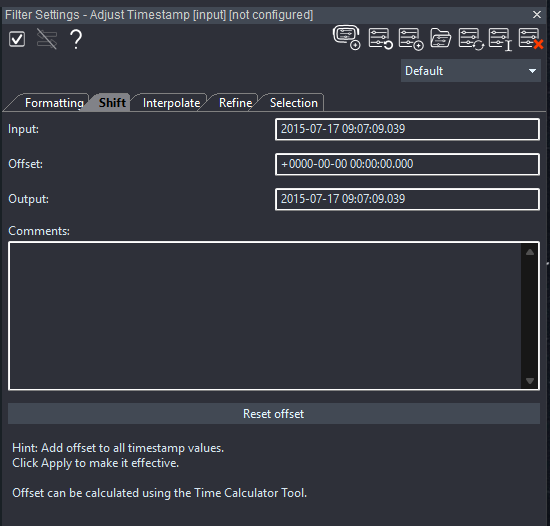
Shifting, interpolating, and refining are all catered for.
When interpolating or refining, you will need a speed source, and we will look at those shortly.
Before that, let’s look at the Time Calculator tool.
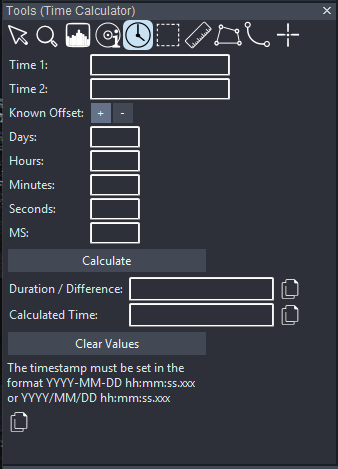
This handy little tool works to calculate both durations and offsets, whatever is required.
Let us recap the five real-time timing data sources.
- Filename
- Encoded Date and Time
- Pixel-Embedded Timestamp
- Subtitle Stream
- Data Timestamp
All of these sources linked the footage to a specific date and time. Amped FIVE can use this data to control the video playback speed.
Within the player bar, the Playback Control settings allow selection of the desired source.
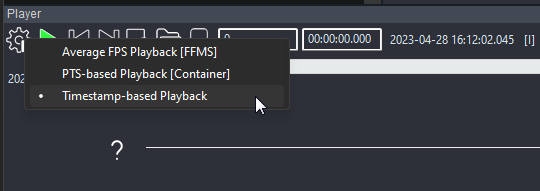
So far, we have only touched on real-time timestamps, but what about the video timing itself? It is this that will allow us to refine or interpolate timestamp data. It will also allow us to determine the frame rate reliability and any uncertainty value.
Average FPS and Container Frame Rate
Standard formats contain information relating to the duration of the video.
With a 10-second video, with 300 frames, the average frame rate would be 30 frames per second.
Here we can see the data within Advanced File Info.
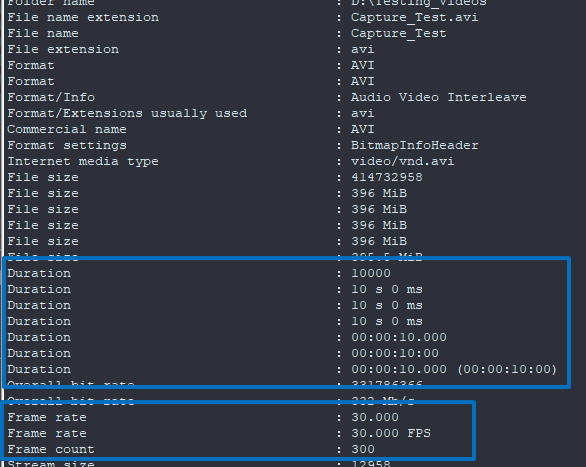
Before we carry on, we need to establish these data sources.
An incorrect frame count can cause errors in timing calculations. It is, therefore, important that you understand how you are decoding and interpreting the frame count.
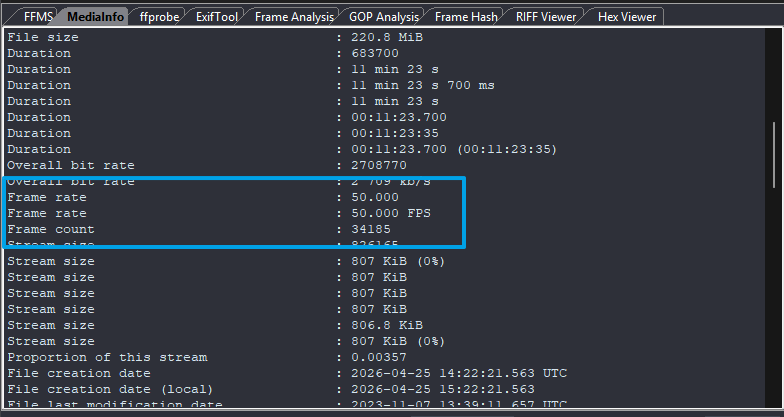
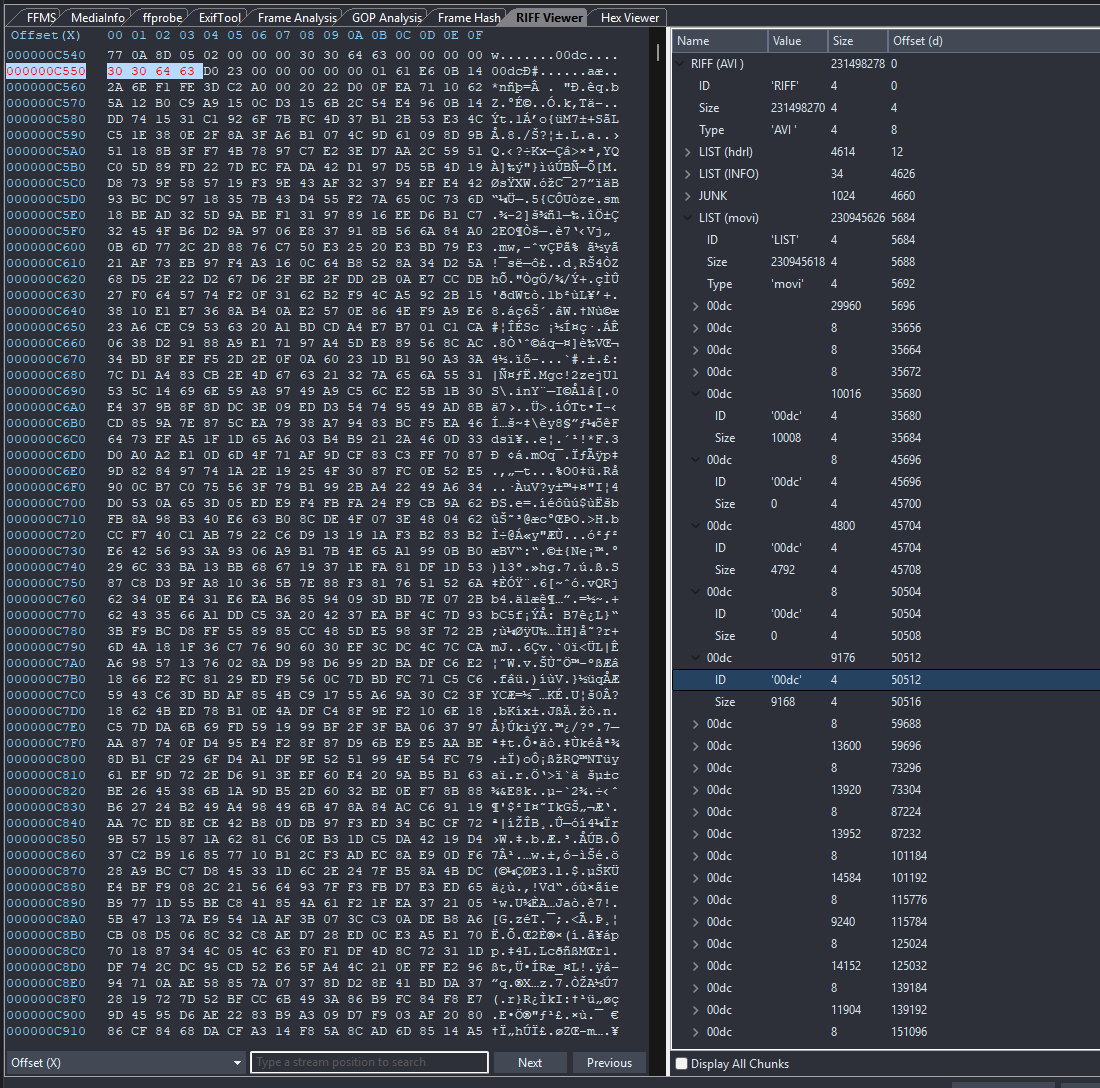
Mediainfo is obtaining the above information from the AVI container data. The AVI is presenting 34185 chunks. It thinks that every chunk is a frame. It’s not. Every other chunk is empty.
It has calculated the frame rate using the wrong information. It’s actually 25 FPS.
The legacy AVI format is notoriously tricky when it contains modern video codecs. Understanding the issues with containers is an important concept, and the RIFF Viewer within Advanced File Info can help you.
The video duration is another value that needs checking and cross-referencing.
It is very common for data to be stored in a header, but for the stream to get cut short due to problems. The duration presented then does not reflect the true duration in the file.
Looking at a new file now, we have an easy value to interpret.
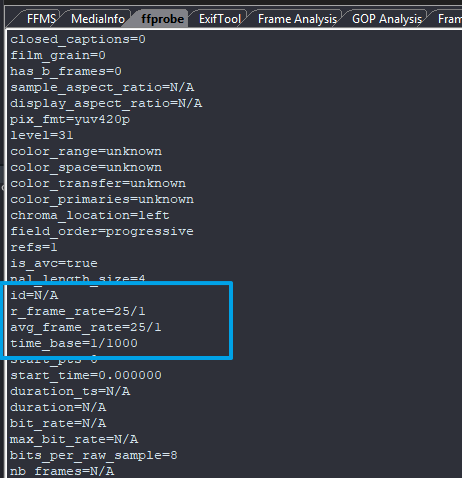
The file is 25 FPS.
Well, not quite.
You see, the video file here is variable. The average is 25 FPS but each frame is held for a different length of time.
This example is one of the most common challenges we see when conducting timing analysis on case files.
A system has read this container frame rate as 25 FPS and output it at 25 FPS at a Constant Frame Rate (CFR). It gives each frame a 40ms delta.
Using the Frame Analysis Tab in Advanced File Info, we can see that each frame has a duration based on its Presentation Time Stamp (PTS), and they are not 40ms.
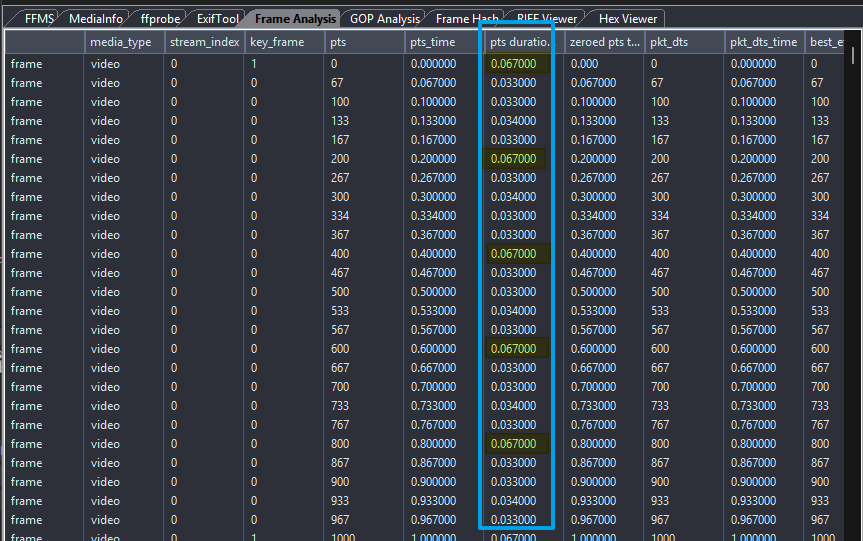
There is a pattern.
These are again vital to identify if speed and motion are being investigated.
Before taking a look at the videos’ internal timestamps, let’s just look at timecode.
Timecode
You may have to deal with broadcast video or files originating from devices that can be used for broadcast and consumer editing, such as GoPro cameras. These will then have an internal timecode that is fixed to their set frame rate.
Timecode: 00:04:57:12
Rather than MS after the seconds, we have the frames in that second. In the example above, we are 12 frames into that second. In order for this to be correct and for it to be used correctly, the frame rate must be correct.
If consumer video applications are used, they will use this data source, and this is where mistakes can happen when looking at duration and speed.
DTS, PTS and Delta Rate
DTS: Decoding Timestamp
PTS: Presentation Timestamp
Before we get into the importance of these, again its worth indicating that these are very container dependent and are formed from a calculation using the Timebase. Every major container is different, and they all store the data differently.
Regardless, there will be two important final values. When to decode and when to present.
Many years ago, when temporal video compression was in its infancy, chips could not decode and then present at the same time. Consequently, there was some buffer, and frames were decoded into memory before they were required to be displayed.
In modern times, the need for different decoding and presentation relates to frames that must be decoded out of order. These are known as Bi-Directional frames, or B-frames.
The key takeaway of this information is that the data is a construct, and it’s the timebase that dictates how to work everything out, along with how many ticks there are in a second.
If we have a stream timebase of 1/1600, and then a frame that has a tick duration of 544, then:
544/1600 = 0.34. This is 0.034 frame duration.
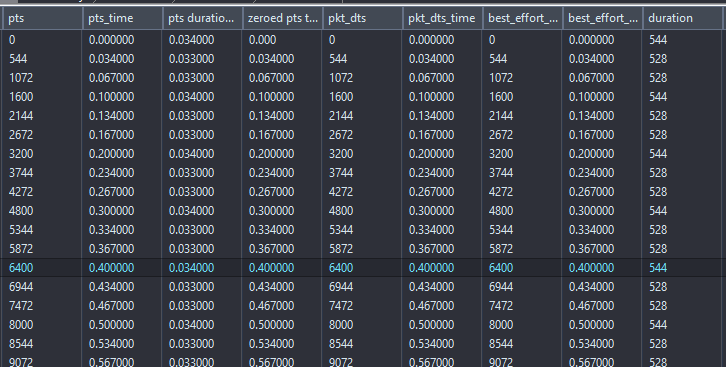
One duration after the other, and you have the PTS.
Due to how each container controls timing, it’s important to not simply look at packet duration. It’s the time between two PTS values that correctly indicates a frame duration.
So, what’s the Delta Rate? Very simply its a more accurate average frame rate. Calculated by the total number of frames divided by the sum of all the PTS deltas.
Visual Verification
Finally, we reach a point when there are a few too many conflicts. A good example is a specific brand of DVRs that get their exports incorrect and feed the wrong timing into their export container. The timing is off by 1 frame.
How was this established? Through the use of a timing device in front of a camera, and then recording that footage.
The accuracy of that device will again be determined by the investigation. It’s possible to get duration verified using a simple digital clock.
For millisecond accuracy, you will need to up the game with a validated LED lightboard.
Conclusion
Video timing is not easy, and it is one of the most common issues we receive at Amped Support. The tools within Amped FIVE, and the filters for adding and controlling the timing, are all built on real-world situations. They are designed specifically to allow you full control in evaluating every possible timing source, and then controlling or adjusting the speed to ensure authenticity in the video presentation. The reliability of any data usage can then be reported effectively.
Get into the habit of pulling files apart and evaluating their timing controls. There is often a reason for the anomalies and conflicts, but you have to find them first.
However, with CCTV files, you’ll often end up headfirst down the rabbit hole.