In the world of forensic video analysis, where evidence integrity can make or break a case, verifying authenticity isn’t just a step in the process – it’s foundational. Amped Authenticate has long been a trusted tool for image authentication, but its Video Mode marks a significant leap forward. It addresses the growing need for a robust, scientifically grounded approach to digital video verification.
For those of you working in digital forensics labs, the explosion of body-worn camera footage, surveillance video, and mobile device recordings presents a significant challenge. You are often tasked with validating not just what is seen in the footage, but whether it has been altered, recompressed, or stitched together. That’s where Video Mode comes in – bringing structure, depth, and precision to a complex problem.
Watch this video introducing the Video Mode in Amped Authenticate.
From First Look to Deep Inspection
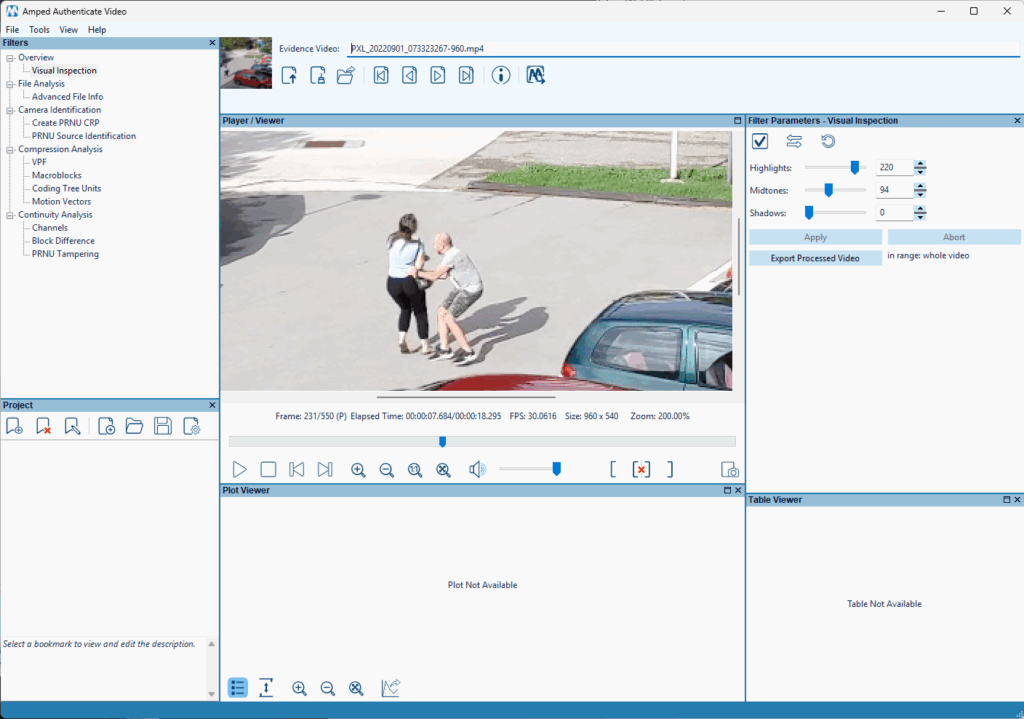
The process starts with loading your video into Amped Authenticate’s Video Mode. The Video Mode has a dedicated GUI, designed to allow viewing multiple kinds of information at the same time: processed frames, plots, and tabular outputs.
Unlike basic media players, the viewer panel doesn’t interpolate pixels when you zoom in, preserving the original resolution and allowing you to inspect frames at the pixel level. That alone is very important when you’re trying to validate claims about what a video does—or doesn’t—show, which is the purpose of the Visual Inspection filter. The filter allows basic-level processing to enhance the visibility of dark or low-contrast regions.
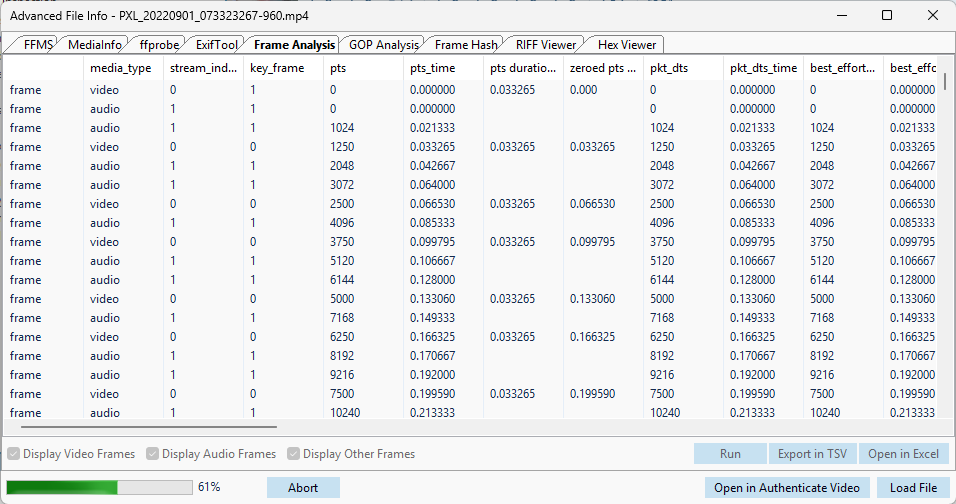
But first impressions aren’t enough in forensics. Authenticate lets you dive into the details of your video file. In the Advanced File Infotool, accessible from both the Filters panel and the Tools menu, you can view metadata extracted from the video using trusted tools such as FFprobe, MediaInfo, and ExifTool. This gives analysts access to frame structure, encoding details, and GOP (Group of Pictures) patterns. These elements can get you a long way when you’re trying to understand whether the video comes from an alleged source.
After completing the preliminary stages of visual inspection and file analysis, we can move to the other filter categories meant to reveal the details of the questioned video’s digital story.
Compression Analysis
Analyzing the compression details of a video can reveal a lot of interesting information. All modern video codecs work by combining temporal and spatial prediction to reduce the redundancy in video frames. Codecs such as MPEG-2, MPEG-4 Part 2, and H.264 split each frame into macroblocks and use inter- or intra-prediction to reduce the amount of data to be stored. The Macroblocks filter lets you inspect each frame to determine what kind of compression is used for each macroblock, if motion vectors are set and where they point to, and how strong the quantization is for that macroblock. When you’re trying to determine the reliability of something barely visible, knowing how much compression has been applied is important.
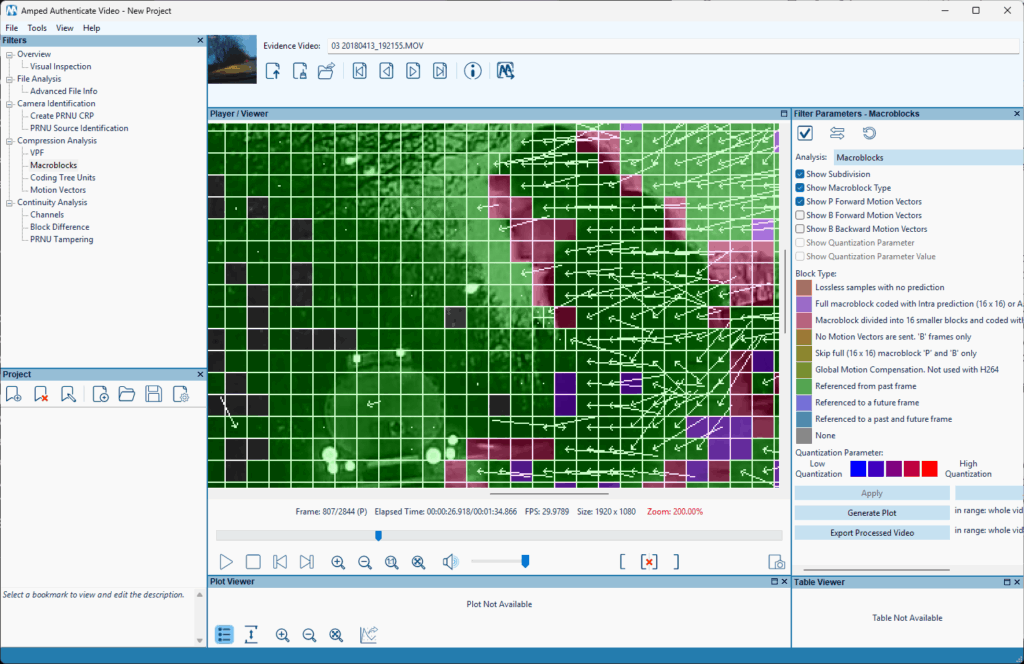
Besides the frame-specific details, you can also check how the use of various macroblock types evolves in time by clicking on the Generate Plot button.
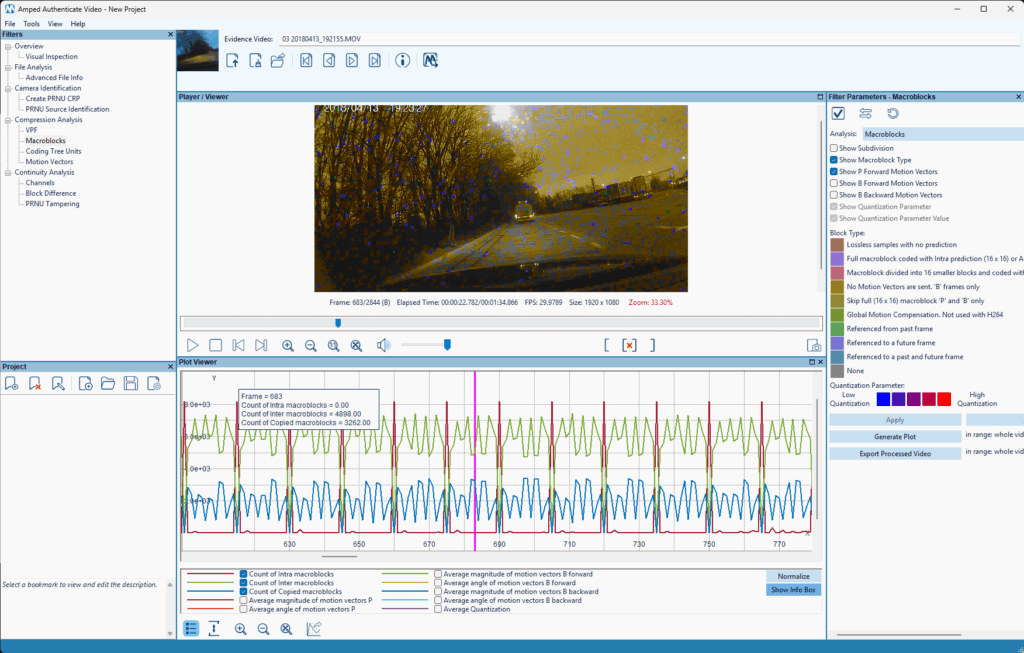
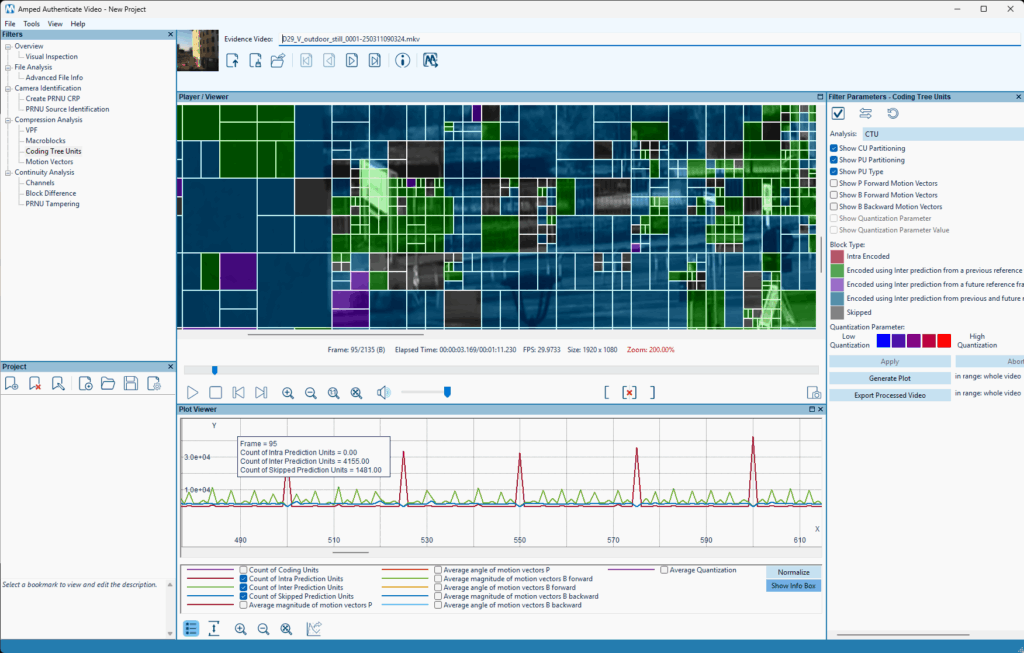
The Coding Tree Units filter offers the very same analysis for videos encoded with the more recent HEVC codec, which uses a different syntax (Macroblocks have been replaced by Coding Tree Units). As you can see in the picture below, HEVC allows a much finer-grained partitioning of pixels into prediction units.
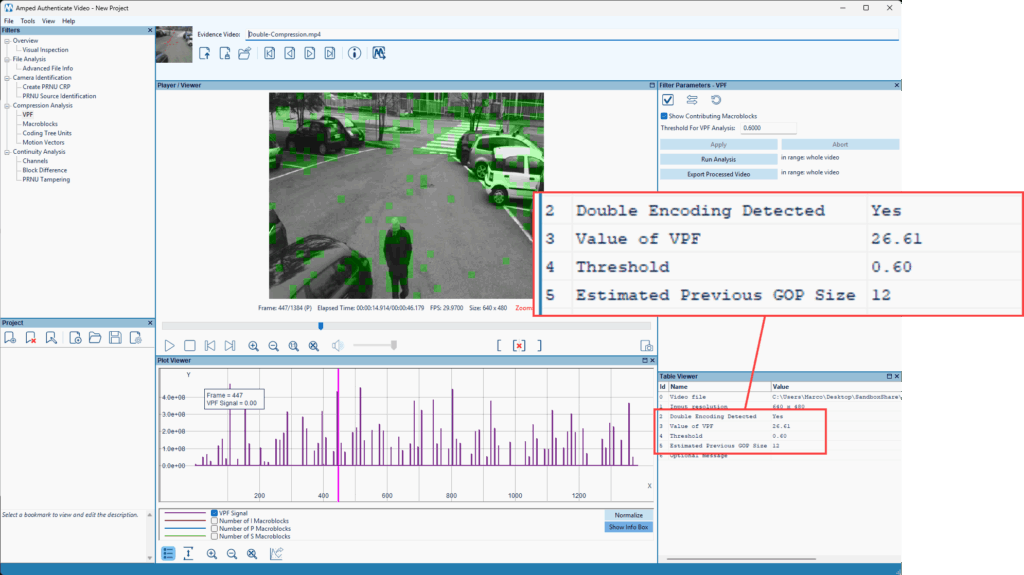
But Authenticate Video goes beyond showing data; it also helps you analyze it to reach conclusions. The VPF (an acronym for Variation of Prediction Footprint) filter examines the macroblocks and motion vectors of the video to determine if traces of double compression are detected.
Results are presented in a table, so the VPF filter makes the most of Authenticate Video’s GUI, showing processed frames, plots and a table as the result. As you can see in the picture below, the filter detected traces of double compression for this video, and estimated that the GOP size used in the previous compression was 12. This information can be very useful for integrity assessment. It allows you to determine whether you’re working with an original recording, or with a re-exported version of a video.
Continuity Analysis
When a video is manipulated by removing, inserting, or replicating a group of frames, traces of these changes may become visible in the temporal evolution of some video properties. The Continuity Analysis filter category helps you spot these traces.
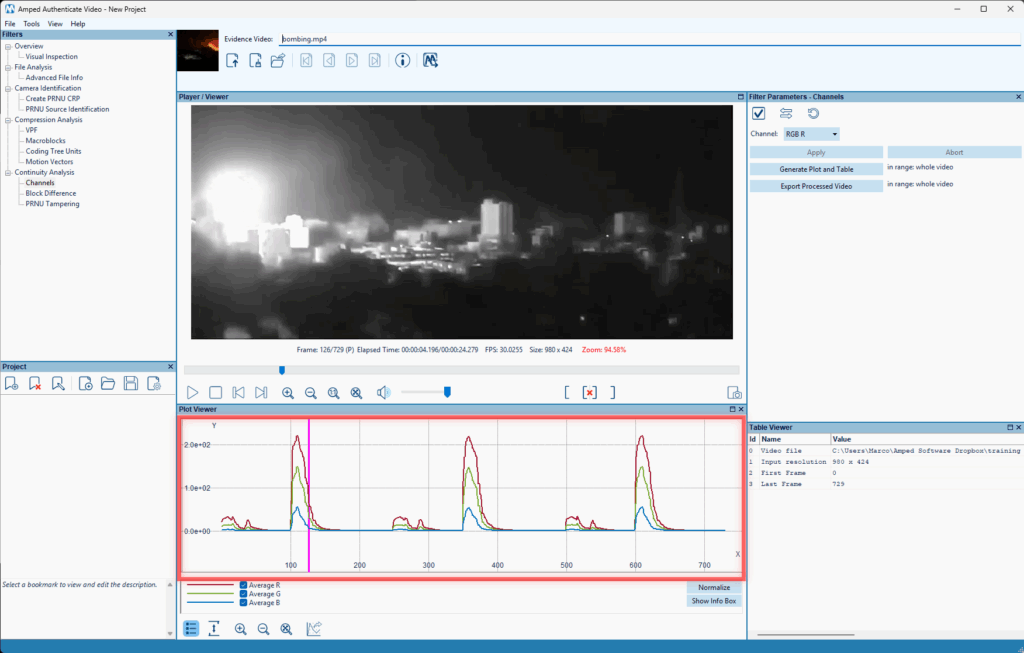
In the example below, a video of a bombing released on an important media outlet showed three consecutive bombings of the same zone. By loading the video in Authenticate Video and running the Channels filter – which shows the average values of red, green and blue across all pixels in each frame – we readily realize that the video has very likely been created by splicing together three replicas of the same content.
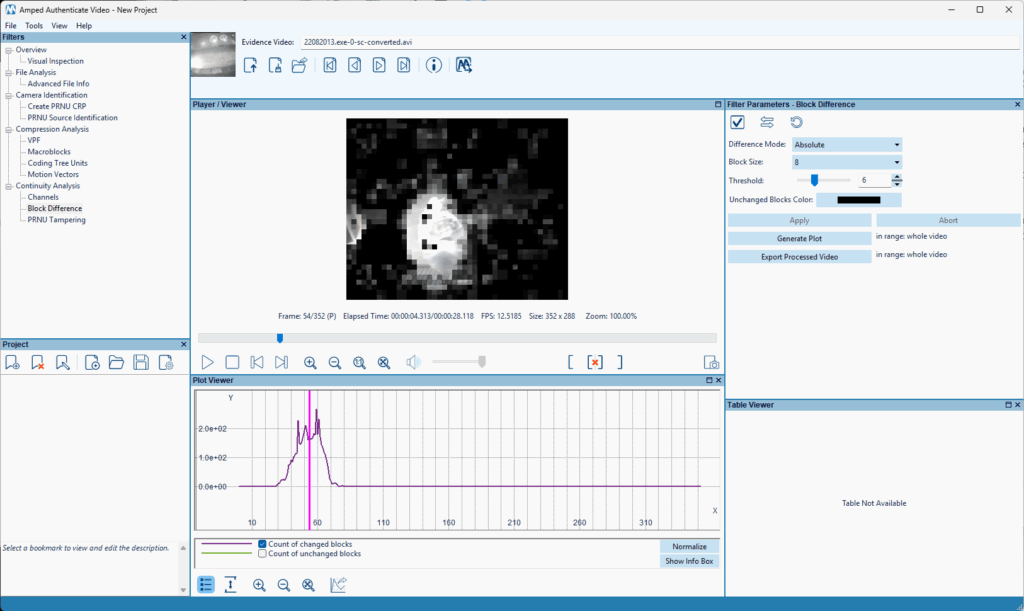
The Block Difference filter, meanwhile, shows how many blocks have changed significantly between consecutive frames. It can be very useful to detect abrupt changes in a video where you wouldn’t expect them (e.g. a surveillance video where nothing apparently happens). It also works excellently as a motion detector when the camera is fixed, provided you set the threshold large enough to ignore compression-related changes.
Source Identification
Last but not least, Authenticate Video allows you to use Photo Response Non-Uniformity (PRNU) analysis to link a video to the specific device that captured it. This feature, known also as Camera Ballistics, can be accessed through the dedicated Camera Identification filter category.
PRNU analysis builds on the fact that every camera sensor leaves a distinctive noise pattern in the images and videos it captures. While initially developed for images, PRNU analysis can also be extended to videos, provided that they are not obtained using digital stabilization.
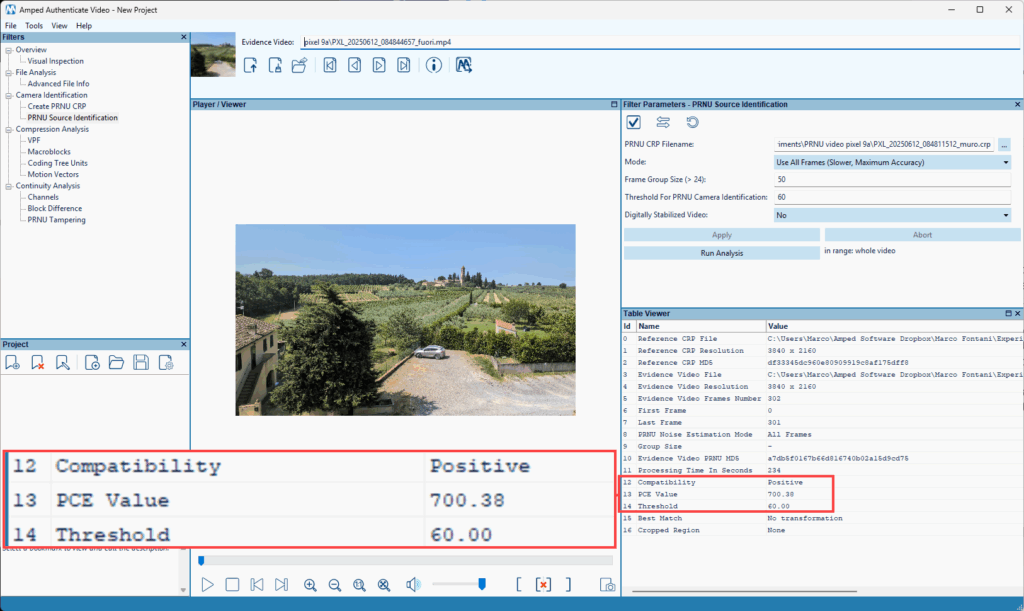
The Create PRNU CRP (which stands for Camera Reference Pattern) filter lets you use a reference video taken with the alleged source device to estimate the noise pattern of the device’s camera. Then, using the PRNU Source Identification, you can check whether a questioned video matches the alleged source device’s CRP.
In the example below, we successfully matched a video from a modern Pixel 9a smartphone.
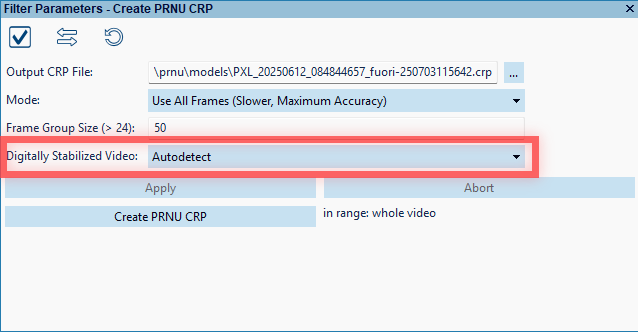
You can check for the presence of digital stabilization when using the Create PRNU CRP by setting the dedicated parameter to “Autodetect”.
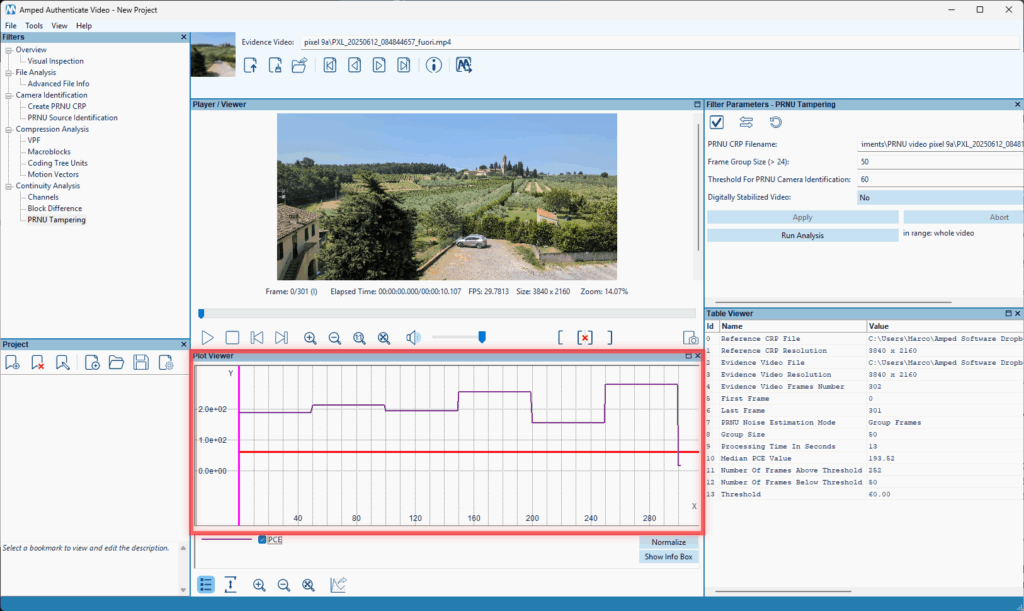
Finally, the PRNU Tampering filter, found under the Continuity Analysis category, allows you to verify whether a video matches the expected CRP throughout its duration. If there are time portions where this consistency is lacking, it could indicate a video montage. In the example below, the correlation (PCE) score computed on groups of 50 frames always exceeds the threshold by a large amount. This indicates that every frame “packet” seems to originate from the input CRP, as expected for an original video.
Built for Real-World Forensic Workflows
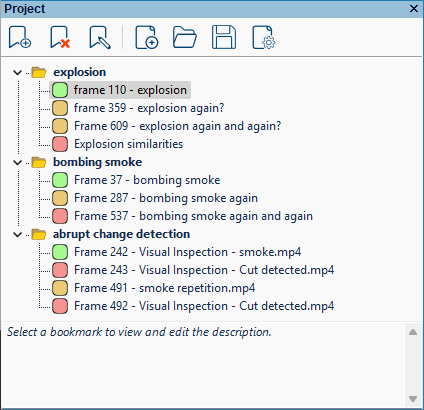
The power of Amped Authenticate’s Video Mode lies in its technical depth and also in its design, which aligns with the workflows of forensic professionals. The layout supports repeatable, documented workflows – something any lab supervisor or accreditation auditor will appreciate. Whenever you find an interesting result, you can bookmark it in the Project panel, and everything will go into the final report.
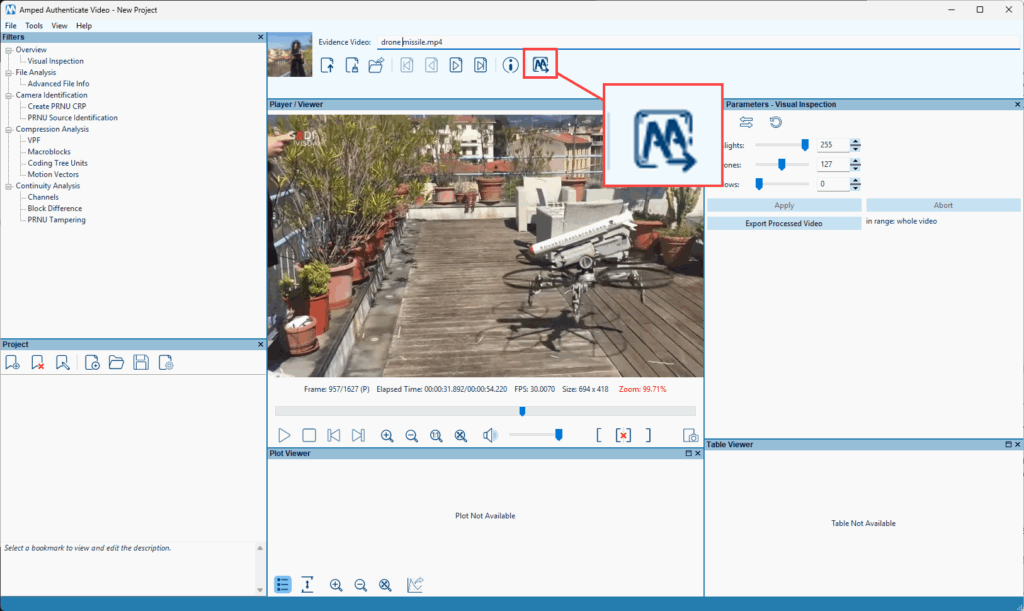
And if you spot something weird in a frame that needs to be annotated or examined with some of the tools available in Authenticate’s Image Mode, you can click on the dedicated button at the top of the GUI to automatically open the frame there.
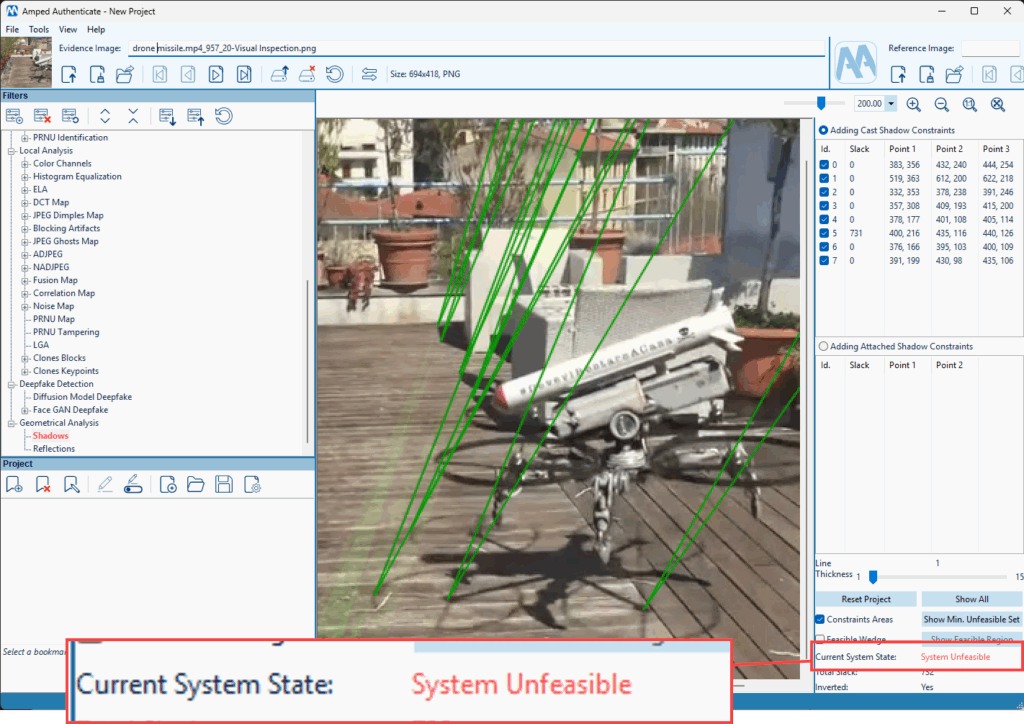
This is especially useful for running shadows, reflections, or even a deepfake analysis on an individual video frame.
Most importantly, Video Mode is grounded in science. Each filter is based on published research and independently validated. For analysts bound by Daubert or Frye standards in court, that scientific basis isn’t just comforting, it’s essential.
Conclusion
In an era where manipulated videos can undermine justice and public trust, Amped Authenticate’s Video Mode is a much-needed tool in the forensic video analyst’s arsenal. Video Mode provides unmatched scrutiny, clarity, and defensibility when authenticating body camera footage, surveillance video, or evidence from mobile devices.