When you are asked to examine a suspected deepfake, the first question is usually simple: is it real or fake?
Forensic analysis, however, rarely works that way. A single AI-generated score, a detector warning, or a visual anomaly may be useful, but none of these should be treated as a conclusion on its own. If your findings may influence an investigation, support a report, or be challenged in court, you need a workflow that is explainable, reproducible, and defensible.
This is where deepfake forensics must move beyond the “detection button”.
What Do We Mean by a Deepfake?
Before looking at the workflow, it is useful to clarify what we mean by a deepfake.
The definition is not unique worldwide: in Europe, for instance, the AI Act defines it[1] as an “AI-generated or manipulated image, audio or video content that resembles existing persons, objects, places, entities or events and would falsely appear to a person to be authentic or truthful”.
From the perspective of UK law enforcement[2], the definition is not linked to the context and focuses less on the generation/manipulation technology, i.e., “deepfakes are digitally created and altered content often in the form of fake images, videos and audio recordings”.
Regardless of the slight differences, for the purpose of this article, we can agree that a deepfake, as the name suggests, is any piece of fake media created, either fully or partially, using deep learning technologies.
In practice, a deepfake should not be understood only as an entirely synthetic image. It may also be a real image that has been digitally altered, where only a face, an object, a background area, or a specific detail has been generated, replaced, or manipulated.
This distinction matters. If the question is only whether the whole image is real or fake, important local traces may be missed. A forensic workflow must therefore consider both global indicators, such as metadata or file history, and local indicators, such as inconsistencies around a specific person, object, shadow, reflection, or region of the image.
From Deepfake Suspicion to Forensic Analysis
In its original blog post, Deepfake Forensics Workflow for Image Analysis, Amped Software outlines a structured approach for examining suspected AI-generated or AI-manipulated media.
The goal is twofold:
- check whether a file has been produced or altered by AI,
- understand which traces can be observed, how they relate to the image formation and processing history, and whether multiple findings support the same interpretation.
In this article, you will walk through a practical forensic workflow for suspected deepfake image analysis, from AI-based triage to metadata inspection, compression analysis, geometric consistency checks, pixel-level examination, and documentation.
Why Deepfake Detection Alone Is Not Enough
It is tempting to treat deepfake analysis as a binary task: upload a media, run a detector, and get an answer. However, if you are working in a forensic or investigative context, that approach is too fragile.
AI-based detection can be extremely useful, especially when you need to triage large volumes of images or quickly prioritize material for further review. A detector may flag a file as suspicious, indicate possible synthetic generation, or suggest that a face or region deserves closer attention. That can save time and help you decide where to focus.
But a detector output is not the same as forensic evidence.
Most AI-based tools are data-driven systems. They are trained to recognize patterns in the data they have processed/seen before. They may also struggle when faced with new generation methods, heavy compression, social media processing, partial edits, or content outside their training distribution. Even when a tool gives a very high confidence score, that score should not be confused with a forensic probability or a defensible conclusion.
For this reason, Amped Software has emphasized that deepfake forensics is much more than deepfake detection. The analyst’s task is not simply to ask whether an AI model thinks an image is fake. The task is to examine the file across multiple domains, identify observable traces, test alternative explanations, and document findings in a way that another competent examiner can understand and review.
In practical terms, AI detection should be treated as a starting point. It can raise the first flag. The forensic workflow must then determine whether other traces support, contradict, or refine that initial indication.
The Key Question: Can the Image Be Relied Upon?
In forensic image analysis, the question is not always whether an image is entirely real or entirely fake. A more practical question is whether the image, or a specific part of it, can be relied upon.
For example, one question may be whether a person was present at the scene. If no relevant artifacts are observed and the file container is consistent with a native image, the examiner may be able to say that they found no indication that calls the reliability of that area into question. Conversely, if a halo around the subject or some geometric inconsistency is observed, the examiner may conclude that the image is unreliable.
This is where local analysis plays a crucial role. To identify these inconsistencies, local tools allow the analyst to investigate the regions that matter most to the case. The result is not simply a yes-or-no answer. It is a documented assessment of what can be observed, what cannot be confirmed, and which parts of the image should be treated with caution.
Watch the Podcast Episode: Beyond the Deepfake Detection Button
For a broader discussion of the concepts behind this workflow, Amped Software also covers the topic in the podcast episode “Deepfake Forensics: Beyond the Deepfake Detection Button”.
The episode introduces why suspected deepfakes should not be evaluated through a single detector result alone, and why forensic analysis requires a structured, multi-method approach.
How to Analyze a Suspected Deepfake: A Forensically Sound Workflow
A practical workflow can include the following stages.
1. Start with AI-based Triage
Use AI-based detection as a first screening step, especially when you need to review large volumes of images or quickly identify files that deserve closer attention.
This can help you decide where to focus your analysis, but it should not be treated as a conclusion. An AI-based detector output is an investigative lead. It tells you that something may require further examination, not that the image has been proven fake.
2. Inspect Metadata and File Information
Next, look at the file’s metadata and container information. Check timestamps, software tags, encoding details, and any available information about the file’s processing history. You may find traces that suggest AI generation, editing, exporting, or platform processing (see some examples below).



You may also find that the metadata has been stripped or is incomplete. In both cases, interpretation matters. Missing metadata does not prove manipulation, and suspicious metadata should be assessed alongside other findings.
3. Look at Format and Compression Traces
The file format can strongly influence what you can examine. A JPEG image, for example, may contain compression traces that help you identify whether the file has been recompressed or whether specific areas look different from the rest of the image.
These traces can be especially useful when the suspected manipulation is local rather than global. A face, object, or background area may have been edited while the rest of the image remains mostly unchanged. In that situation, local inconsistencies can be more meaningful than a general detector score.
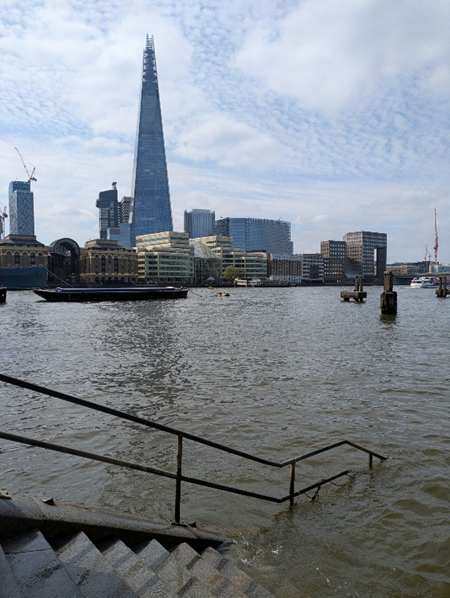
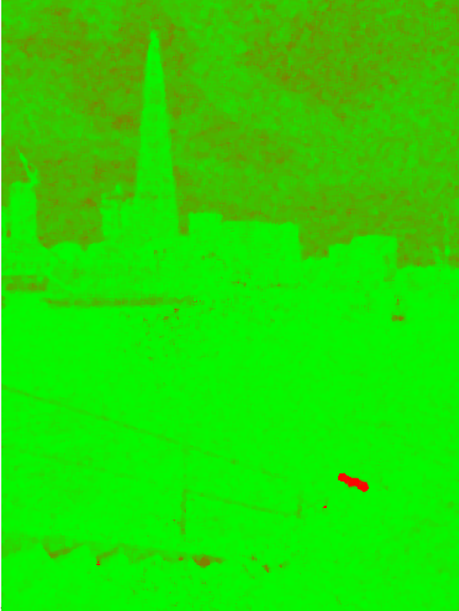
In the example below, we show the output of a detector that highlights in red the region that exhibits a different compression history from the rest of the image.
4. Check Geometry, Shadows, and Reflections
If the image content allows it, examine whether the scene is physically and geometrically consistent.
Look at perspective, proportions, alignment, shadows, reflections, and the relationship between people and objects in the scene. These checks are valuable because they are often explainable without relying on black-box outputs. If a shadow, reflection, or perspective line does not make sense, you can usually show the issue visually and describe it clearly.
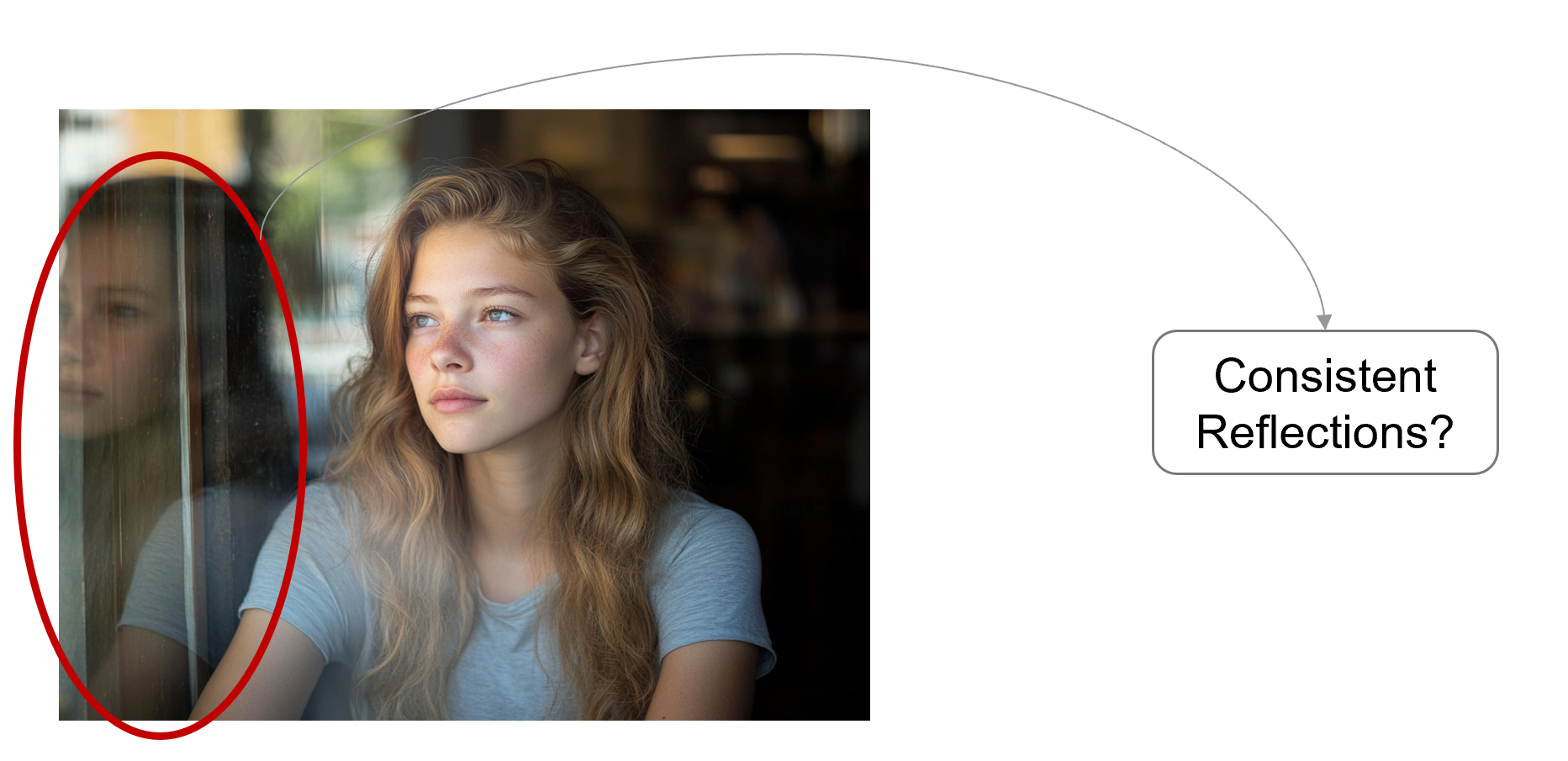
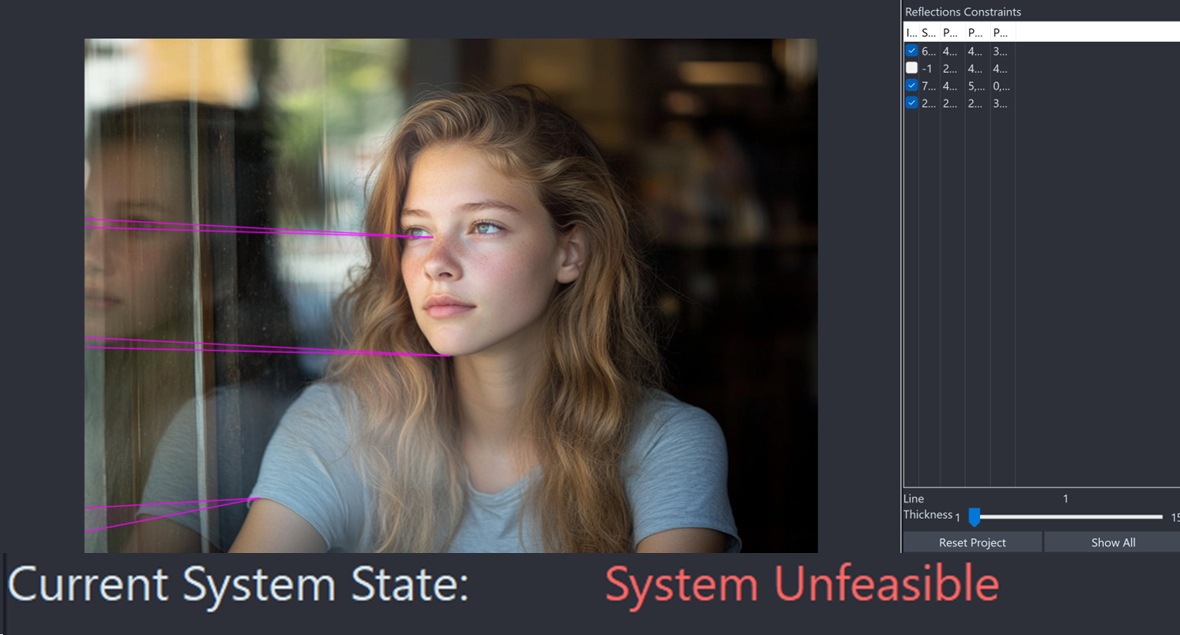
This type of analysis may not identify the specific tool used to create or alter the image. However, it can help you demonstrate that the image content is inconsistent or unreliable.
5. Examine Pixel-level Traces
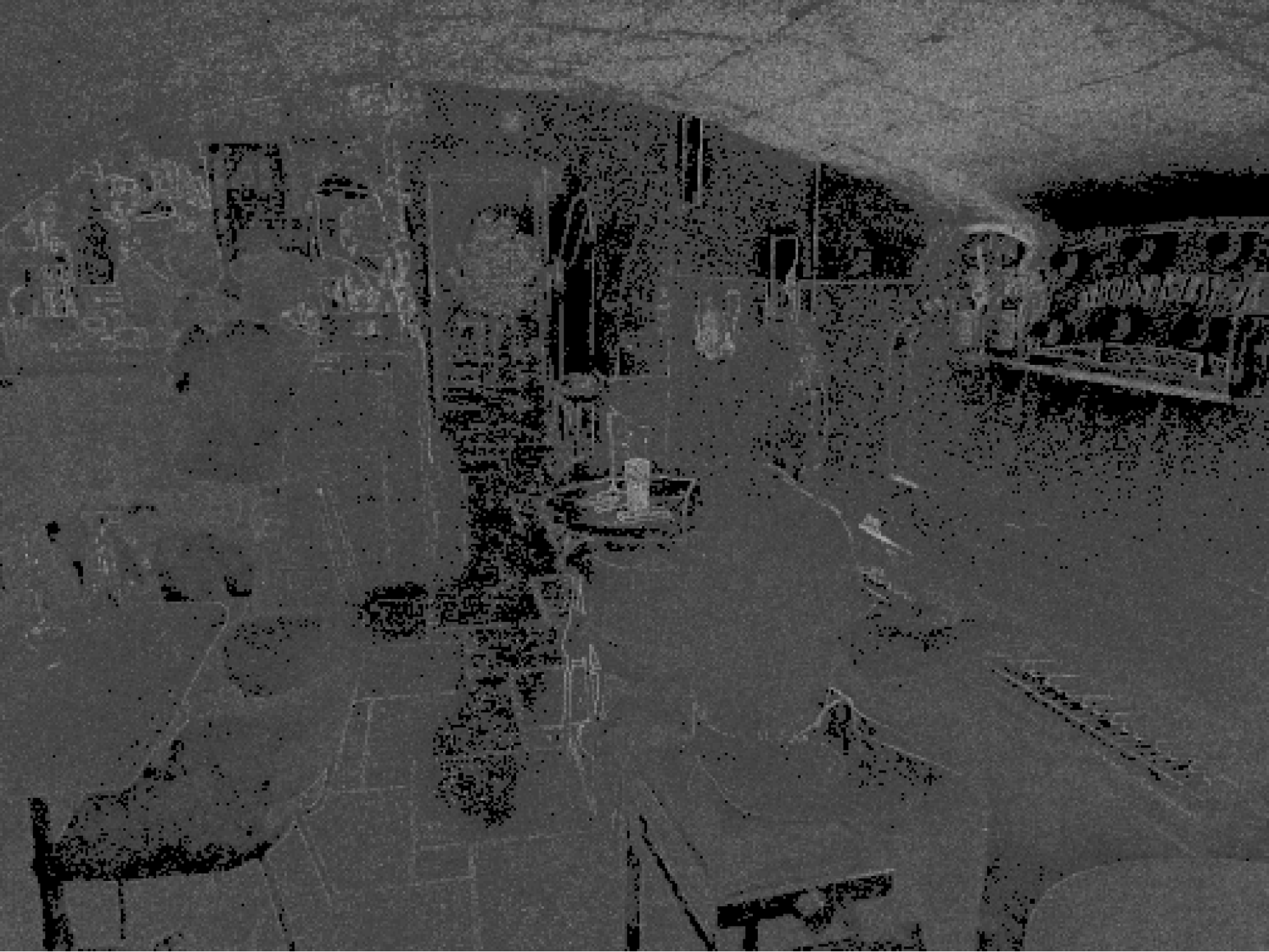
Then move deeper into the image itself. Look for inconsistencies in noise, texture, resampling, local sharpness, blending, and other pixel-level traces.
AI-generated or AI-edited content may appear visually convincing but still contain statistical or structural inconsistencies. These traces are not always obvious to the naked eye, and they should be interpreted carefully. A single anomaly may have several possible explanations, including compression, resizing, platform processing, or legitimate editing.
The goal is not to find one suspicious artifact and stop there. The goal is to understand whether several observations point in the same direction.

6. Compare Findings Across Methods
At this stage, bring the results together.
Ask whether the AI triage, metadata, compression traces, geometric checks, and pixel-level findings support the same interpretation.
Do they reinforce each other?
Do they contradict each other?
Could the same traces be explained by normal processing, social media recompression, or a non-malicious edit?
You are not simply collecting tool outputs. You are evaluating whether the observed traces form a coherent and technically defensible explanation.
7. Document the Workflow
Finally, document what you did.
Record the file examined, the tools used, the settings applied, the observations made, and the limitations encountered. Your report should make clear which findings are strong, which are only indicative, and which require caution.
A good forensic workflow should be repeatable and reviewable. Another competent examiner should be able to understand your process, follow your reasoning, and assess whether the findings support your conclusions.
Conclusion
Deepfake image analysis is not about finding a single artifact or relying on a single detection score. It is about building a clear, technically grounded interpretation from multiple observations.
As synthetic media becomes more convincing, your workflow becomes even more important. AI-based triage can help you identify suspicious material. Metadata, compression traces, geometric consistency, pixel-level analysis, and careful documentation, however, are what allow you to move from suspicion to a defensible forensic finding.
Amped Software’s approach is built around that principle: use technology to support the examiner, but keep the reasoning transparent, repeatable, and reviewable.
When you analyze a suspected deepfake, the strongest question is not simply “Does a detector say this is fake?”. It is: “What can I observe, how can I test it, and can I explain my findings clearly?”.
[1] See AI Act, Article 3: Definition (https://artificialintelligenceact.eu/article/3/)
[2] See https://www.police.uk/advice/advice-and-information/online-safety/online-safety/deepfakes-what-is-a-deepfake/