A single mobile extraction can produce thousands of photos, hours of voice notes, and multiple videos. Corporate investigations add screen recordings, meeting captures, and shared drives full of scanned documents. Reviewing all of it manually takes time most investigations cannot spare.
Belkasoft X helps reduce that workload. The software extracts media files from across all your data sources for your review, while BelkaGPT, an AI module built into Belkasoft X, handles audio transcription, image description, OCR, classification, facial recognition, and natural language search across case artifacts—all offline, all without sending sensitive data to third parties.
In this article, we will walk through each capability with a practical eye on where the software reduces manual effort and saves time.
Extracting Media Artifacts
Belkasoft X supports over 1,500 artifacts for computer and mobile devices. Media files can be stored in various locations on a device: camera photos and videos, mobile app caches, and files embedded in documents.
Belkasoft X aggregates media files from the entire case and presents them in the Artifacts tab. On the Structure tab, the findings from the data sources are organized under three specific nodes for each media file type: Audio, Pictures, and Videos.
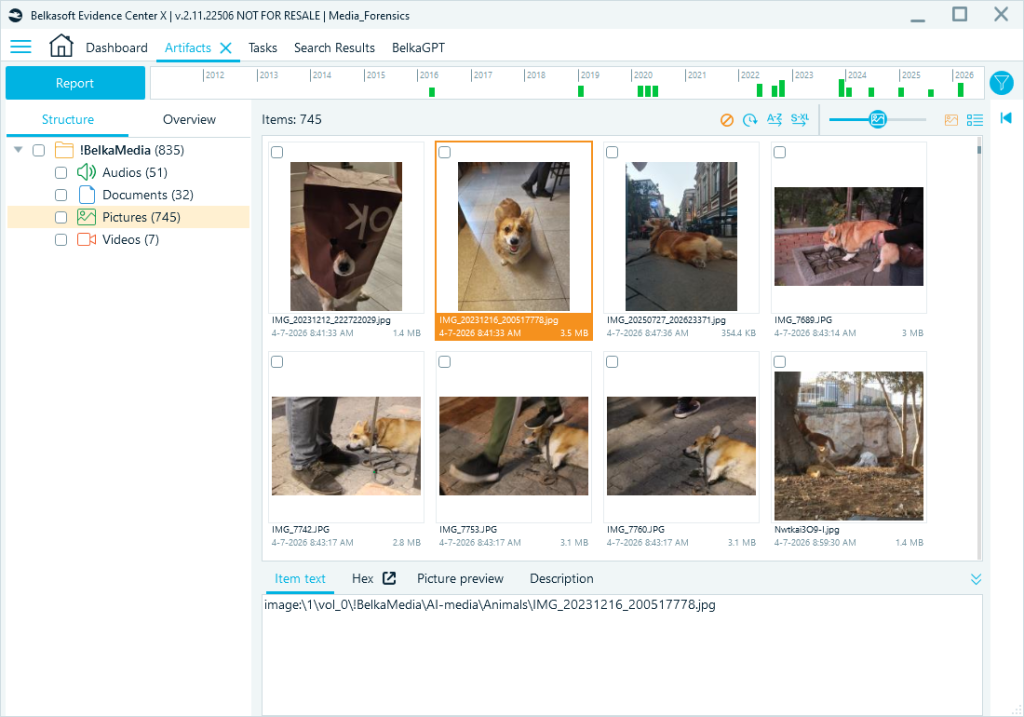
Alternatively, you can review all media artifacts across the entire case on the Overview tab. For each file, you can check the origin path to see where it came from or view it within the file system.
Audio Extraction
Belkasoft X detects a wide range of audio file types.
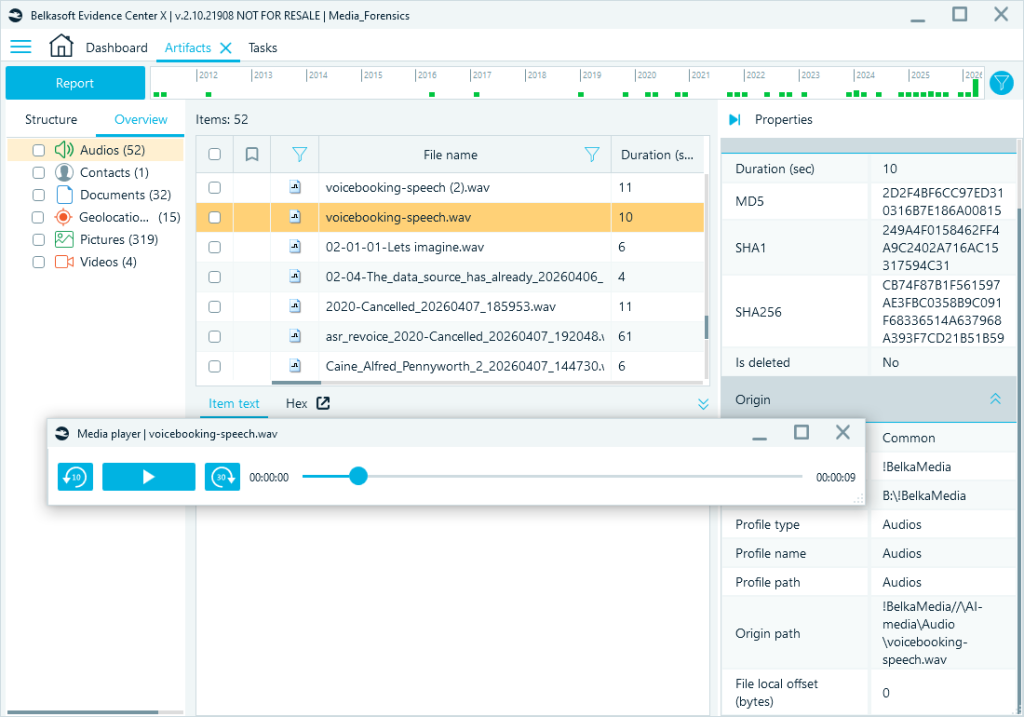
Besides actual files, Belkasoft X can also find traces of files that are no longer on the device. For example, when a user sends an audio message via an app, a record of that transfer is often preserved on the device—even after the file itself has been cleared from the app cache. Belkasoft X displays such artifacts alongside any properties it can determine, such as duration and origin, giving you a more complete picture of what was exchanged.
You can play audio files in the built-in player, export them to your disk, or open them with your default player.
Picture Extraction
The Pictures node collects image files from across the case: files on the device, carved pictures, photos from email attachments, images embedded in documents (Word, Excel, PowerPoint, OpenOffice, PDF, etc.), and video key frames (more on that later).
For each image, Belkasoft X extracts file system metadata and EXIF metadata. All of these records can be used to filter case artifacts.
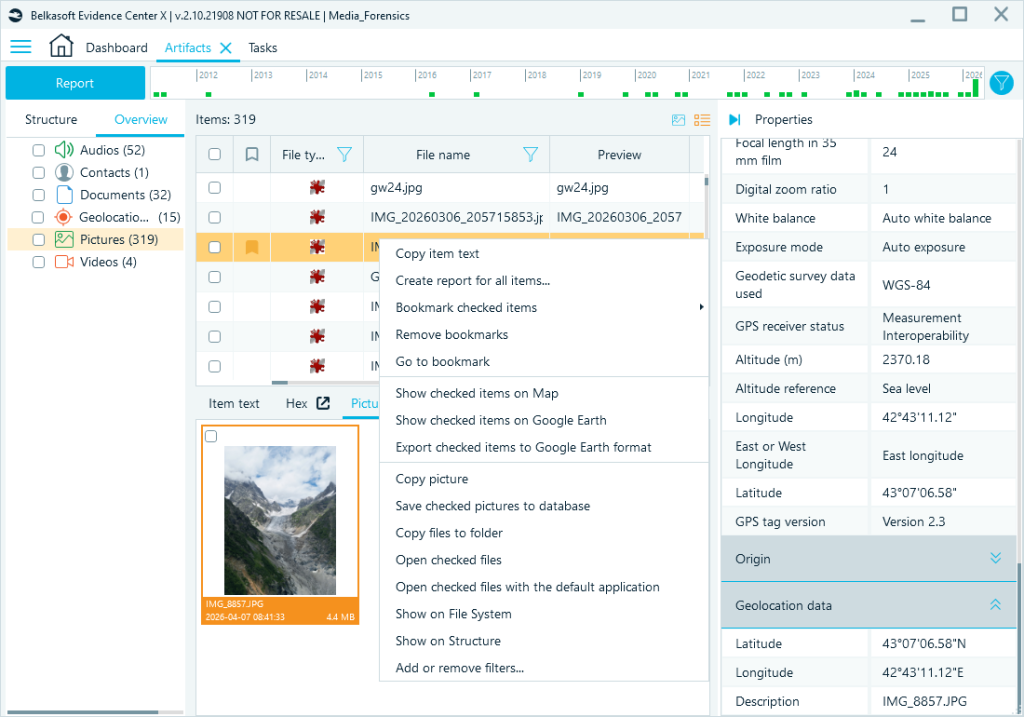
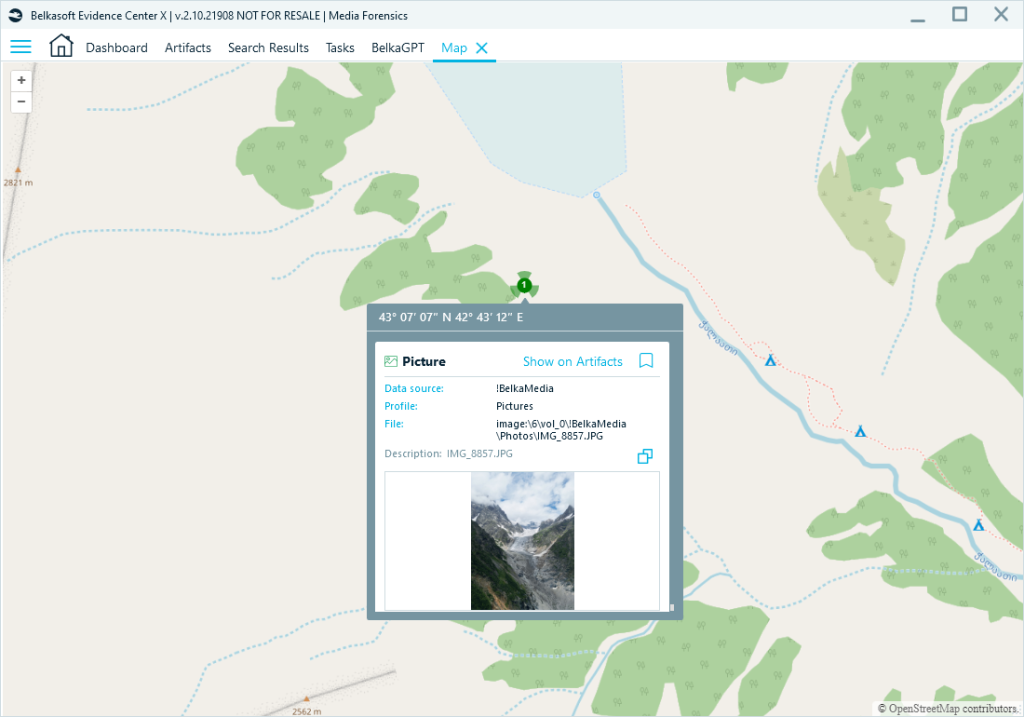
Photos with GPS coordinates can be reviewed on the built-in Map view.
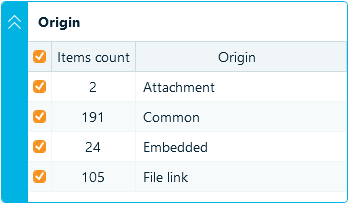
You can also filter files by origin—email attachments only, carved images only, received as file links, or images embedded in documents. This is useful when you need to narrow your scope before reviewing.
Video Analysis
Video files appear under the Videos node and are collected the same way as pictures: from files on the device, from carving, or from messages and documents.
You can extract key frames for each video to get a quick visual overview of what is inside. Extracted frames can be found in the Key frames tab under a processed video:
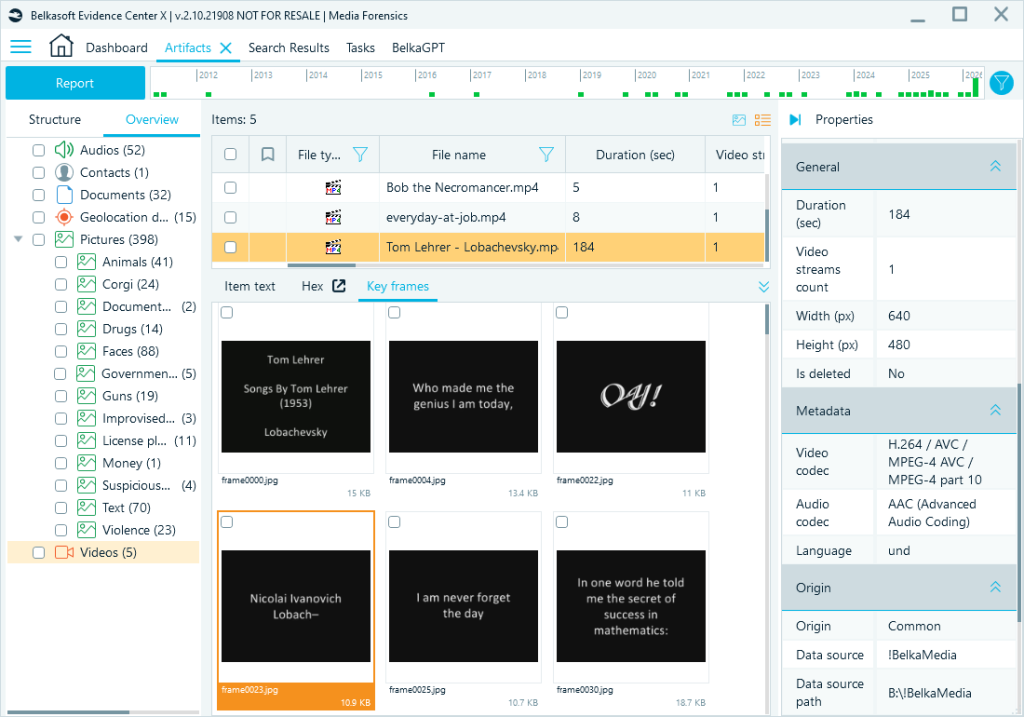
Extracted key frames also appear under the Pictures node on the Overview tab. Upon extraction, you can run additional analysis on key frames as if they were standalone pictures.
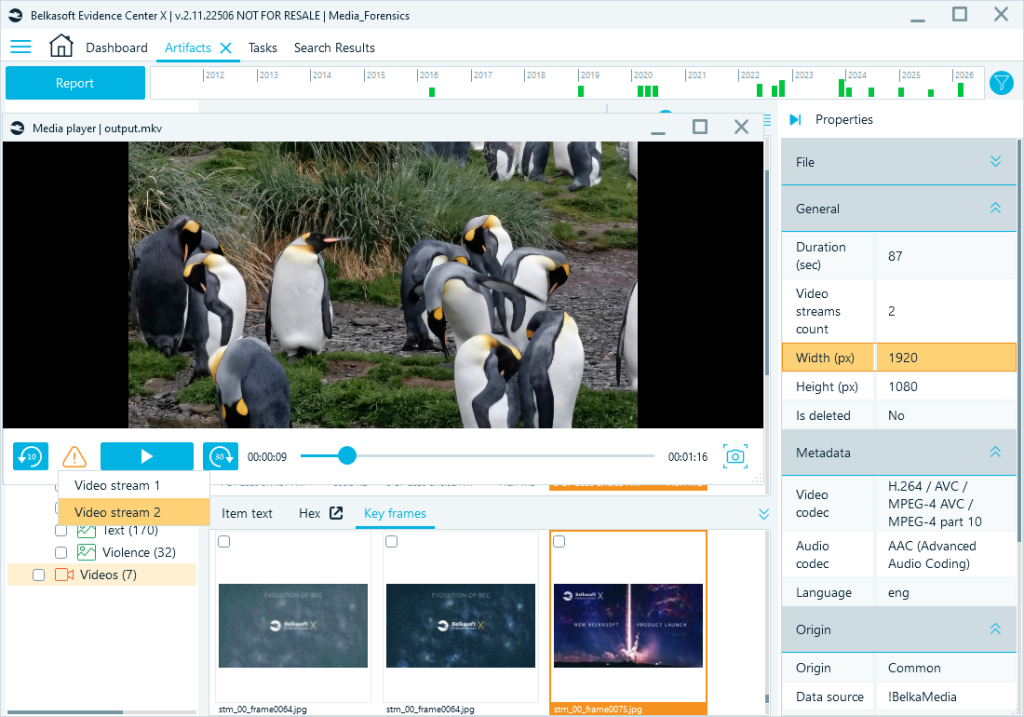
Note: Some video files contain more than one video stream. This is a known method for concealing illegal content, including CSAM, in a secondary stream while the primary stream shows something ordinary. Belkasoft X detects multiple streams, lets you play each one separately, and allows you to extract key frames and run analysis on each.
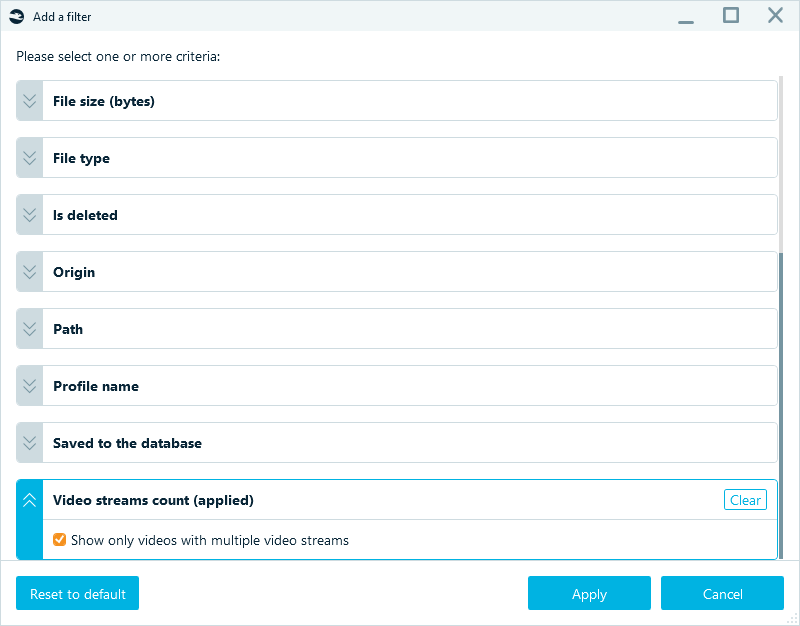
To identify all videos with more than one stream in your case, you can use the filter:
For more details, see Analyzing Videos with Multiple Video Streams.
Advanced Capabilities: BelkaGPT for Media Analysis
The capabilities described above let you find, filter, and review media evidence. BelkaGPT takes the next step: it makes that evidence searchable by content. Instead of browsing files manually, you can search transcripts, query image descriptions, and run targeted classifiers across an entire case.
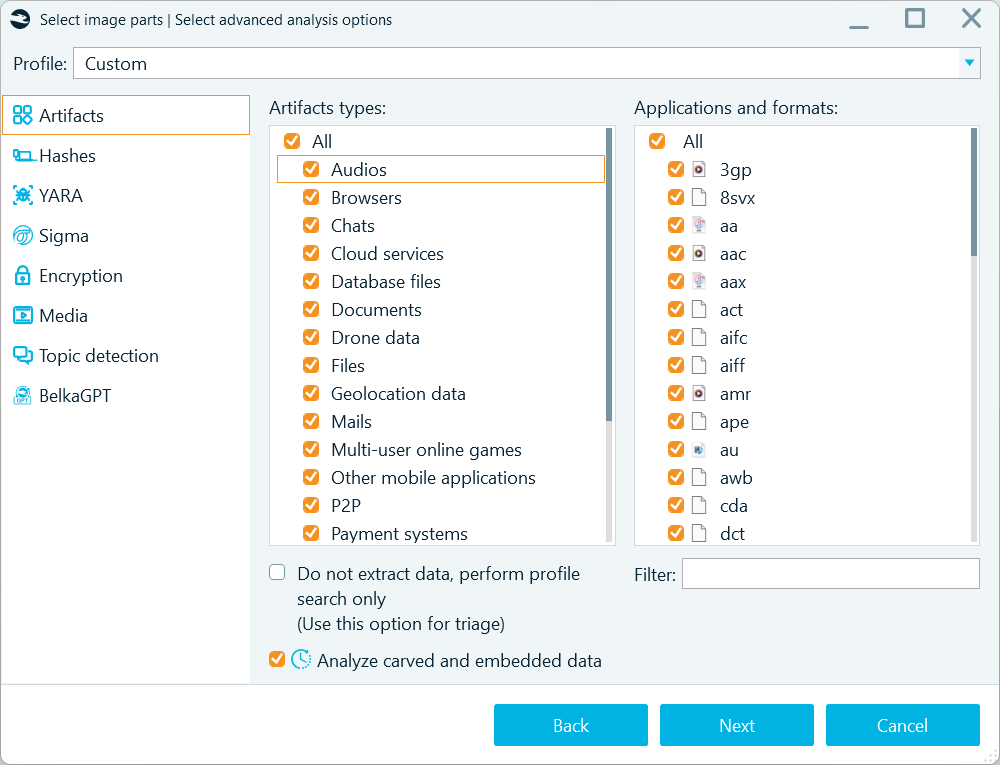
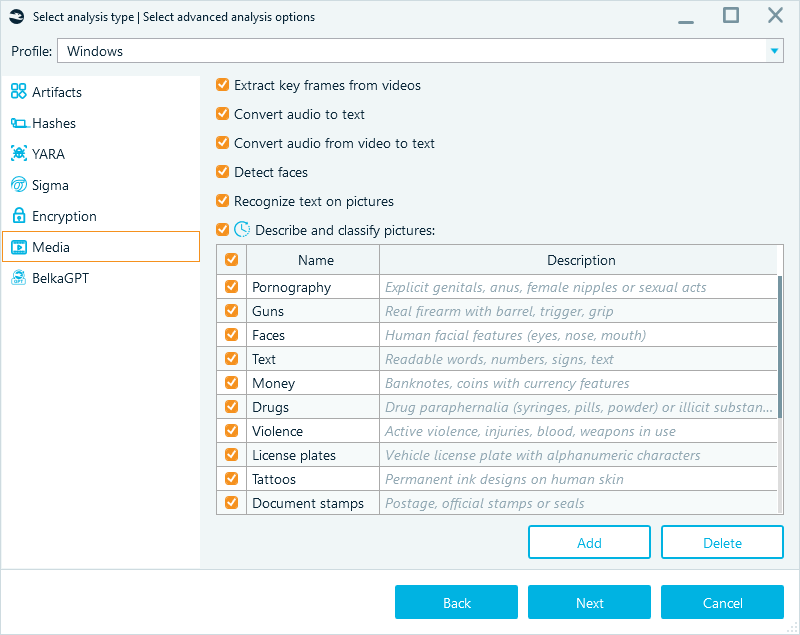
When selecting analysis options, you can pick which AI capabilities to enable: image descriptions, OCR, classifiers, facial recognition, audio transcription—so you can keep the output focused on what is relevant for your case.
Audio: Making Recordings Searchable
Voice notes, calls, interviews, ambient recordings, and video soundtracks all share the same problem: you cannot skim them visually. If you need to know what is in a recording, you have to listen to it. And if you have hundreds of recordings, that review becomes slow by default.
The speech-to-text component in BelkaGPT converts spoken audio into timed transcripts, and once transcribed, those recordings become searchable. You can look for a name, a location, or a specific phrase across every transcribed file at once. This changes the workflow from sequential listening to targeted retrieval. Transcripts can also be used directly in reports, removing the need to transcribe recordings separately.
You can find the full list of supported languages on the BelkaGPT page.
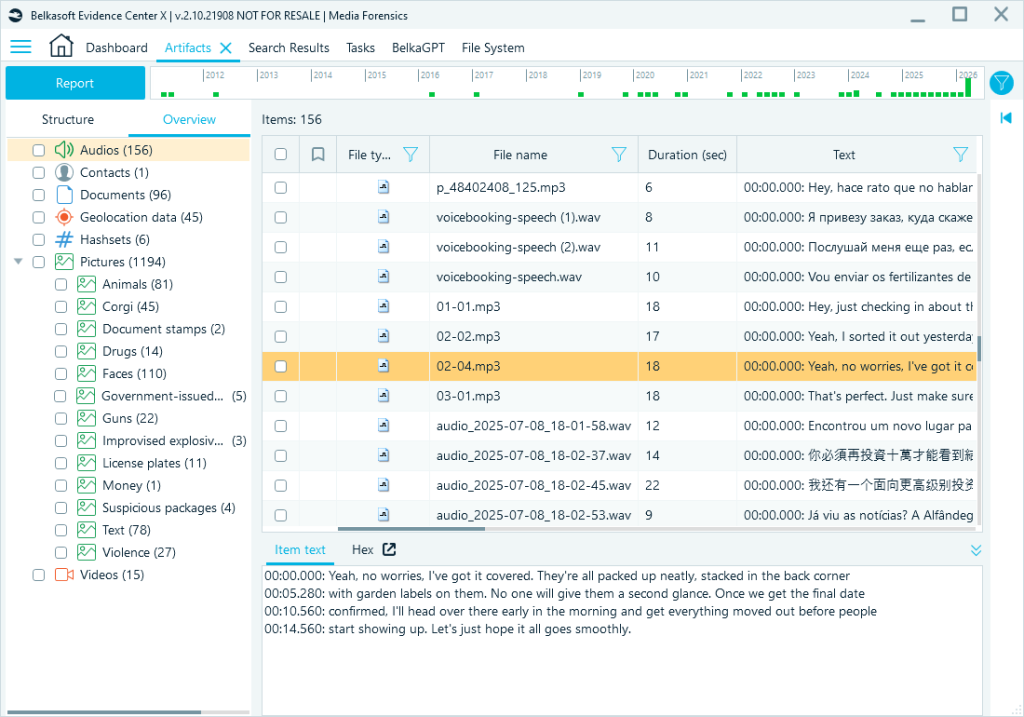
A note on accuracy: results depend on audio. Clear recordings with a single speaker and minimal background noise should transcribe well. Poor-quality recordings, multiple overlapping speakers, heavy background noise, and strong accents will produce less reliable output. Treat transcripts as a triage tool: they can tell you which recordings are worth a careful review.
Pictures: Description, OCR, and Classification
Photos are easier to skim than audio, but only up to a point. A grid of ten thousand thumbnails is not a review. BelkaGPT gives you several tools to work through image evidence systematically: content descriptions, OCR, classification, and facial recognition.
Note: Images should be at least 64 × 64 pixels to be processed by BelkaGPT; smaller items are skipped.
Descriptions: Making Images Searchable by Content
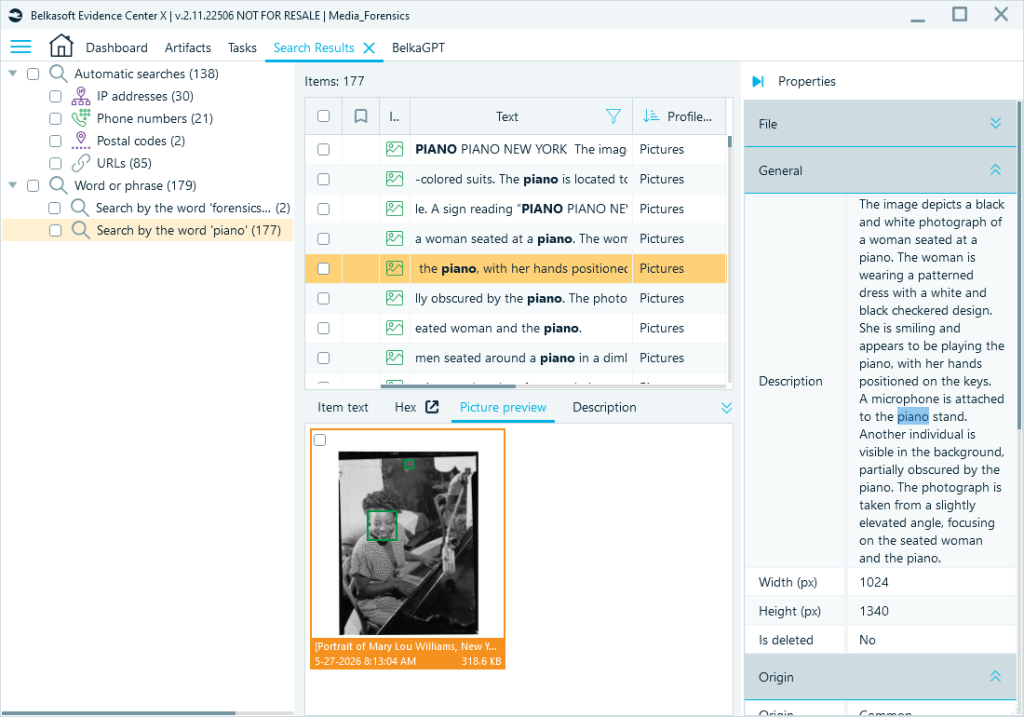
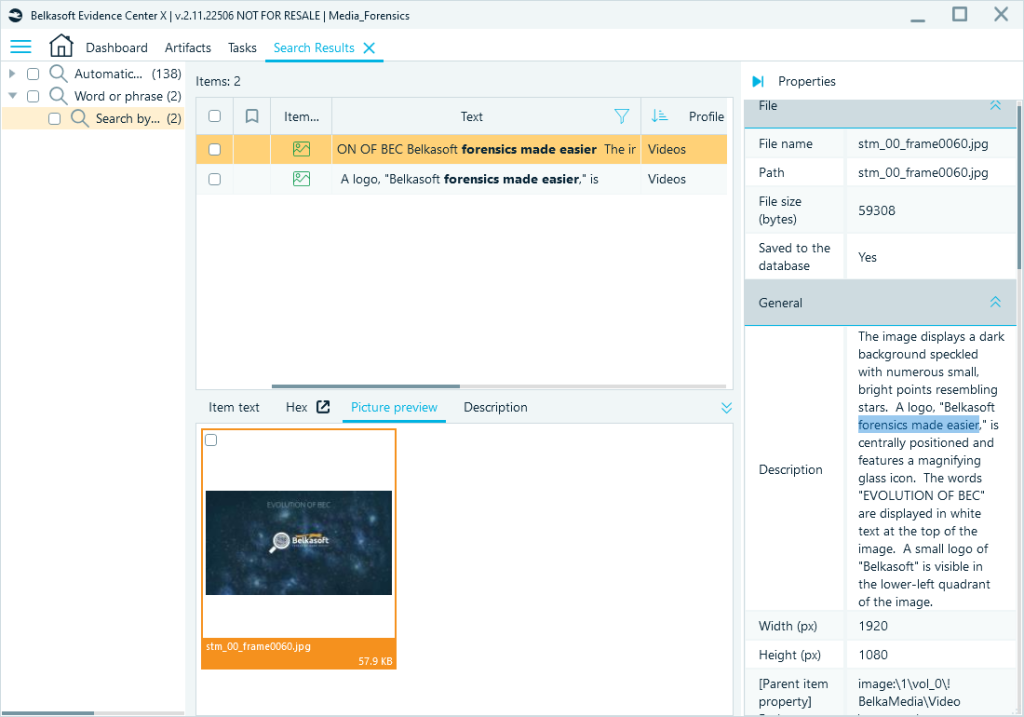
For each analyzed image, BelkaGPT generates a written summary that covers people, objects, locations, contextual details such as lighting and weather, and identity signs such as logos or badges. All descriptions are generated in English and indexed for search.
That distinction, from preview to indexed record, matters more than it might seem. A thumbnail tells you roughly what an image looks like. A description tells you what is in it, in terms you can search.
If you are looking for documents in an archive with thousands of images, searching descriptions for the particular word is faster than clicking through thumbnails one by one. For example, our text search results included almost two hundred descriptions with the word “piano”:
OCR: If It Has Text, You Can Find It
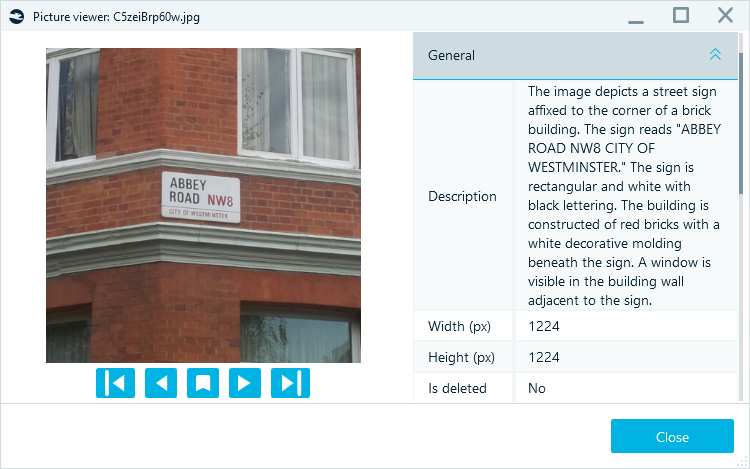
OCR is a well-known tool and one of the most immediately practical capabilities here: rather than browsing through all the photos and searching for text, you can go straight to the images that contain it. All pictures containing text are placed under the Text node.
BelkaGPT extracts text from images and stores the results in a separate field where they can be searched for alongside everything else in the case.
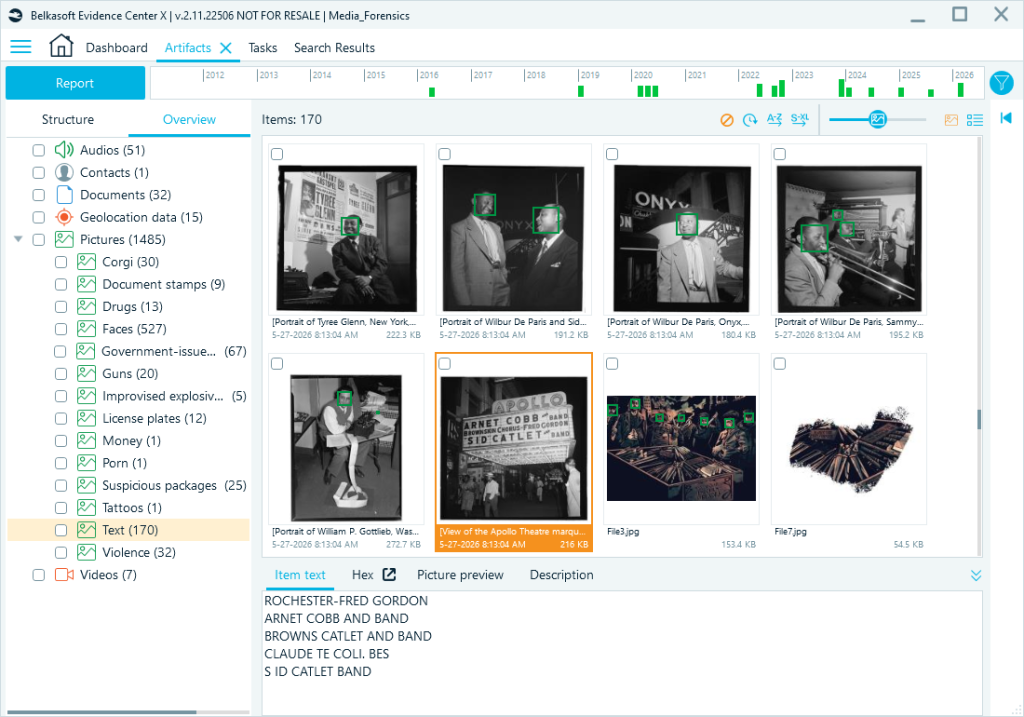
OCR is also incorporated in picture descriptions:
Classification: Focused Detection at Scale
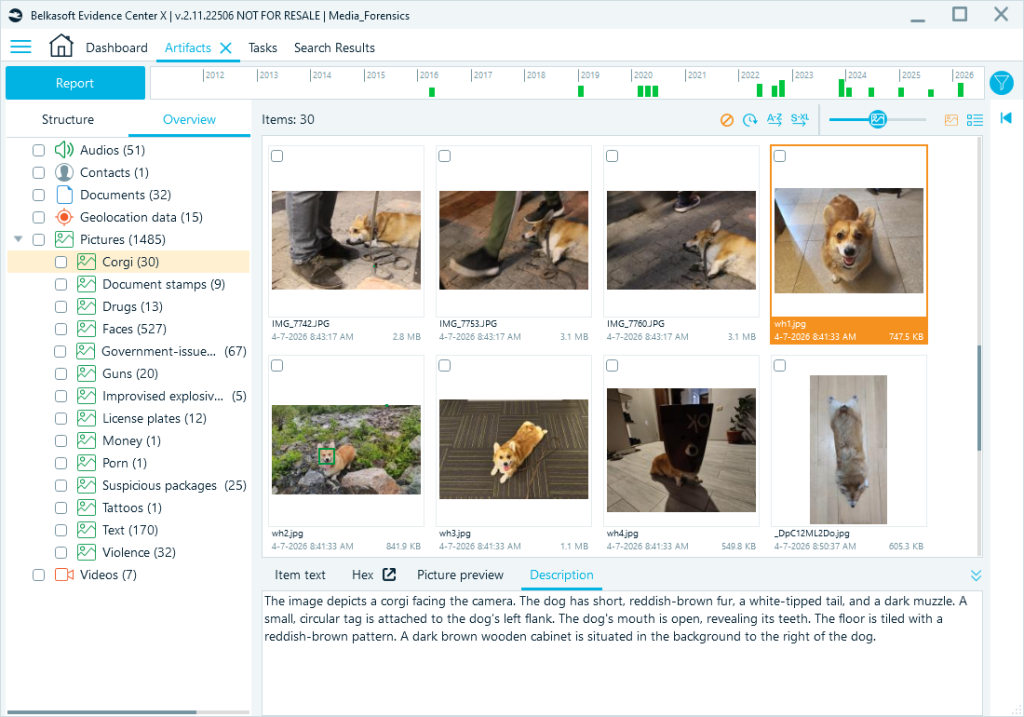
Descriptions give you broad coverage. Classification gives you targeted detection. You define a category, and BelkaGPT analyzes each image against it, grouping results under that label. Classification can be more consistent than browsing descriptions because it directs BelkaGPT’s attention to your target category rather than generating a general overview.
Belkasoft X ships with predefined classifiers covering common investigative categories. You can also build your own—and this is where the feature stands apart from comparable tools. Click Add under the classifier list, supply a name (up to 30 characters) and a short description (up to 10 words works best), and BelkaGPT applies it immediately.
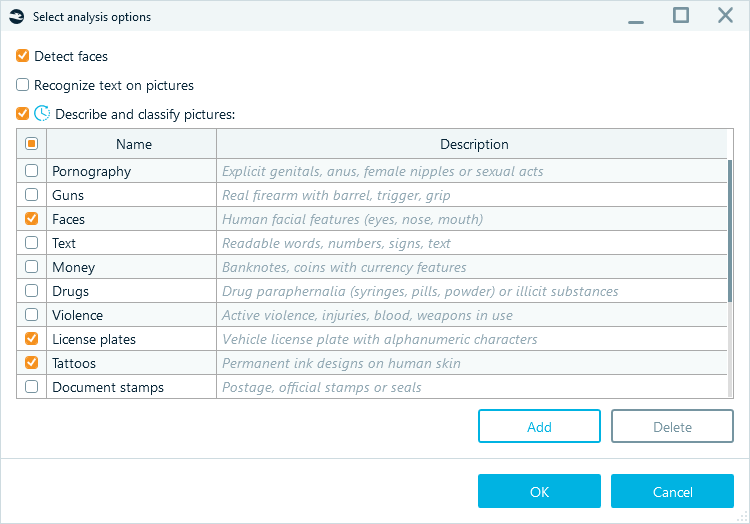
To demonstrate, we created a “Corgi” classifier. If you leave the Description field blank, the software will classify pictures based on what is written in the Name field.
The same logic applies to operationally relevant categories. If your case involves improvised explosive devices, workplace access badges, or suspicious packages, you define those categories in your own terms—and get results specific to your investigation.
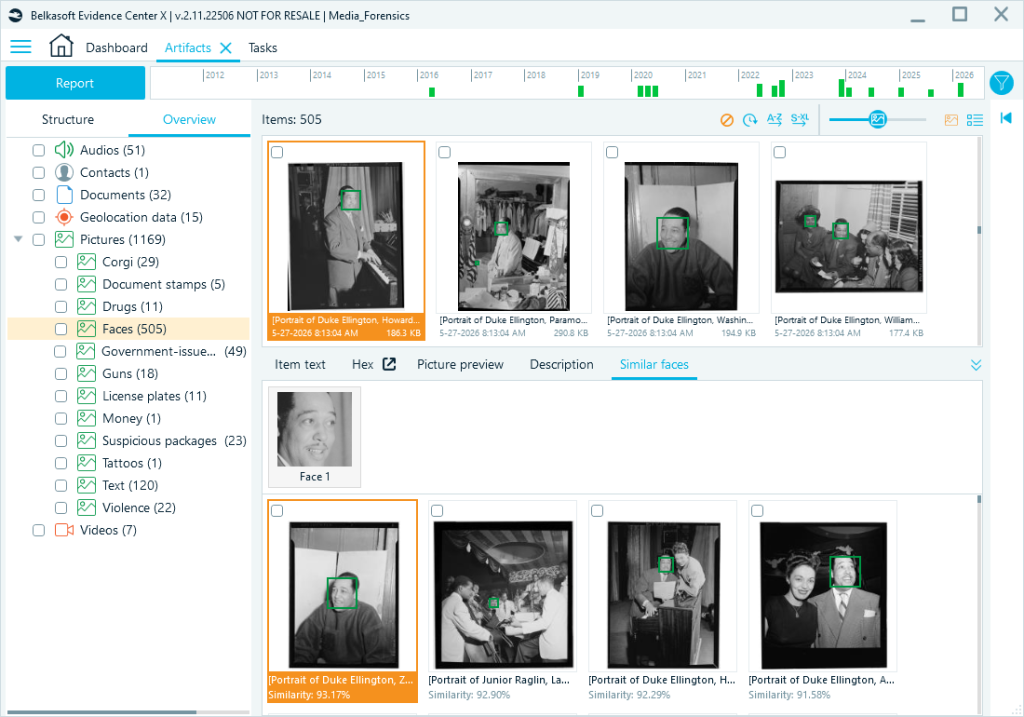
Facial Recognition: Finding the Same Person Across Case Data
When a person of interest appears in multiple photos at different times, from different angles, or under different lighting conditions, facial recognition helps you find those connections without reviewing every image manually. Belkasoft X supports two approaches:
- You can search by face: Submit a reference image, and BelkaGPT returns images from the case that match it.
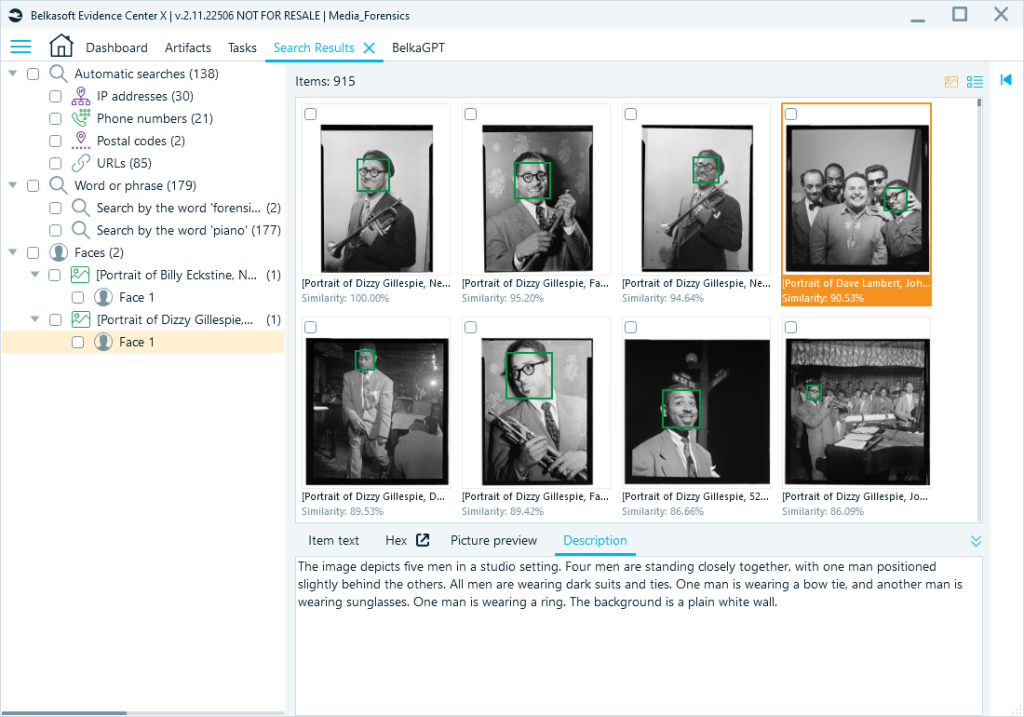
- You can browse by clustering: Select any detected face to see a Similar faces tab with other images of individuals who match. Results start at 50% similarity and are sorted highest first, so the most likely matches appear at the top.
Video: Audio and Key Frames Together
Video analysis in BelkaGPT combines two capabilities: the audio track can be transcribed using the same speech-to-text that handles audio files, and the visual content is processed by extracting key frames.
As a result, you will get a timed audio track transcript for each video:
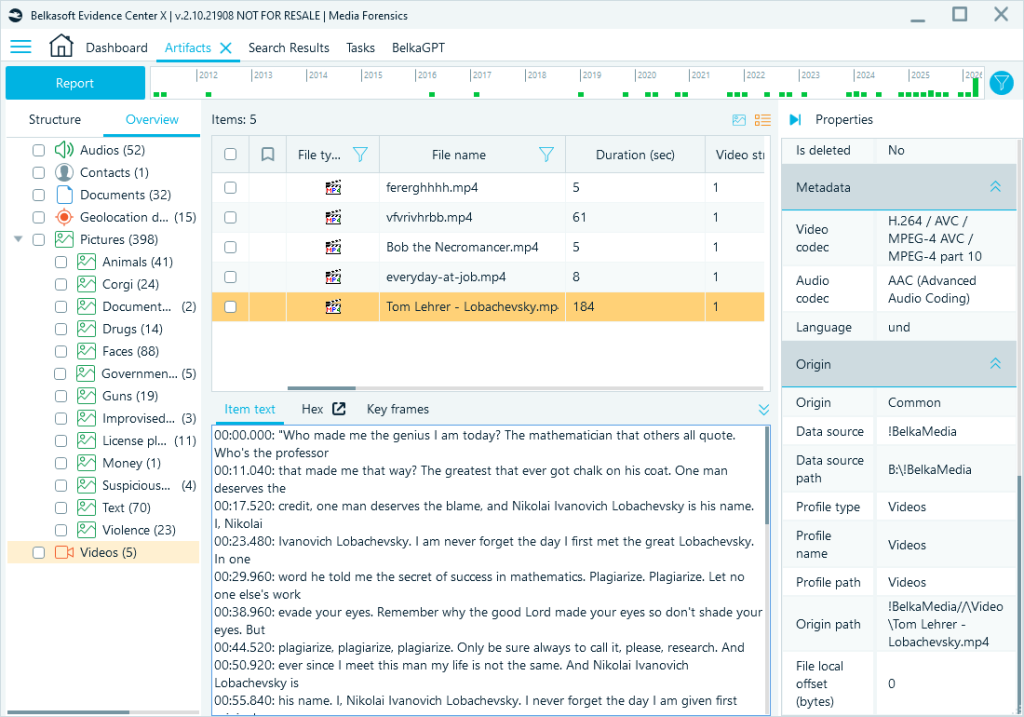
Key frames extracted from videos can also be described and classified like other picture files. You can locate them on the Overview tab under the Pictures node and select the required BelkaGPT analysis options. After the processing tasks are complete, the key frames will appear under the detected categories and become searchable.
Natural Language Search
Once BelkaGPT has processed your case data, all output is available for natural language queries in the BelkaGPT window.
Type a question, and BelkaGPT searches across processed case artifacts and returns an answer with references to relevant items. Responses are based on up to 10 artifacts. You can click Show more to see additional results sorted by relevance.
We asked BelkaGPT to find pictures containing signs, and it suggested several findings for review.
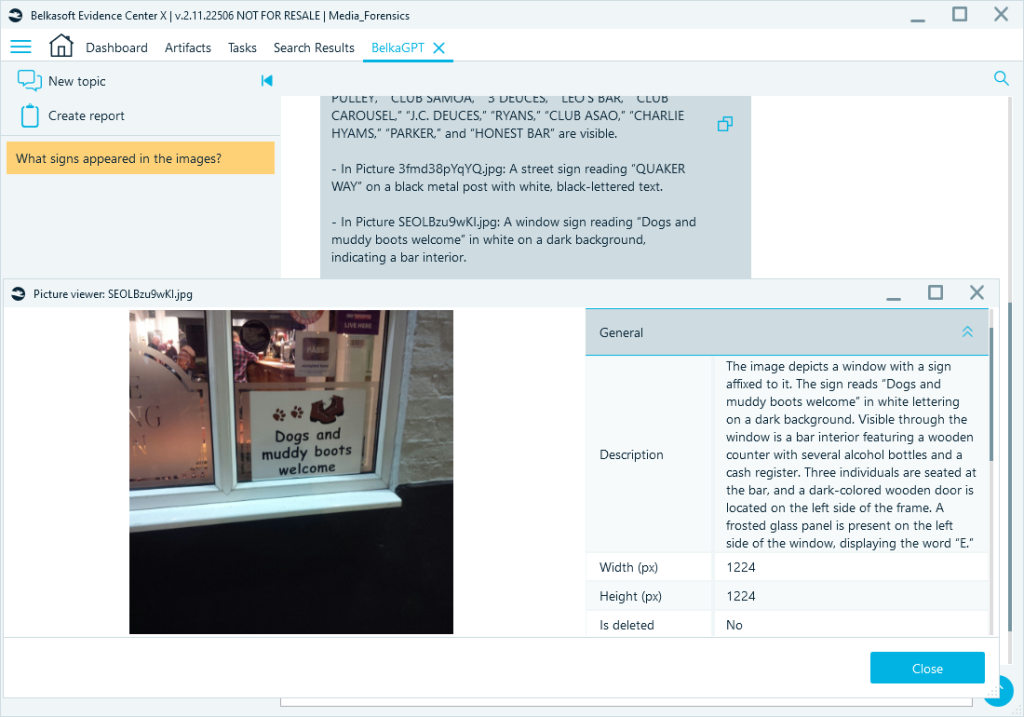
Note: Picture descriptions are always generated in English. Use English queries for the best results.
Planning Your Analysis
BelkaGPT analysis takes time, and processing duration depends on your hardware and the size of the data sources. Before you run it, it is worth deciding what actually needs to be processed.
Belkasoft X lets you run analysis within one of three ranges, from broad to narrow:
- On import: If you are dealing with a large data source and need everything searchable from the start, running analysis during ingestion makes sense. The trade-off of such an approach is the time upfront.
- On specific artifact types: In some investigations, you might only care about specific data sources—for example, an encrypted container or data from a specific application. Running targeted BelkaGPT processing saves computational resources and time.
- On specific artifacts: This is the surgical approach. If a case hinges on communication, you might run speech-to-text only on WhatsApp or Telegram voice messages. This keeps the focus tight and the processing time minimal.
Keep the analysis focused on what your case actually requires. Running weapon classifiers in an embezzlement case or drug detection classifiers in a passport fraud investigation produces output you will not use. Expand once you know what the data contains.
All BelkaGPT processing happens locally on your forensic workstation. No case data is sent to an external server. For most forensic workflows, this is a baseline requirement, not a bonus feature.
Performance depends directly on your hardware. On a CPU-only machine with a standard Intel Core i5, generating descriptions and running eight classifiers takes roughly 90 seconds per image. On a workstation with a discrete Nvidia GPU and 16 GB of VRAM, the same task takes about 5 seconds, approximately 18 times faster. For labs that regularly handle large data volumes, that difference determines whether comprehensive analysis is practical or selective.
For labs that cannot equip every workstation with a high-end GPU, Belkasoft offers the BelkaGPT Hub module. It distributes processing across machines on the lab network, so Belkasoft X clients can offload analysis to a shared high-performance machine.
Where AI Fits in a Real Workflow
BelkaGPT compresses the time between receiving a data source and knowing where to focus. Instead of starting a case with forty thousand unreviewed photos and no leads, you start with classified, described, OCR-indexed data you can search. Instead of listening through three hundred voice notes one by one, you search transcripts for the name you are looking for and find out in seconds which recordings are worth your time.
That said, BelkaGPT supports the investigator; it does not replace one. A transcript still needs verification before it appears in a formal report. An image description might miss a detail that a human would catch. A facial recognition result at 55% similarity still needs a human decision before it means anything.
The work is still yours. BelkaGPT means you spend less of it on the parts that do not require human judgment, and more of it on the parts that do.
Request a trial of Belkasoft X to see BelkaGPT in action.