
Pieces0310 is a digital forensics practitioner with many years of experience in computer and mobile investigations, strengthened by a solid background in cybersecurity.
There is a well-known Chinese proverb: “Even the most skillful housewife cannot cook without rice.” Digital forensics should no longer begin only after an incident occurs; preparation must be done in advance as part of everyday practice. Based on my many years of experience in forensic analysis, the most critical problems often do not stem from flawed tools or methodologies, nor from a lack of effort by the forensic examiner, or even from insufficient workstation performance. Rather, they arise when evidence has been damaged or destroyed, resulting in gaps in the investigation.
Why Evidence Preservation Must Begin Before An Incident
Operating system mechanisms are often designed to optimize performance and provide a good user experience—not to preserve artifacts for investigative analysis. Therefore, at this stage, digital forensics should focus on getting the fundamentals right—properly preserving and archiving digital evidence is the best safeguard for investigative analysis. If the subject of analysis is already incomplete or has even been wiped clean, then no matter how much effort is invested, it may ultimately be in vain.
Regardless of the type of case, when investigating clues related to an incident, artifacts with timestamps often play a crucial role in timeline analysis. Recently, while conducting a forensic analysis on a computer, I discovered that very few security event logs remained. This situation once again highlights the importance of archiving critical artifacts—such as event logs—for timeline reconstruction.
The Risks Of Log Rotation And Incomplete Centralized Logging
Using Windows as an example to illustrate the relevant characteristics: by default, the event log management mechanism is set to rotate. Once the storage limit is reached, older data is overwritten. The available actions include exporting or clearing logs. Some organizations rely on mechanisms such as SIEM to centrally collect selected important Event IDs. However, from a forensic analysis perspective, filtering and retaining only certain event records may not preserve the complete log content.
Moreover, whether due to intentional or unintentional evidence destruction, gaps may arise during investigation and analysis. In such cases, having an automated event log archiving mechanism can effectively eliminate this hidden risk. As for how long the archived security logs should be retained, that depends on organizational needs and should be determined accordingly.
To address this, we could write a batch script with the purpose of archiving all Windows event logs to a remote system. The script also records the archiving status of each .evtx file into a plain text log file, providing system administrators with a verification checkpoint.
Securing Credentials And Exporting Logs With Built-In Tools
How can access to the network drive be achieved without exposing plaintext credentials in the net use command? In fact, to avoid displaying plaintext credentials in the script, you can use “cmdkey”, a built-in Windows credential management tool, to add the credentials required to access the destination host.
For example: cmdkey /add:srv-backup /user:admin /pass:1qaz2wsx
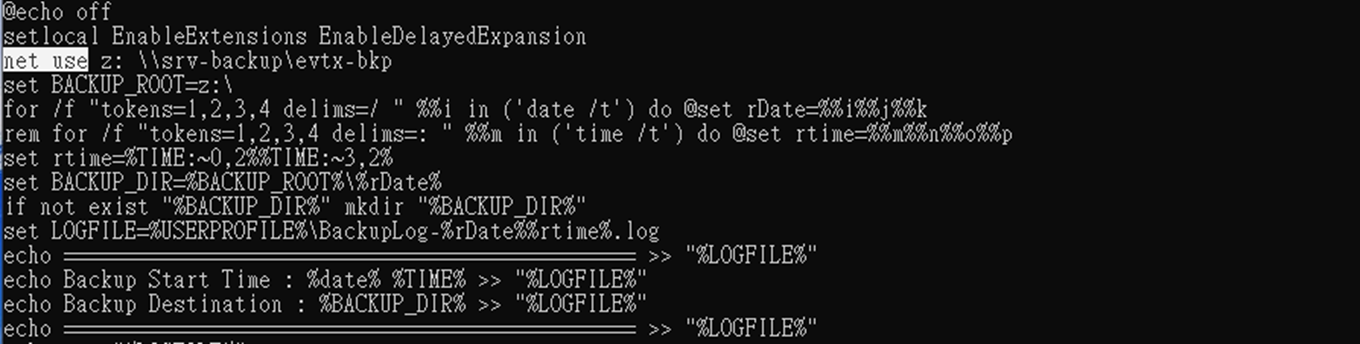
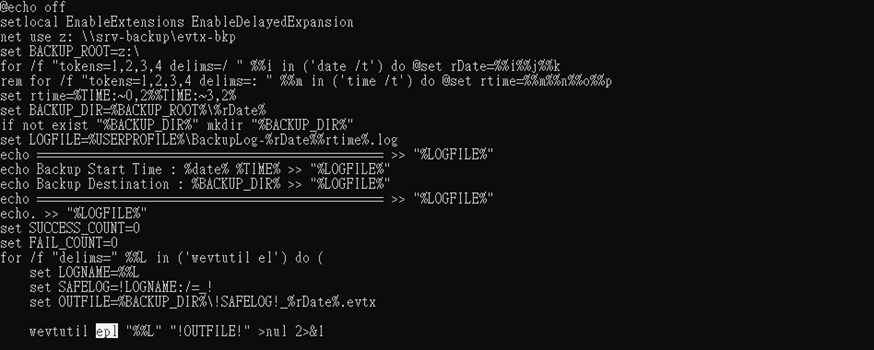
So how is the archiving performed? Instead of using the copy command to duplicate each .evtx file, the script utilizes Windows’ built-in event log management utility, “wevtutil.” By exporting logs through the Event Log API, it ensures the integrity of both structure and content. The parameter “epl” stands for “export log”, allowing logs to be exported as .evtx files to a designated destination host for archiving.
Scheduling, Retention Policies, And Verification Procedures
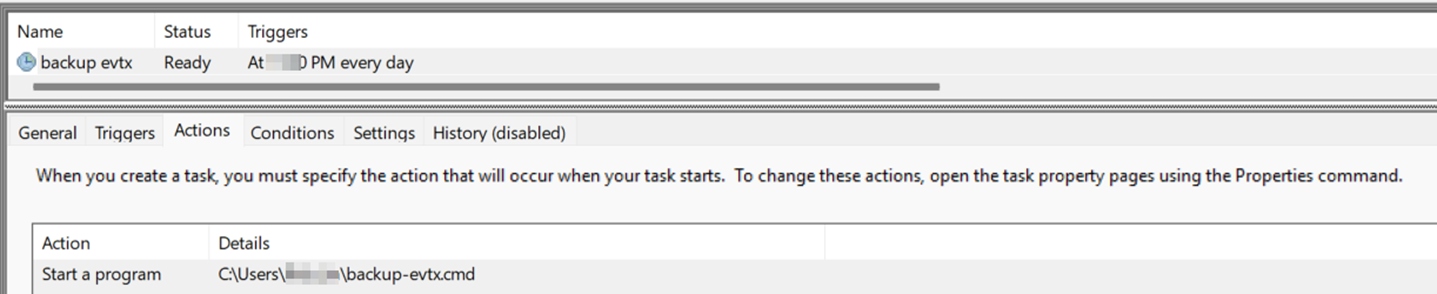
After manually verifying that the script runs correctly and produces the expected results, the next step is to schedule it to execute at a specific time each day. This will create a folder named with the year, month, and day on the destination disk, containing all event log files from that day. If you wish to limit the retention period of archived logs or move them for further archival storage, you can configure an additional script on the destination host to handle those tasks.
In addition, if real-time notifications of each archiving operation are required, system administrators can integrate command-line email tools such as vmailer or blat into the script. All that is required is to provide the relevant parameters, including the real-time log filename generated during archiving, the MTA used for relaying, the recipient, and the email subject.
Note that the “^” symbol at the end of lines in the script is not a typo or a meaningless character. In the Windows command-line environment, it is a line continuation character used to indicate that multiple lines should be treated as a single command.
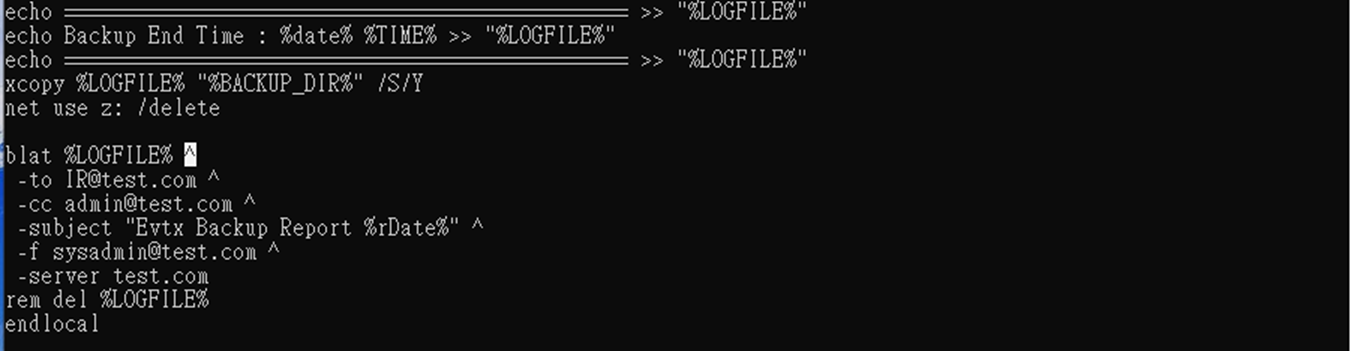
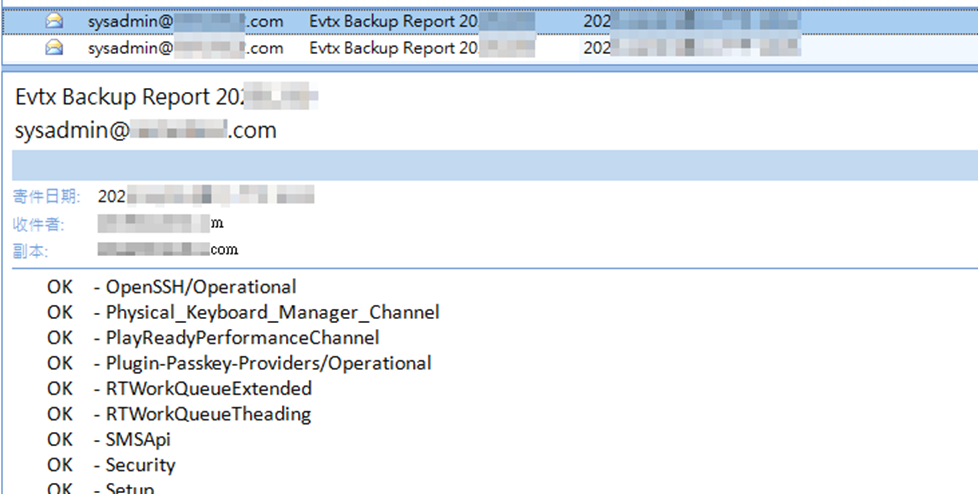
Finally, let’s look at the email received after daily archiving. It records in detail the start and end times of that day’s archiving process, as well as whether each .evtx file was successfully archived. Based on this information, system administrators can perform verification on the destination host to ensure that critical computer event logs are properly archived on a separate system without issue.
The batch script referenced above is available for download here. It can be modified as necessary to suit specific requirements. When logs are properly archived, they can provide valuable support for both incident response and forensic analysis—even if the victim’s computer has been subjected to evidence destruction.





Interesting point about evidence loss happening long before an investigation actually begins. Log rotation and partial SIEM collection can easily leave gaps in a timeline.
Suppose the existing logs were sufficient. I’m curious about your experience regarding strengthening the evidential value of archived logs. Archiving preserves artifacts, but how do practitioners typically address integrity and authenticity afterwards?
For example, are there common practices around:
– hashing or signing archived logs
– maintaining meta-logs about the archiving process itself
– chained or tamper-evident logging
– independent verification of archived artifacts
– maintaining chain-of-custody records from the moment logging begins
I’m asking partly from a technical perspective. I’m a developer trying to better understand how forensic practitioners approach evidence preservation and verification in real environments.
Thank you for your interest. To share a bit of my experience: using automated mechanisms for log archiving—while simultaneously generating hash values for those archived files—is certainly feasible.
That said, the aspect of automated evidence preservation most likely to be challenged is its authenticity. To put it bluntly, the core issue is whether the evidence has been tampered with. However, this often involves the nuances of legal strategy and courtroom cross-examination.
Feel free to send me a private message; I’d be more than happy to discuss and exchange ideas with you on this topic. Thank you!