Belkasoft X is a comprehensive digital forensics tool that supports evidence from five source categories: computers, mobile devices, cloud services, vehicles, and drones. Because mobile evidence often accounts for the largest share in modern investigations, mobile forensics is a major focus of the platform. It provides an extensive mobile acquisition and analysis toolset, which is continually improved and expanded to keep pace with evolving devices, operating systems, security controls, and applications.
This article explores how Belkasoft X supports the complete mobile forensics workflow—from acquiring data from mobile devices under different technical conditions to recovering deleted data, examining applications, reconstructing events, and presenting defensible findings.
A Layered Approach to Mobile Acquisition
The amount and type of data you can recover from a mobile device often depends on the device manufacturer, chipset, operating-system version, security patch, lock state, and available credentials. Belkasoft X addresses this variability with multiple acquisition methods that can be used independently or in combination.
You can begin with basic options, such as backups, media extraction, or screen capture. These methods preserve readily accessible evidence, but they may exclude protected application data, system files, and other valuable artifacts.
Belkasoft X therefore supports a graduated acquisition workflow:
- Identify the device, operating system, security patch, lock state, and available credentials.
- Begin with a lower-risk method, such as a backup, media extraction, or screen capture.
- Assess the acquired data and identify important gaps.
- Apply a supported advanced method, including full-file-system extraction of physical imaging where available and justified.
- Use alternative methods, such as cloud acquisition, for mobile backups and apps.
This acquisition ladder is central to Belkasoft’s mobile forensics approach. It allows you to match the depth of extraction to the technical conditions and evidentiary needs of each investigation.
Forensic Acquisition of iOS devices
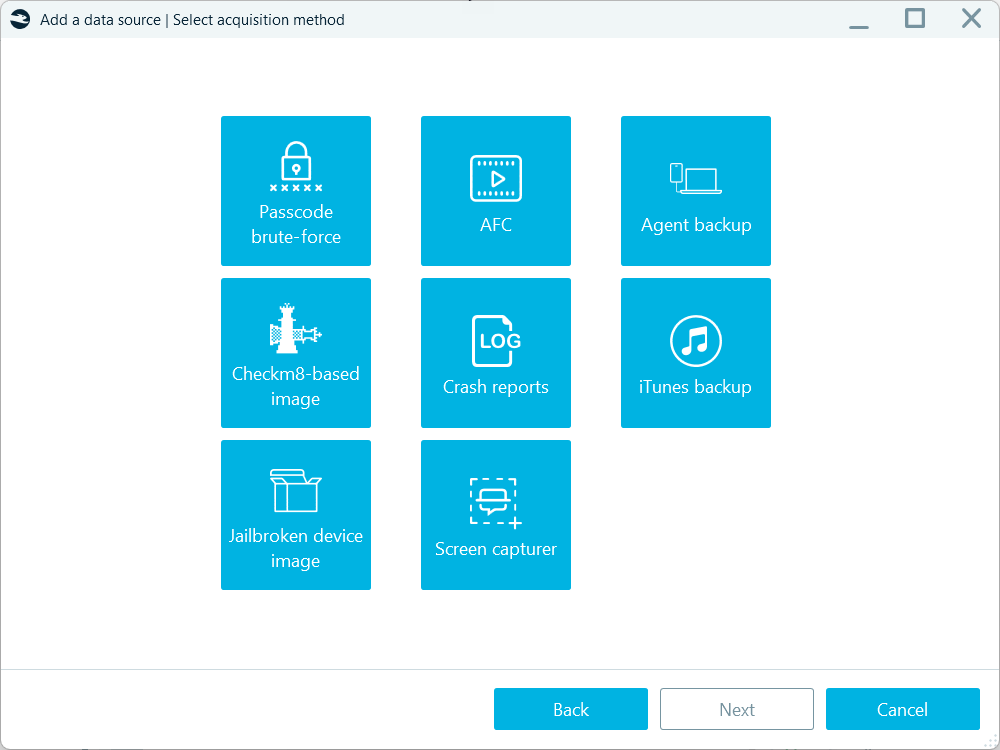
Belkasoft X supports several forms of iPhone and iPad acquisition. Among them:
- iTunes backup acquisition
- Media collection through Apple File Conduit (AFC)
- checkm8-based acquisition
- Agent-based acquisition
- Acquisition from jailbroken devices
- Crash-log extraction
- Screen capturer
Logical iOS Acquisition (iTunes backup)
iTunes backup is a standard way to create a copy of essential iOS device data. Belkasoft X mimics this process in the iTunes backup method to create a logical image of iOS devices. It is one of the least intrusive ways to collect a rich set of iOS evidence, including contacts, calls, SMS, media files, system setting files, and other types of evidence that iPhones and iPads save to backups.
If you do not have the device’s passcode, Belkasoft X can connect to the device through a valid lockdown file. You can find such a file on computers that have been recently paired with the iOS device.
checkm8-Based Acquisition
For supported devices using Apple A7 through A11 processors—broadly covering the iPhone 5s through iPhone X generations and corresponding iPads—the checkm8 method can acquire a full-file-system copy and keychain. Belkasoft’s implementation does not require a jailbreak, although you must still confirm the exact device and OS combination before acquisition.
For eligible devices, Belkasoft X can also lift the USB Restricted Mode, which may otherwise prevent communication through the Lightning port after a period of inactivity.
Agent-Based iOS Acquisition
Agent-based acquisition covers a wider range of Apple hardware than checkm8. The current mobile acquisition matrix includes support across iOS versions from 10.3.3 through 18.7.1, subject to specific device and version exclusions.
The depth of the extraction varies. Depending on the target, the agent may extract a full file system and keychain or a rich partial file system containing:
- Third-party messenger and social-media data
- Email-client and browser data
- Media files
- Selected Safari, Notes, Apple Maps, and Weather data
- Relevant application and system files
Where calls, SMS, Health data, the keychain, or other native artifacts fall outside an agent method’s scope, you can combine the extraction with an iTunes backup. This is an important cell phone forensics principle: complementary acquisitions may provide better coverage than a single method.
iOS Passcode Recovery
An optional Mobile Passcode Brute-Force module supports passcode recovery for specific iPhone and iPad models. Availability and recovery speed depend on the device generation, processor, iOS version, and security configuration.
Forensic Acquisition of Android Devices
Belkasoft X divides its Android acquisition capabilities into two broad groups: generic methods that work across many Android devices and specialized methods designed for particular chipsets.
Generic Android Acquisition Methods
General acquisition methods can be attempted on almost any Android device where the phone can be unlocked and USB debugging can be enabled. The amount of recoverable data still depends on the Android version, security patch, application settings, available permissions, and condition of the device.
Belkasoft X provides the following generic Android acquisition methods:
- ADB backup: Uses Android’s standard backup mechanism to collect available application and device data. It is comparatively straightforward and minimally intrusive, but modern Android versions and individual applications may restrict what the backup contains.
- Agent backup: Installs a temporary Belkasoft acquisition agent on the device to collect accessible data. The agent is removed after the acquisition. Collects essential communication data, such as calls, contacts, SMS together with the media files and the list of installed applications.
- Portable agent backup: Runs the acquisition agent using an SD card, a USB storage device connected through an adapter, or another available storage location. This method can be useful for on-site acquisition or when USB debugging cannot be enabled on the device.
- Android SIM device: Collects data from the Sim card inside an Android device, including cellular data, such as the mobile subscriber’s ID (IMSI) and phone number.
- Advanced ADB acquisition: Combines ADB, agent, and SIM card data collection in one run.
- Automated screen capture: Preserves information displayed through the device interface, including chats, call lists, application content, and settings. Automatically scrolls and captures the device screen content.
- MTP and PTP acquisition: Copies media files exposed through Android’s standard transfer protocols. This method is useful for collecting photographs, videos, audio, and other accessible files.
- APK downgrade: Temporarily replaces a supported application with an older version that allows its data to be included in an ADB backup. Belkasoft X collects the available application data and then restores the original version. This method supports selected messaging, social-media, browser, and communication applications.
- Android 12 and 13 application-data acquisition: Provides access to application folders on eligible Android 12 and 13 devices. It can recover application data unavailable through a standard backup without requiring the device to be rooted.
- Rooted-device acquisition: Creates logical or physical images from Android devices where root access is already available. A logical image can be particularly valuable on encrypted devices because it captures files after the operating system has decrypted them.
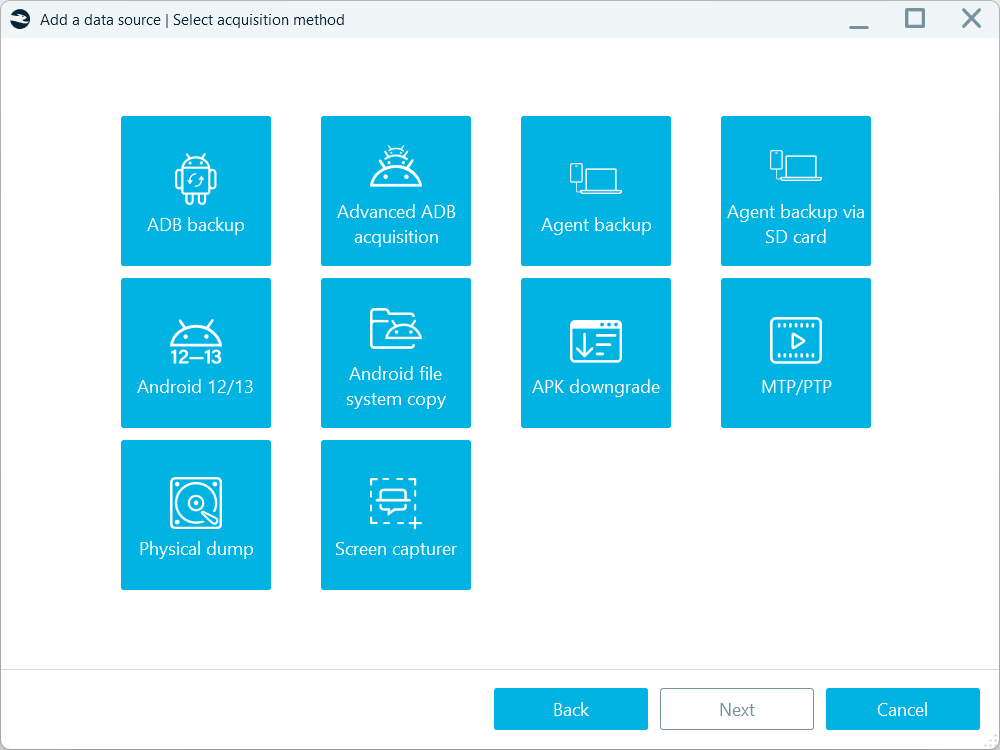
These methods can complement one another. You might begin with screen capture, media extraction, or an ADB backup, review the results, and then apply an agent-based or application-specific method to address gaps.
Chipset-Based Methods
Chipset-based methods provide deeper acquisition options for supported Android hardware. Compatibility depends on the exact device model, chipset, firmware, security configuration, and encryption implementation.
Belkasoft X supports the following chipset families:
- MediaTek: Several acquisition options are available for supported MediaTek devices, including agent-based methods and MTK dump acquisition. For eligible encrypted devices, you can acquire the dump first and perform decryption or passcode recovery afterward. Separating these stages allows you to preserve the available data before deciding how to access the encrypted user partition.
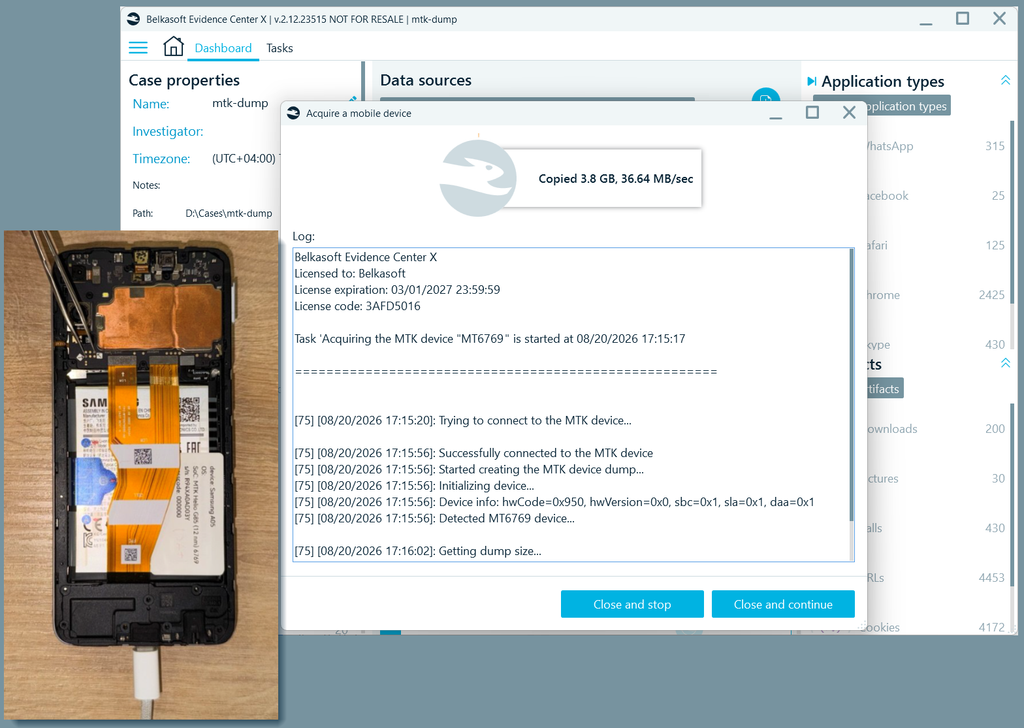
- Kirin: Supported Huawei and Honor devices using Kirin 970 and 980 chipsets can be acquired through dedicated workflows. These methods can collect the information needed for decryption and, where supported, passcode recovery.
- Unisoc and Spreadtrum: Belkasoft X can acquire supported devices using Unisoc or older Spreadtrum chipsets. Available workflows include acquisition and decryption of eligible devices protected with file-based encryption, passcode recovery for supported models, and physical acquisition of certain older devices.
- Qualcomm: Emergency Download mode supports physical acquisition from a large collection of compatible Qualcomm Snapdragon devices. This method can operate below the Android operating system, but availability depends on the exact model and supported loader.
Chipset-based methods can provide considerably more data than a standard backup, but they also require closer attention to device compatibility, encryption, and procedural risk. You should confirm the exact model and chipset against Belkasoft’s current mobile acquisition support before selecting a method.
Android Passcode Recovery
The optional Mobile Passcode Brute-Force module supports eligible MediaTek, Kirin, and Unisoc devices. The general workflow is to acquire the cryptographic material, recover the passcode, decrypt the device image, and proceed with forensic analysis.
Compatibility remains model- and chipset-specific. You should review the exact support list rather than assume that all devices using a named chipset are covered.
Remote Mobile Acquisition
Belkasoft Remote Acquisition, included with Belkasoft X Corporate, extends extraction to devices located outside the forensic laboratory.
Remote mobile acquisition allows you to use a remote computer (endpoint) to acquire data from a connected mobile device. This workflow supports the following acquisition methods:
- Android: ADB backup, MTP/PTP, Android file system copy (for rooted devices)
- iOS: iTunes backup, AFC (Apple File Conduit), Jailbroken device image
The remote acquisition option can be useful when a corporate investigation requires targeted data collection for an incident that involves a remote employee or office.
Cloud Sources That Complement Mobile Evidence
Cloud evidence can fill gaps left by a device extraction or corroborate records found locally. Belkasoft X supports acquisition from sources that include:
- iCloud and iCloud backup
- Google Drive, Gmail, Google Keep, Google My Activity, and related Google services
- Telegram
- WhatsApp backups and QR-based collection
- Microsoft 365 (OneDrive)
- Huawei cloud services
- Email and webmail providers
- Other supported cloud platforms
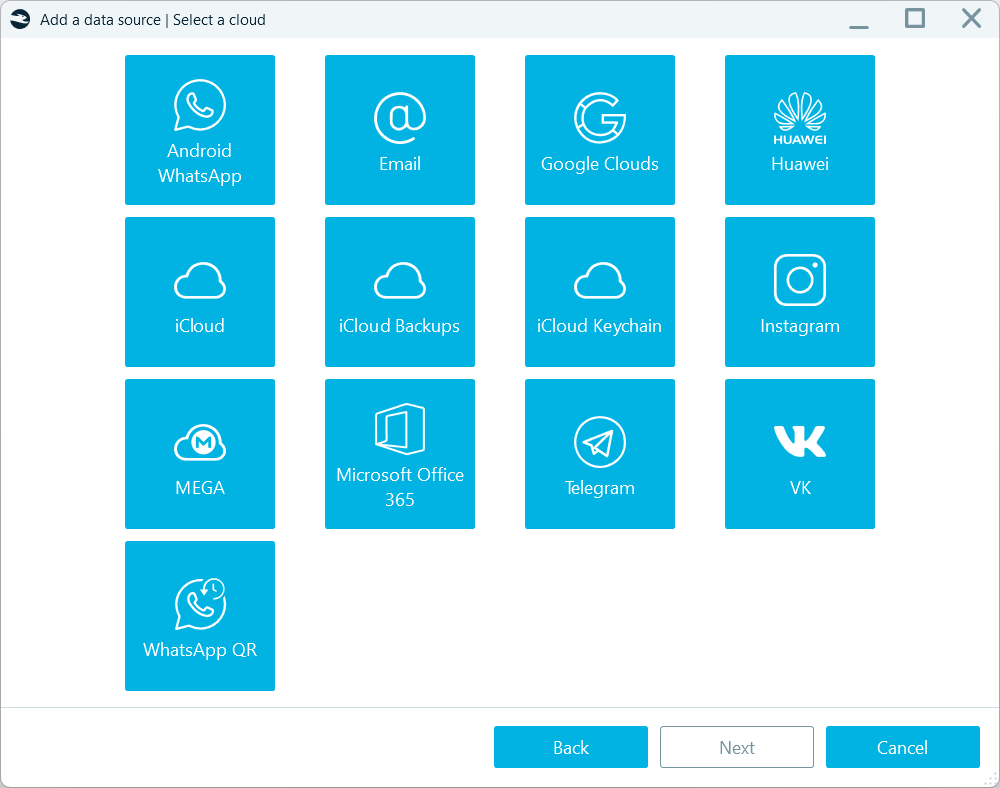
Bringing device and cloud evidence into the same case lets you compare local messages, attachments, account activity, backups, and timestamps without treating each source as a separate investigation.
Third-Party Images and Existing Extractions
Belkasoft X is not limited to evidence that it acquires itself. Supported mobile sources include:
- UFED, UFD, UFDX, and UFDR data
- GrayKey images
- Oxygen Forensic Backup images
- iTunes and other mobile backups
- Android logical and physical images
- Huawei HiSuite backups
- Xiaomi MIUI backups
- TWRP extractions
- JTAG and chip-off dumps
This interoperability gives Belkasoft X two possible roles. You can use it as the primary acquisition and analysis platform, or you can use it to examine and validate evidence produced by another tool. Cross-tool examination is particularly useful for critical findings, unsupported devices, and cases in which you need to understand whether two parsers interpret the same source data differently.
Automated Mobile Artifact Extraction
Belkasoft X supports automated extraction of more than 1,500 application and system file types or versions. Mobile evidence categories include:
- Calls and contacts
- SMS, MMS, and chat messages
- Browser activity
- Documents
- Pictures, audio, and video
- Geolocation records
- Cryptocurrency wallets and transactions
- Health, fitness, sleep, and wearable-device data
- Social media activity
- Application permissions and device information
- Wi-Fi, Bluetooth, and network records
- Mobile system artifacts
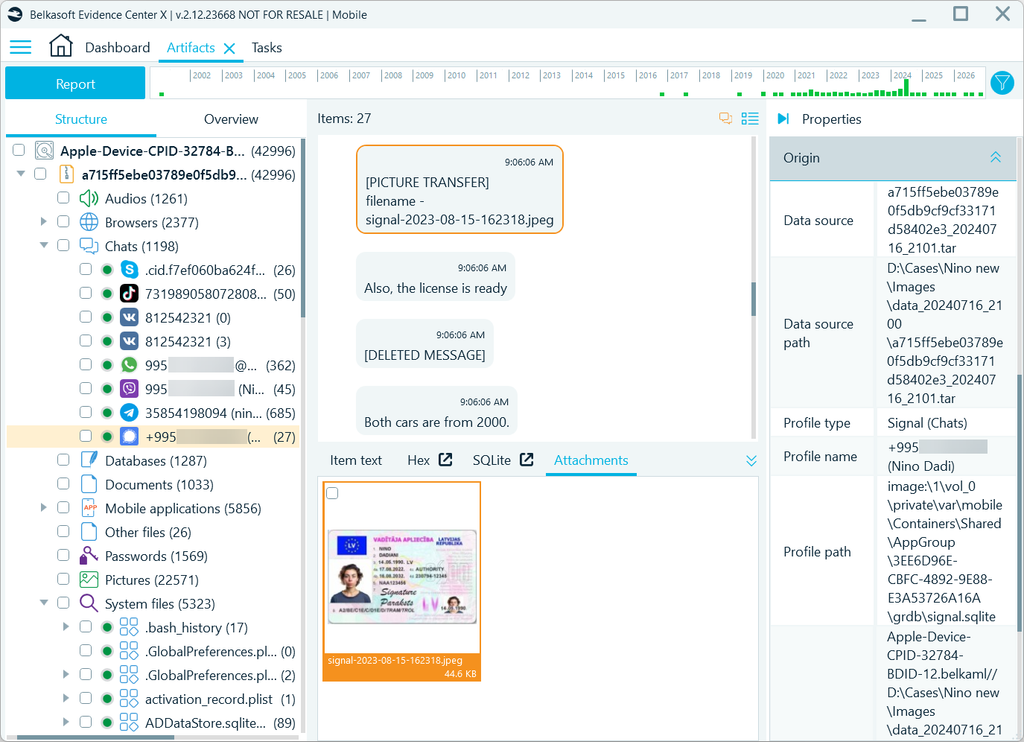
Extracted evidence is organized into easy-to-review artifact categories. You can search, filter, bookmark, and report records while retaining their relationship with the original file, database, or source path.
SQLite and Deleted-Record Recovery
Many mobile applications store their information in SQLite databases. A normal database viewer may display active records while missing evidence is stored in transaction areas:
- Freelist pages
- Write-ahead logs
- Rollback journals
- SQLite unallocated space
- Damaged or partially overwritten databases
These areas can contain deleted messages, earlier versions of edited records, and transactions not yet committed to the main database.
Belkasoft X uses low-level SQLite parsing rather than relying solely on standard database functions. It can recover and label records from these additional areas while retaining their connection to the relevant artifact category. The underlying process is described in its SQLite forensics guide.
Analysis of Unsupported SQLite Applications
When an application does not have a dedicated parser, Belkasoft X can identify SQLite databases and make them available for direct review. BelkaGPT can classify databases according to their contents, such as:
- Communications
- Locations
- Credentials
- Financial information
- Investigator-defined categories
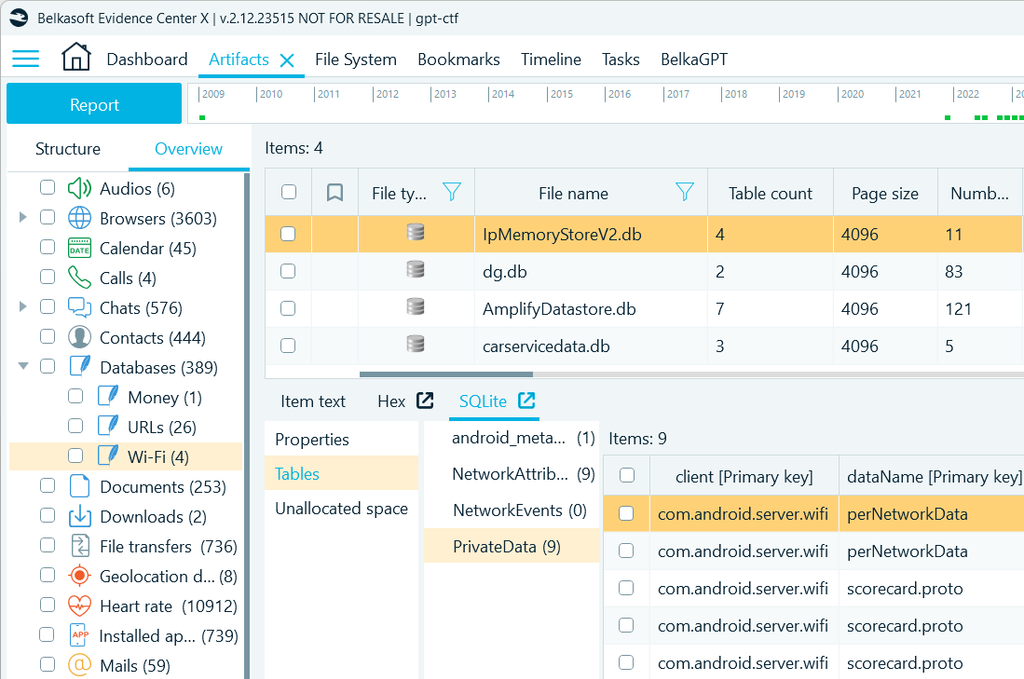
You can also create custom SQLite artifacts by mapping database fields—such as timestamps, participants, message text, identifiers, and coordinates—to standard Belkasoft X properties. These custom records can then participate in normal searching, filtering, reviewing, and reporting alongside automatically parsed artifacts.
AI-Assisted Mobile Evidence Analysis
BelkaGPT adds AI-assisted functions to the forensic workflow, including:
- Natural-language questions about case evidence
- Chat topic detection
- SQLite database classification
- Picture description and classification
- Facial recognition and similar-face search
- Audio and video transcription
- Language detection
- Evidence translation from over 200 languages
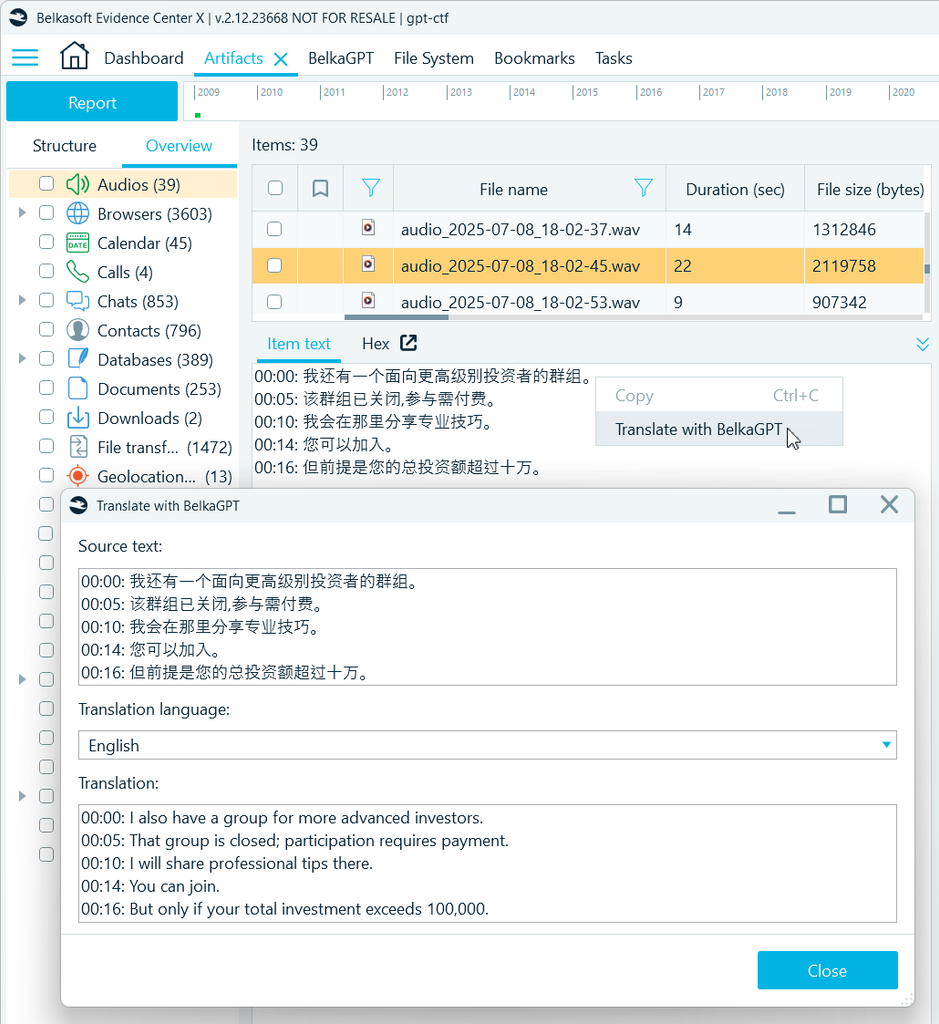
BelkaGPT is designed to operate locally. Evidence is processed within your organization’s infrastructure instead of being automatically uploaded to an external AI provider. BelkaGPT Hub can distribute processing to local CPU- and GPU-equipped systems while the case remains inside your environment.
Timeline, Communication, and Location Analysis
Extracting artifacts is only the first analytical step. You must still determine how the records relate to one another. Smart analytical tools in Belkasoft X accelerate this analysis.
- Timeline Analysis: The Belkasoft X Timeline combines timestamped artifacts from every source in your case. It supports filtering by date, time, source, artifact category, event type, and other properties. Events remain linked to their original artifacts, allowing you to move from a chronological overview to the supporting evidence.
- Communication Map: The Connection Graph focuses on people and communications. It displays relationships derived from calls, emails, SMS, and chat applications, including evidence found across different devices.
- Geolocation Visualization: You can display location artifacts on maps, compare routes, and export selected data to KML. An offline map-server option allows you to visualize geolocation evidence without connecting forensic workstations to public mapping services.
File-System and Low-Level Examination
Automated parsing does not remove the need to inspect source data. Belkasoft X includes several built-in examination tools:
- File System Explorer
- Hex Viewer
- SQLite Viewer with Queries
- Plist Viewer
- Registry Viewer
These tools let you examine files, folders, database structures, property lists, raw bytes, metadata, and carved content without exporting every item to a separate utility.
For an examiner, this creates a useful progression from high-level artifact review to low-level validation. When an automatically parsed record becomes important, you can trace it back to the original data and inspect how the result was produced.
Evidence Integrity and Independent Testing
Belkasoft X provides several features that support a documented forensic process:
- MD5, SHA-1, and SHA-256 hashing
- Acquisition and processing logs
- Task logs
- Source and origin-path information
- Bookmarks
- Reports of selected evidence and analytical views
Belkasoft X has also been tested through the U.S. National Institute of Standards and Technology Computer Forensics Tool Testing program, with reports published by the Department of Homeland Security. The report is available through the NIST mobile-device testing index.
Reporting and Portable Case Review
Belkasoft X lets you create reports from artifacts, bookmarks, searches, SQLite data, timelines, maps, tasks, and connection graphs. You can export findings into standard formats like PDF or CSV, and formats that allow processing the findings in other platforms, such as Semantics21, ProjectVic, and Relativity.
A free Evidence Reader allows investigators, attorneys, clients, and other authorized reviewers to open a portable, read-only case without getting another full Belkasoft X license.
This allows you to share selected evidence, bookmarks, analytical results, and supporting context while protecting the original case from modification.
Belkasoft X: A Mobile Forensics Tool for Real-World Investigations
Belkasoft X provides substantial coverage across the mobile forensic workflow:
- Essential and advanced iOS and Android acquisition
- Passcode recovery for supported devices
- Remote mobile device acquisition
- Cloud sources associated with mobile activity
- Third-party forensic images
- Automated application parsing
- Encrypted messenger analysis
- SQLite analysis and deleted-record recovery
- Offline AI-assisted review
- Timeline, communication, and location analysis
- Low-level source examination
- Reporting and portable case sharing
Its wider all-in-one architecture adds another benefit once the mobile work is underway. Belkasoft X can place phone evidence alongside data from computers, cloud services, vehicles, drones, and volatile memory within the same case. This makes it easier to extend a mobile-centered investigation when relevant evidence appears elsewhere.
Whether Belkasoft X is the right fit depends on your device population, acquisition requirements, validation procedures, and existing toolset. Its combination of mobile specialization, analytical depth, interoperability, and broader case support gives it a clear position among modern mobile forensics platforms.