For most digital forensic labs, backlogs are part of everyday operations.
Evidence volumes keep growing, and so does the number of devices per case. Meanwhile, labs are expected to deliver results faster, often without a corresponding increase in staff or budget.
Bigger drives are part of the problem, but only part of it.
Talk to forensic practitioners about their daily work and you hear about all the time spent around forensic imaging: wiping targets, waiting for ports, prioritizing evidence, configuring jobs, transferring images to storage, checking completed tasks and setting up the next batch.
Repeated across hundreds of devices, even short delays quickly add up and become part of the backlog. So the question isn’t only How do we image faster? It’s also How do we keep evidence moving?
That’s where Atola TaskForce 2 comes in.
Faster Forensic Imaging Is Also About Parallel Acquisition
The speed of an individual imaging session matters, particularly with modern SSD drives. But in a high-volume lab, there’s another metric that matters just as much: how many devices can be processed at once.
One team we trained recalled an ICAC investigation involving 149 drives. They also routinely receive batches of SD cards and USB devices for triage and imaging.
In that environment, making one acquisition faster helps. But if the next twenty drives are waiting for a port, there’s still a queue.
TaskForce 2 combines high single-session performance with large-scale parallel imaging. It supports 25+ simultaneous imaging sessions, with cumulative performance of up to 25 TB/hour.
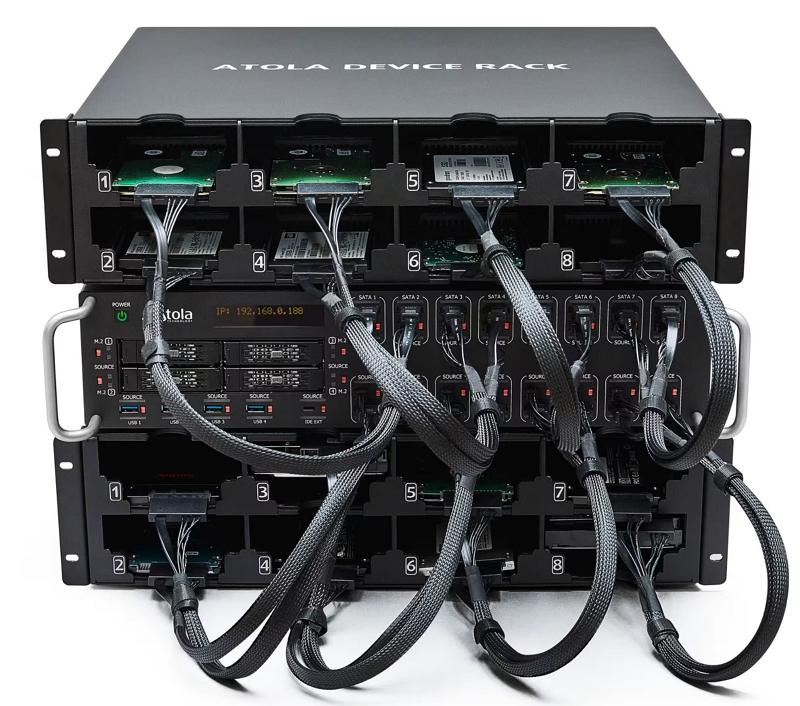
For a busy lab, that changes the question from How quickly can we image this drive? to How much evidence can we get through acquisition today?
Single-session speed gets one device through faster. Parallel acquisition gets many devices through together. A high-volume forensic lab needs both.
A Few Clicks, Hundreds of Times
Most examiners have performed the same sequence countless times: select the destination, choose the image format and hashing options, enter case information, start imaging.
It takes little time, until you multiply it by dozens of devices every day.
Express Mode removes much of that repetition. Configure an imaging preset once and TaskForce 2 can automatically launch the predefined workflow when a drive is connected.
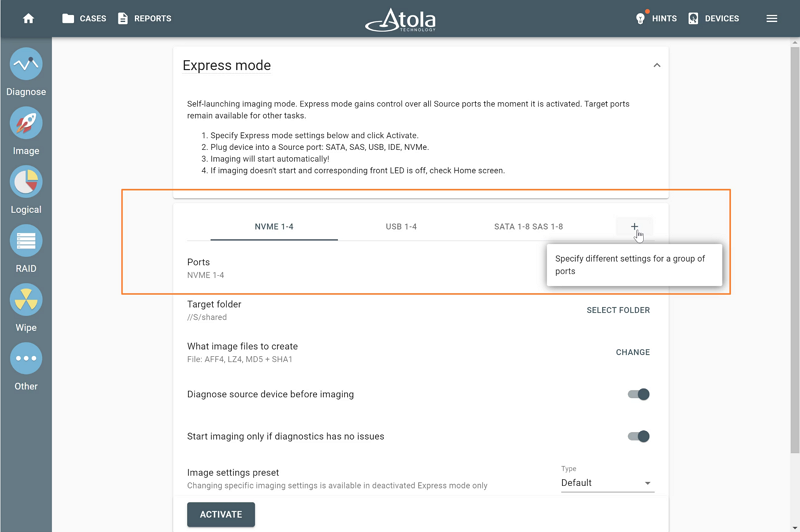
We recently demonstrated Express Mode to a team that routinely makes full images of individual devices. They immediately recognized how much repetitive setup it could remove. Their reaction was memorable but unquotable. Let’s just say, they were excited.
We’ve seen the same thing with Multi-launch. Experienced TaskForce users who had been starting batches of tasks individually discovered during training that they could launch them together instead.
Neither feature changes the speed of the source drive. They save something more valuable: examiner time.
Forensic Imaging Shouldn’t Be an Island
Acquisition is usually the beginning of the forensic process, not the end. Once an image is complete, it needs to reach storage, analysis and reporting. And every manual handoff creates another opportunity for evidence to wait.
Some TaskForce customers already send all acquisitions directly to network storage and automated processing environments. Others are building their own workflows using watch folders and internal tools rather than commercial automation platforms.
TaskForce 2’s Web API allows acquisition to become part of that larger process. It can be integrated with platforms such as Magnet AUTOMATE or with a lab’s own scripts and systems.
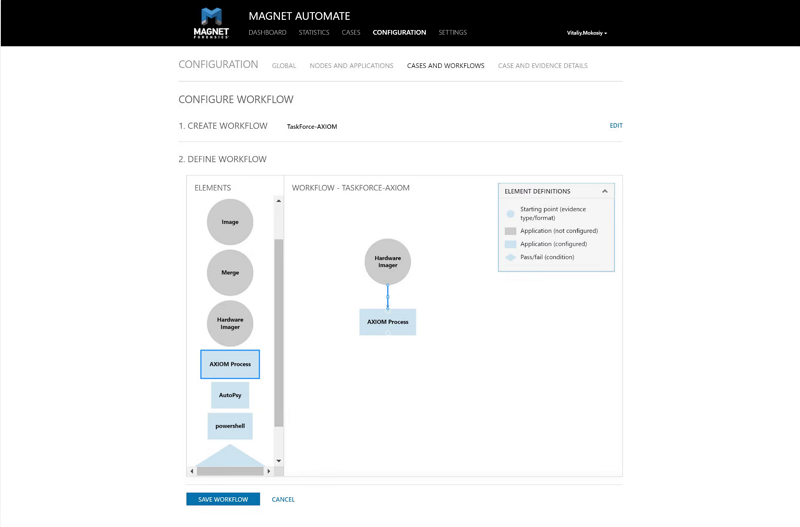
A relatively simple workflow might start imaging automatically through Express Mode, save the completed image to a predefined network location and let a watch folder pick it up for analysis. No one has to notice that one task finished and remember to start the next one.
At scale, removing these downtimes can matter as much as speeding up the acquisition itself.
Not Every Case Needs Every Byte
A full physical image remains the right choice for many investigations. But not every case requires one.
If the scope is limited to particular folders, files or other defined data, acquiring unused sectors adds time, storage and downstream processing without necessarily adding investigative value.
TaskForce 2’s Logical Imaging module lets investigators select data manually or use ‘Include’ and ‘Exclude’ filters to narrow the acquisition.
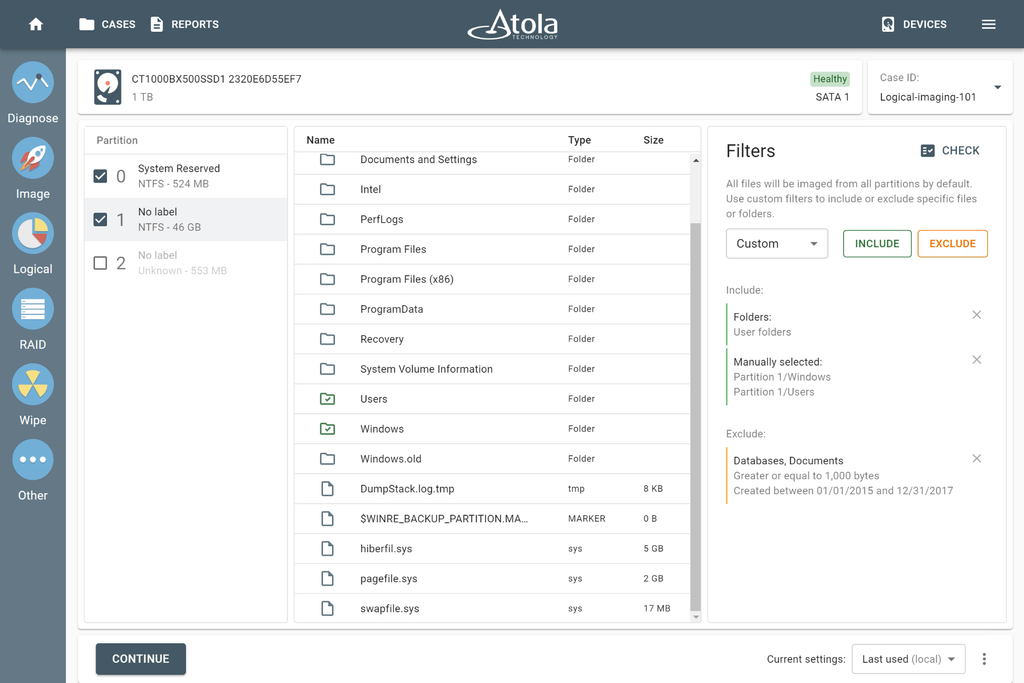
One team we trained was already making manual selections but hadn’t discovered the filters. They immediately saw their value for RAID work, where the reconstructed volume may be huge but only part of its contents is relevant.
The point isn’t that logical imaging should replace physical acquisition. It’s that labs don’t have to apply the same acquisition strategy to every case.
RAID Is Rare. Until It Isn’t
Some labs see RAID regularly; others encounter it only occasionally. But an unfamiliar array can consume a disproportionate amount of examiner time.
One team received 12 HDDs in a box and initially began imaging them individually before realizing they belonged to a RAID. They connected the drives to TaskForce, reconstructed the array and told us afterwards that it had saved them “a LOT of time.”
TaskForce 2 can automatically detect and reconstruct supported RAID configurations, including arrays with unknown parameters and missing devices. Investigators can then work with the reconstructed storage without moving to a separate RAID reconstruction workflow.
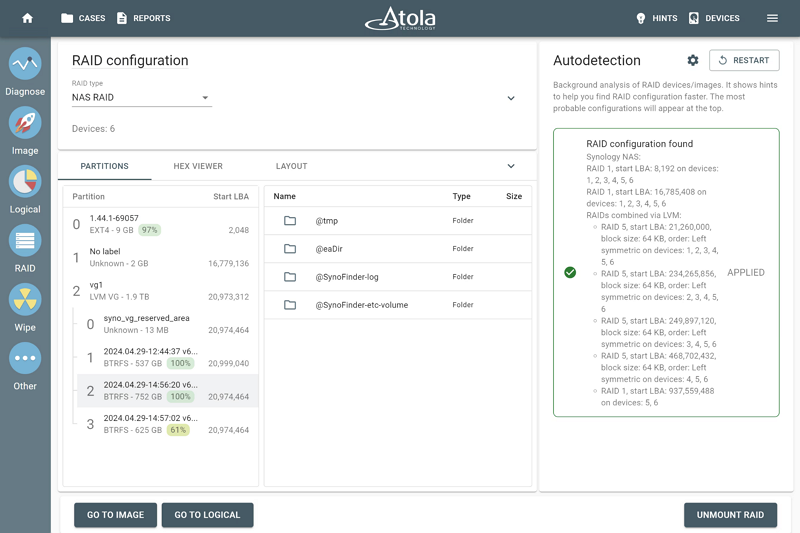
It’s a capability a lab may not need every day. But when it does, the RAID autodetection module can keep a difficult case from sitting in the queue.
With a Damaged Drive, 40% Can Win the Day in Court
Damaged media changes the objective of imaging.
One customer put it particularly well: if the team recovers 40% of a badly damaged drive, and those 40% contain enough evidence to prove the case in court, they’re happy.
In these cases, forcing a conventional linear acquisition isn’t necessarily the best strategy. Diagnostics, multi-pass imaging, selective head imaging and other damaged-drive techniques can help recover useful data while limiting unnecessary stress on unstable media.
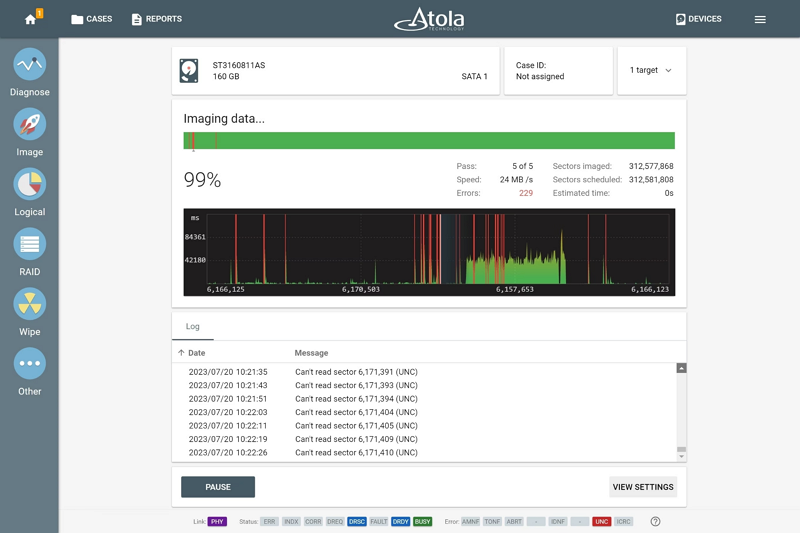
For some laboratories this is occasional work. For others, damaged devices are the workload. We’ve worked with specialist teams that receive media precisely because conventional acquisition has already failed elsewhere.
Keeping diagnostics and damaged-drive acquisition within the same environment can prevent problematic evidence from automatically becoming a separate, specialist backlog.
When the Network Becomes the Bottleneck
Faster acquisition eventually exposes whatever is slowest downstream.
We’ve seen a lab connect TaskForce over 10 Gb Ethernet only to have the receiving server limited to 1 Gb. Another team has 10G infrastructure but sees around 2 Gbit/s in practice. And because almost everything goes directly to network storage, that performance affects the entire acquisition workflow.
At the other extreme, we’ve spoken with a lab running 100 Gbit fiber and InfiniBand with enterprise-scale storage. Their interest was naturally in pushing forensic network connectivity further.
These environments are very different, but they make the same point:
Forensic imaging speed is increasingly end-to-end speed.
Source drive. Imager. Network. Target storage.
Any one of them can become the limit.
TaskForce 2 includes dual 10 Gb Ethernet interfaces. For labs whose infrastructure can use it, the optional 25G Fiber Extension adds two 25 Gb SFP28 interfaces with link aggregation support.
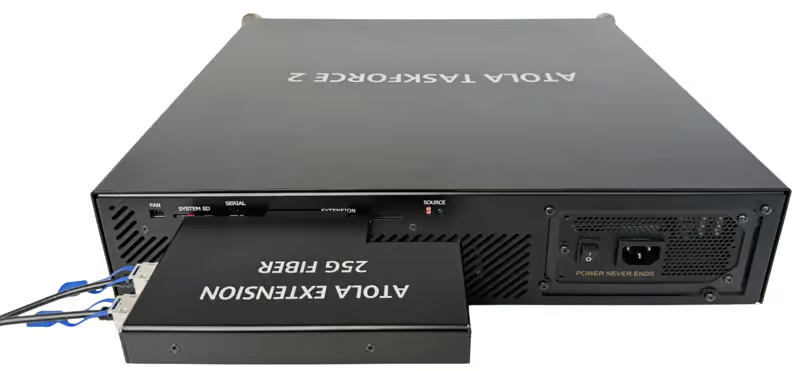
As more evidence goes directly from acquisition to centralized storage and automated analysis, the network is becoming part of the imaging workflow itself.
Sometimes the Capability Is Already There
No matter how intuitive the interface, a good tool that develops and matures over the years will become more capable and complex.
Just as with bad drives blocking evidence discovery, lack of awareness about a system’s capability can cause lack of effectiveness in tackling media. That functionality needs to be discoverable when an examiner actually needs it. That’s why we encourage our customers to take advantage of our free training to help us set you up for success.
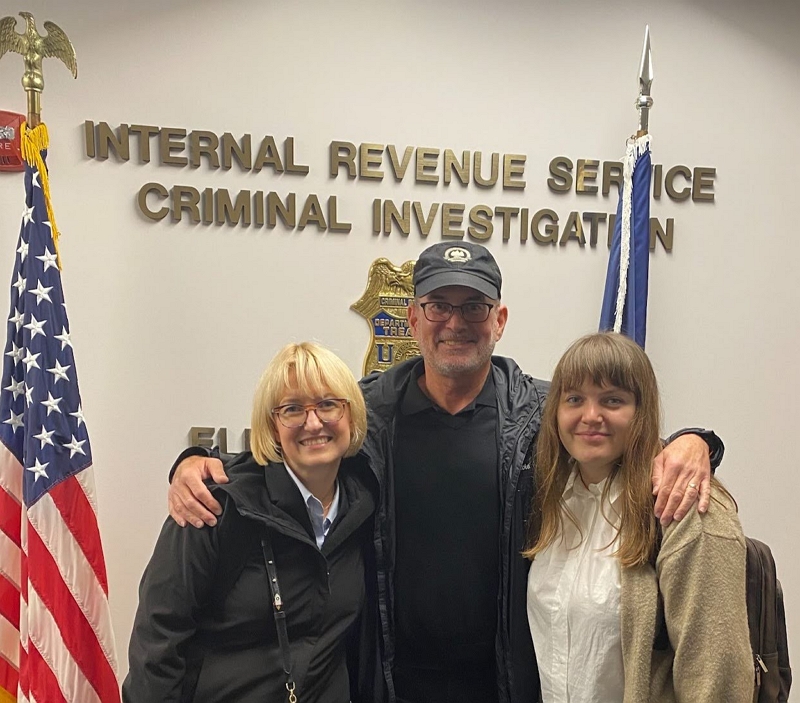
At our free trainings, we’ve shown regular TaskForce users the Express Mode, Multi-launch, Logical Imaging filters, RAID options and damaged-drive functionality they hadn’t used at all or to their full potential. One team processing large numbers of NVMe drives was excited to discover additional ways to use the NVMe connectivity they already had; another described iSCSI client support as the major capability they had been missing; yet another customer said in response to the Express mode demonstration “I wish I knew it for that case I had last week!”
Because once a feature serves your process, your backlog shrinks faster.
So How Can Labs Reduce Forensic Imaging Backlogs?
There is no single cause of a forensic imaging backlog, and no single feature will eliminate one.
Sometimes the answer is faster acquisition. Sometimes it’s parallel imaging, so twenty devices don’t have to wait behind one. Sometimes it’s Express Mode removing repetitive setup or automation removing the gap between acquisition and analysis. For a difficult case, the time saver may be RAID reconstruction, logical imaging or a better strategy for damaged media.
And as acquisition gets faster, the constraint may simply move elsewhere: to the network, storage or analysis infrastructure.
That’s why imaging performance is better understood as a workflow question than a benchmark alone.
The useful metric isn’t only how quickly one drive can be read. It’s how much evidence the lab can process, how much examiner attention the process requires, and how long evidence spends waiting between stages.
Atola TaskForce 2 addresses different parts of that equation: high single-session speed, parallel imaging, automation, logical and RAID acquisition, damaged-media handling, shared access and high-speed networking.
Ultimately, reducing the backlog comes down to something simple: Keep the evidence moving, and let examiners spend their time on the work that actually needs an examiner.