SQLite databases power applications and OS components on billions of computers and mobile devices. They sit at the center of countless investigations—browser history, messaging apps, system activity logs, cloud sync clients—and the list keeps growing. While digital forensic tools parse data from many SQLite-powered apps automatically, less common or recently updated applications may go undetected, leaving evidence on the table. That is why SQLite forensics remains an essential DFIR skill.
In this article, we look at how to locate and examine SQLite databases with Belkasoft X, an all-in-one digital forensics solution for law enforcement and corporate organizations, to surface evidence that automated parsing alone might not expose.
For those who want to master their skills in SQLite queries and earn a certificate of completion, Belkasoft is offering a free on-demand course, “Advanced SQLite Queries with Belkasoft,” available from June 15 to July 15, 2026. To enroll, follow the Belkasoft LinkedIn group and fill out the registration form on the Belkasoft website.
Forensic Implications of SQLite Architecture
SQLite does more than store application data—it also preserves traces of past activity that can be highly valuable during a forensic examination. Beyond the active records visible to an application, SQLite may retain remnants of deleted, modified, or uncommitted data across several internal structures and transaction files. Understanding where this information resides is essential for recovering evidence that would otherwise appear lost.
Several SQLite features are particularly important from a forensic perspective:
- Freelist pages contain space reclaimed from deleted records. Because the underlying data is not immediately overwritten, these pages can preserve recoverable information until they are reused by the database.
- Unallocated space refers to unused areas within database pages that may still contain fragments of previously stored records. These remnants can reveal historical data even when the corresponding records no longer exist in the active database.
- Rollback journals (-journal files) store the original state of data before transactions are applied. If a transaction is interrupted or a crash occurs, these files may retain records that never became part of the final database state.
- Write-Ahead Logs (-wal files) record database changes before they are written to the main database file. Since WAL entries can persist for extended periods, they often contain recent additions, modifications, or deletions that are no longer visible in the primary database.
One important consideration is that access to this transactional history depends on the tool used to examine the database. Standard SQLite browsers may automatically trigger a WAL checkpoint, merging WAL contents into the main database and potentially altering or destroying valuable historical evidence. Forensic-grade tools avoid this risk by opening databases in read-only mode and exposing WAL and journal contents without modifying the source files.
Common Challenges in SQLite Analysis
While SQLite’s architecture can preserve valuable evidence, extracting and interpreting that evidence is often far from straightforward. Modern applications frequently implement additional layers of protection and data abstraction that complicate forensic analysis.
Some of the most common challenges include:
- Encryption: Some applications encrypt entire databases, while others protect only selected data. For example, Signal encrypts its database contents, whereas Chromium-based browsers typically encrypt sensitive fields such as saved passwords and payment card information.
- Binary storage: Not all data is stored in a human-readable format. Applications such as Telegram keep portions of their data in serialized binary structures that must be decoded before they can be analyzed.
- Encoded values: Timestamps, message types, status flags, and other application-specific attributes are often stored as integers. While some encoding schemes are publicly documented, others require reverse engineering, experimentation, or community research to interpret correctly.
Navigating all of this by hand takes time that most investigations do not have. Forensic tools like Belkasoft X handle these tasks automatically, so examiners can focus on what the data means rather than how to read it. However, manual work does not disappear entirely. Validating automatic findings, digging into areas a tool may have missed, or examining an unsupported application all require going back to the raw data. This is where a solid understanding of how SQLite stores information and a reliable SQLite viewer become essential.
Analyzing SQLite Databases with Belkasoft X
Belkasoft X approaches SQLite analysis at two levels. For recognized applications, it parses databases automatically and presents the results as structured artifacts. For everything else, the SQLite Viewer gives direct access to the raw database—tables, deleted records, WAL entries, and unallocated space—for manual research without modifying the source files.
Automatic Detection
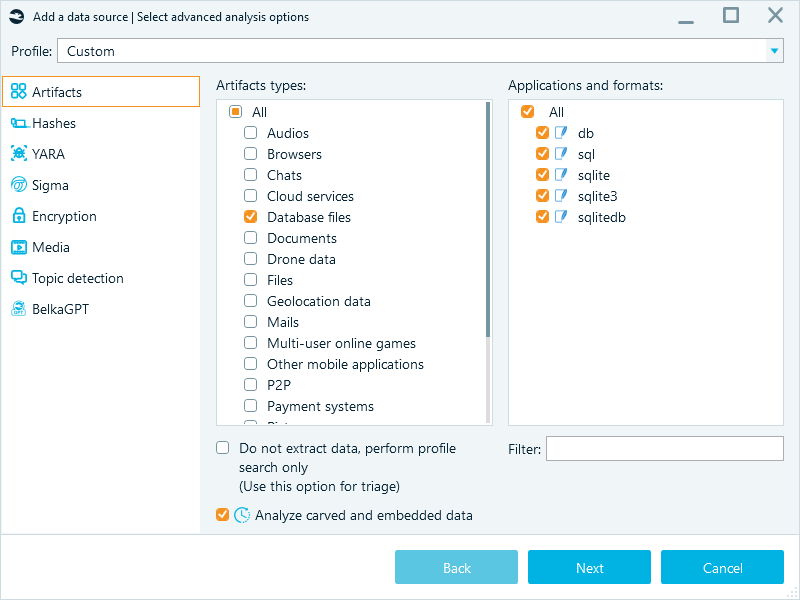
When analyzing a data source, Belkasoft X detects common database extensions, such as .db, .sql, .sqlite, .sqlite3, and .sqlitedb, and verifies their binary signatures to confirm that the files are actually SQLite databases.
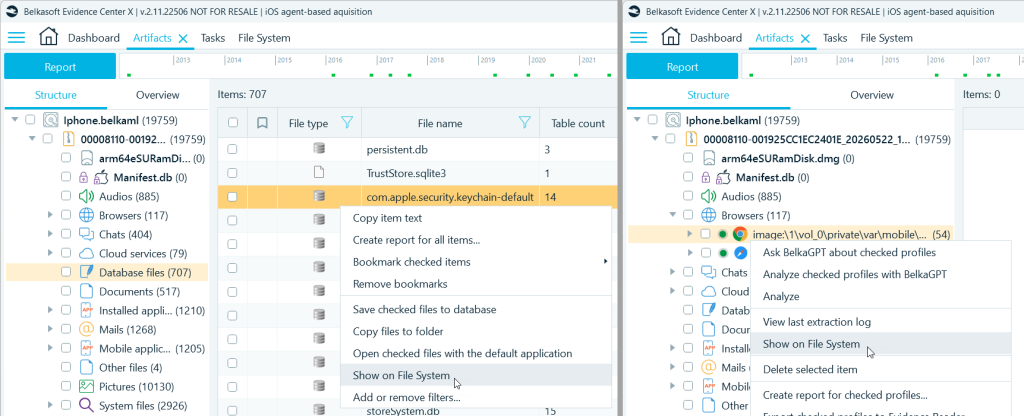
All automatically uncovered databases are displayed in the Artifacts window under the Database files node:
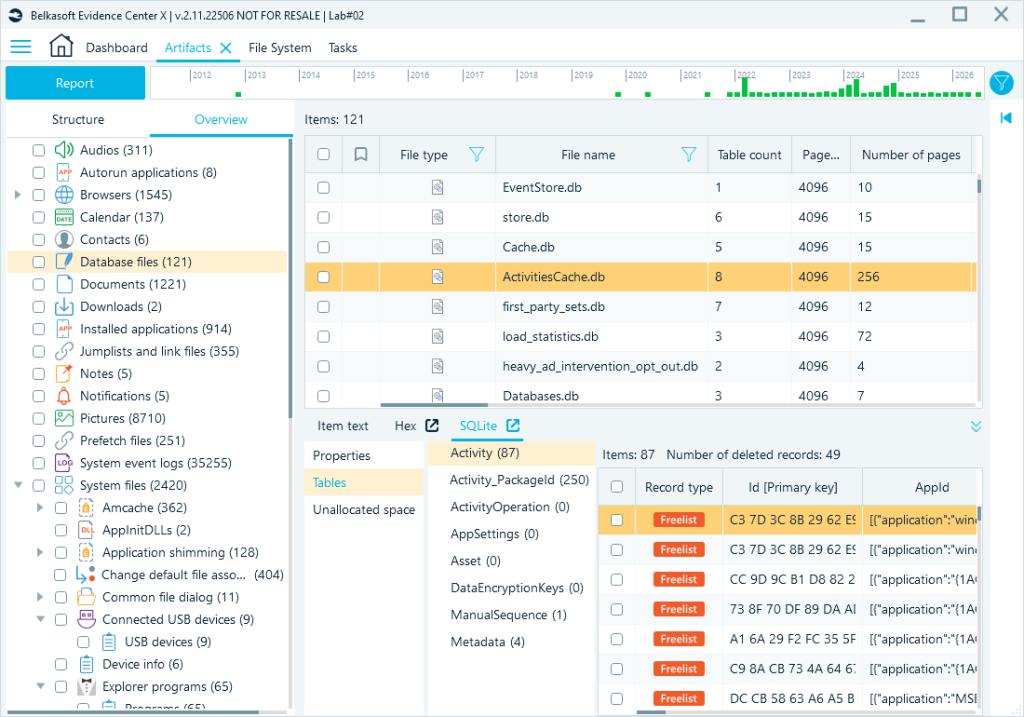
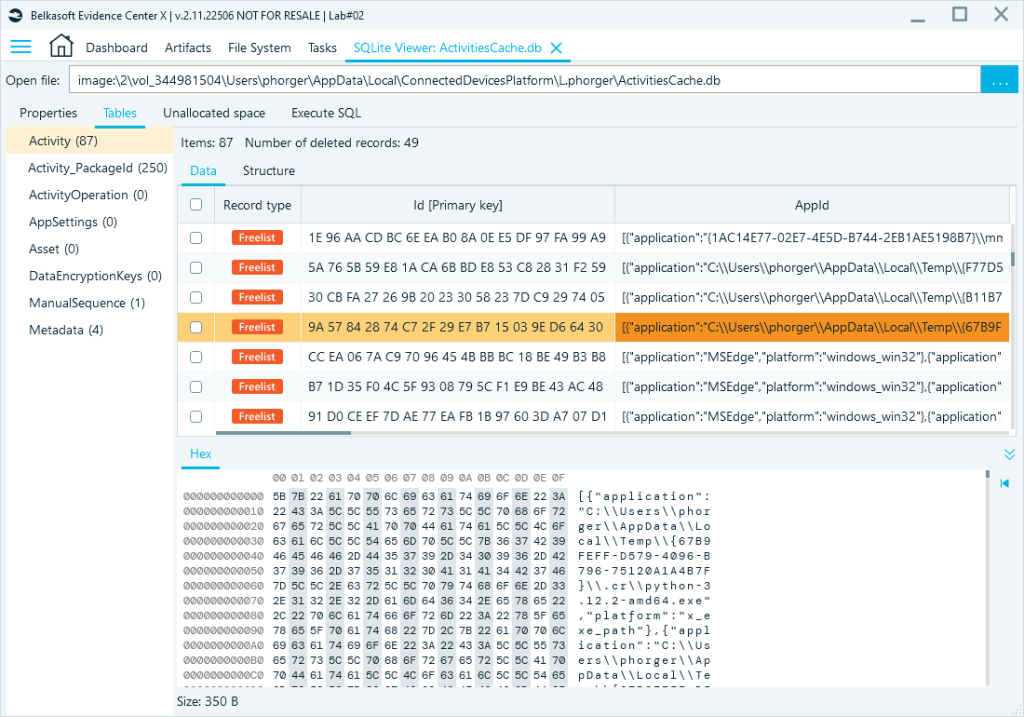
The embedded SQLite Viewer in the Tools pane allows you to preview database tables and records. You can also expand the viewer into a standalone window, giving you the full SQLite toolset to navigate the database, explore BLOBs in the Hex Viewer, or run custom SQL queries.
Supported Applications
Belkasoft X automatically parses a wide range of SQLite-backed applications and presents their data in the Artifacts window with forensically relevant data decrypted and parsed, timestamps converted, and binary fields rendered.
Locating Databases in the File System
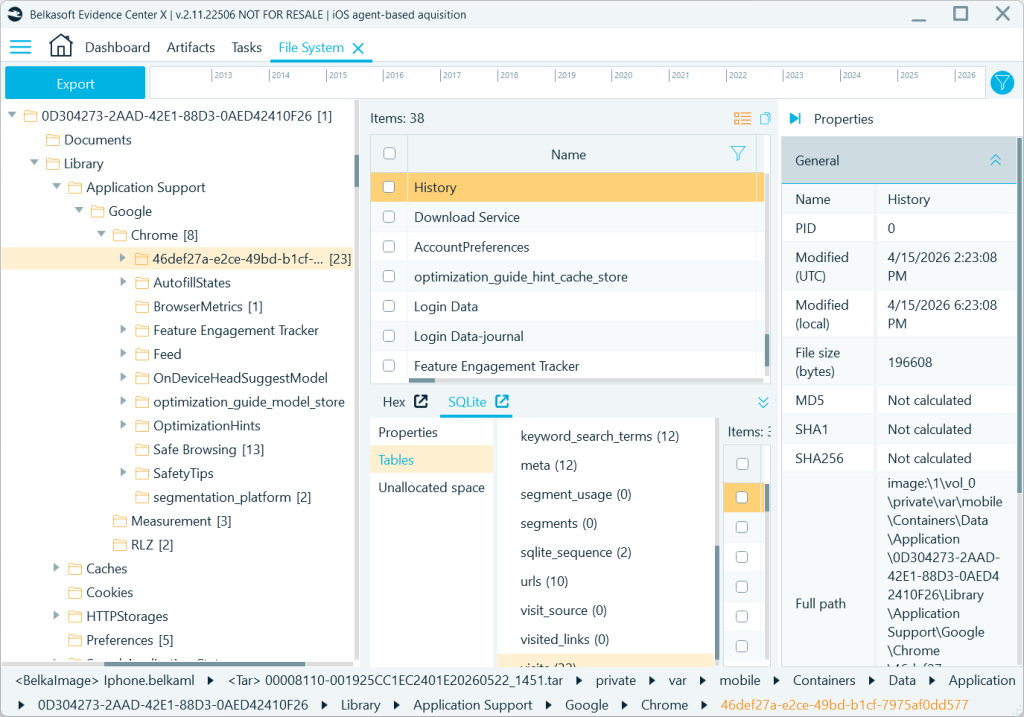
All SQLite databases in the Database files node and artifact profiles in the Artifacts window include the Show on File System option, which takes you directly to their source data folder in the File System window.
Here, you can explore the application folder to locate additional files and databases of interest:
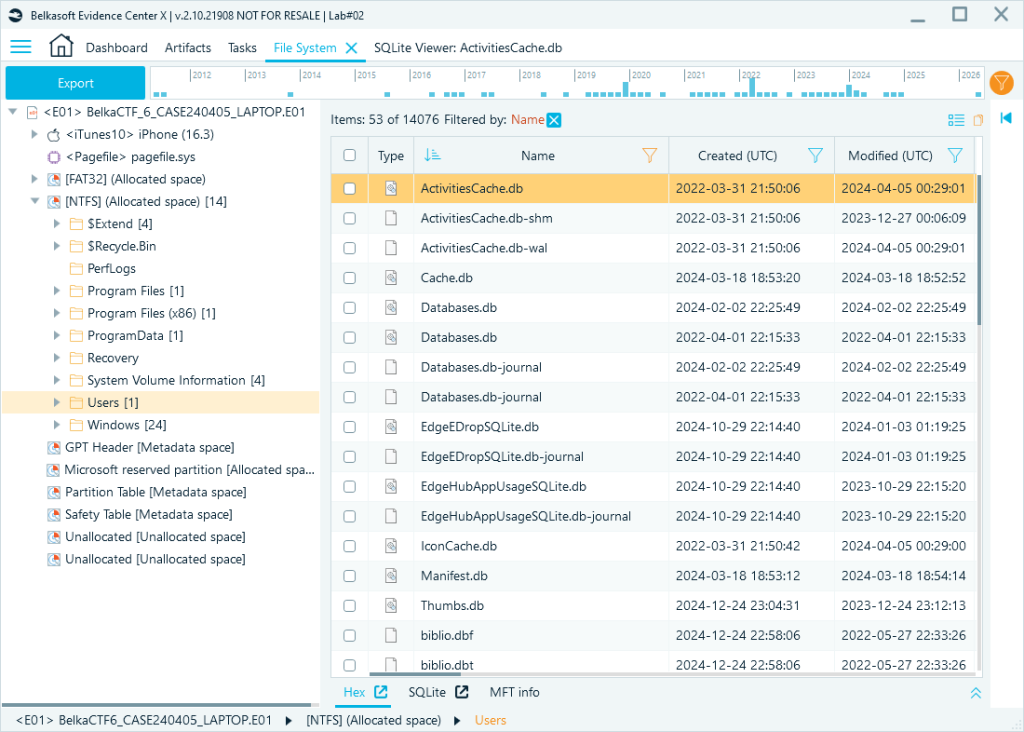
You can also use the File System window to search for SQLite databases across an entire data source. Select a folder to inspect, enable the recursive view, and filter files by extension or name. Belkasoft X lists every matching file in the target folder:
Examining Database Contents
Once you open a database, the SQLite Viewer offers several controls that help examine data more efficiently:
- Column order configuration: Reorder and hide columns to bring relevant fields to the forefront.
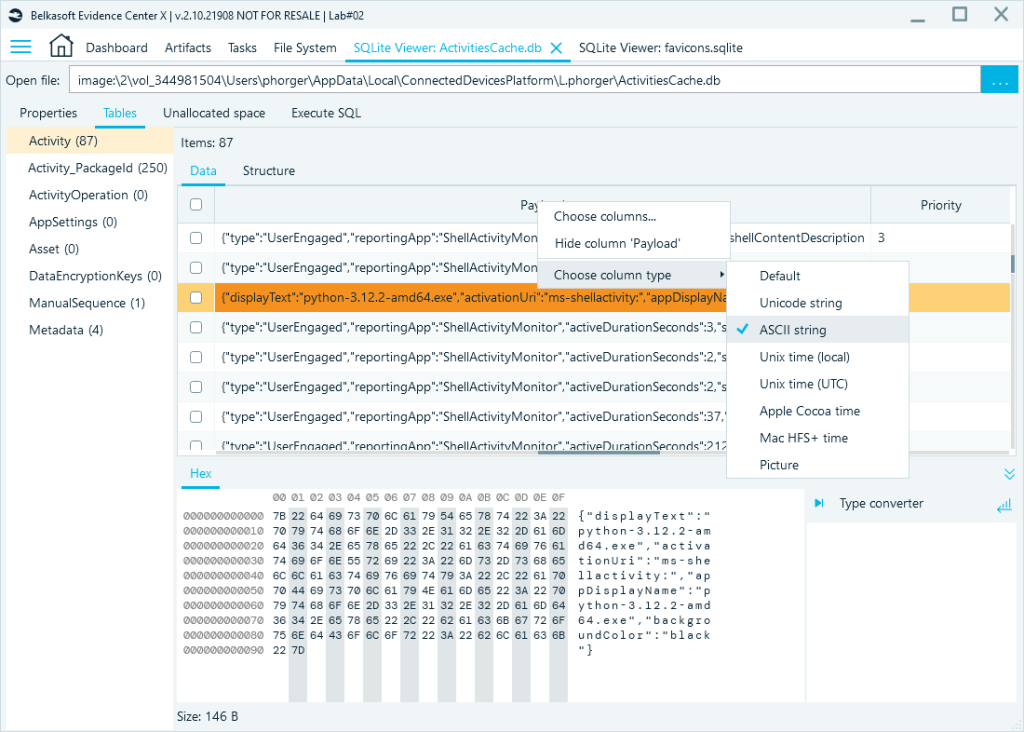
- Format conversion: Convert column data to timestamps, Unicode, or ASCII string columns without writing a query.
- BLOB handling: Binary fields can be rendered as images (if the content is image data), or inspected as ASCII or Unicode strings, or viewed in raw hex.
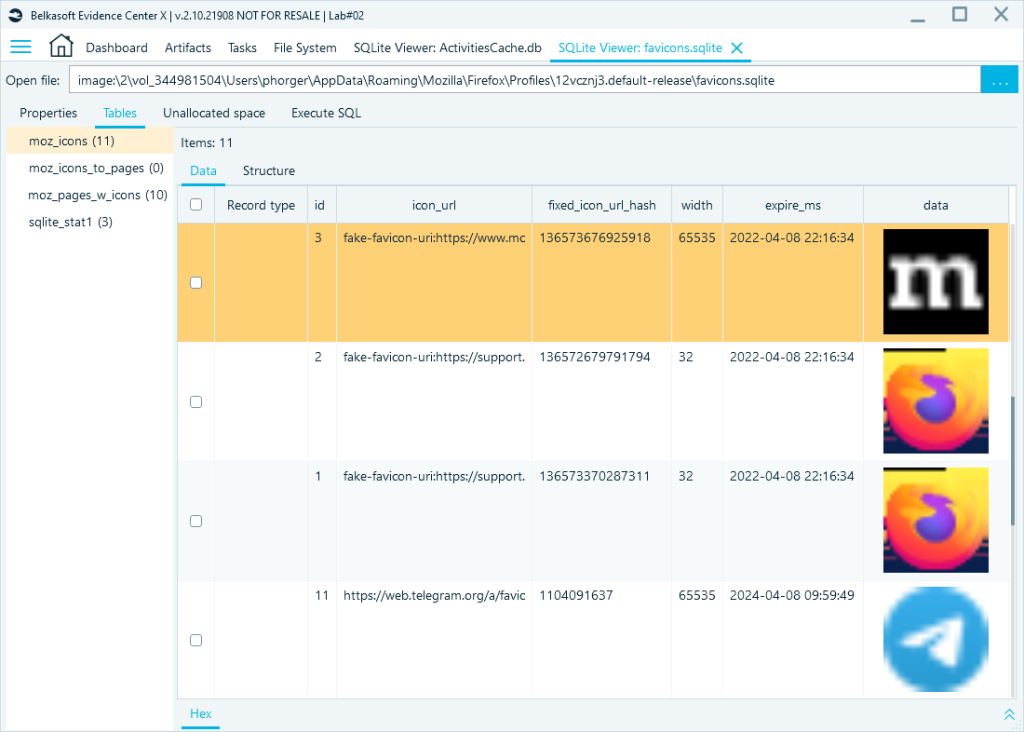
You can also convert binary data to an ASCII or Unicode string, or inspect it in the built-in Hex viewer:
Low-Level Analysis
Belkasoft X’s SQLite Viewer exposes three areas that standard database browsers typically do not surface:
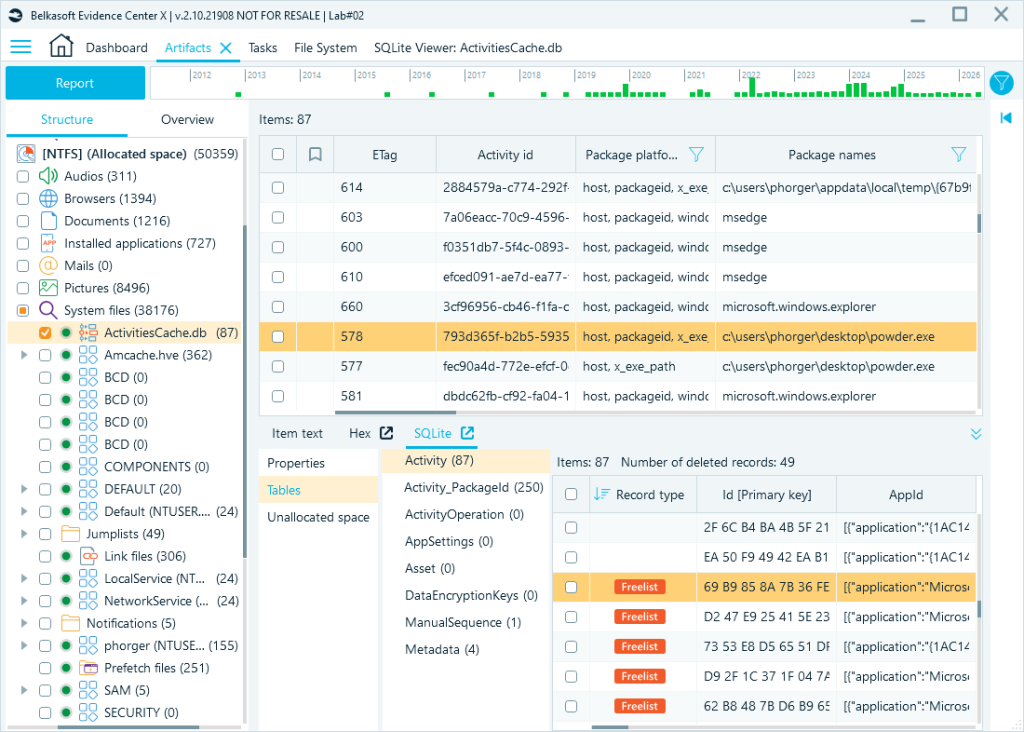
- Freelist pages are highlighted directly in the table view, allowing you to examine deleted records alongside live ones in the same interface.
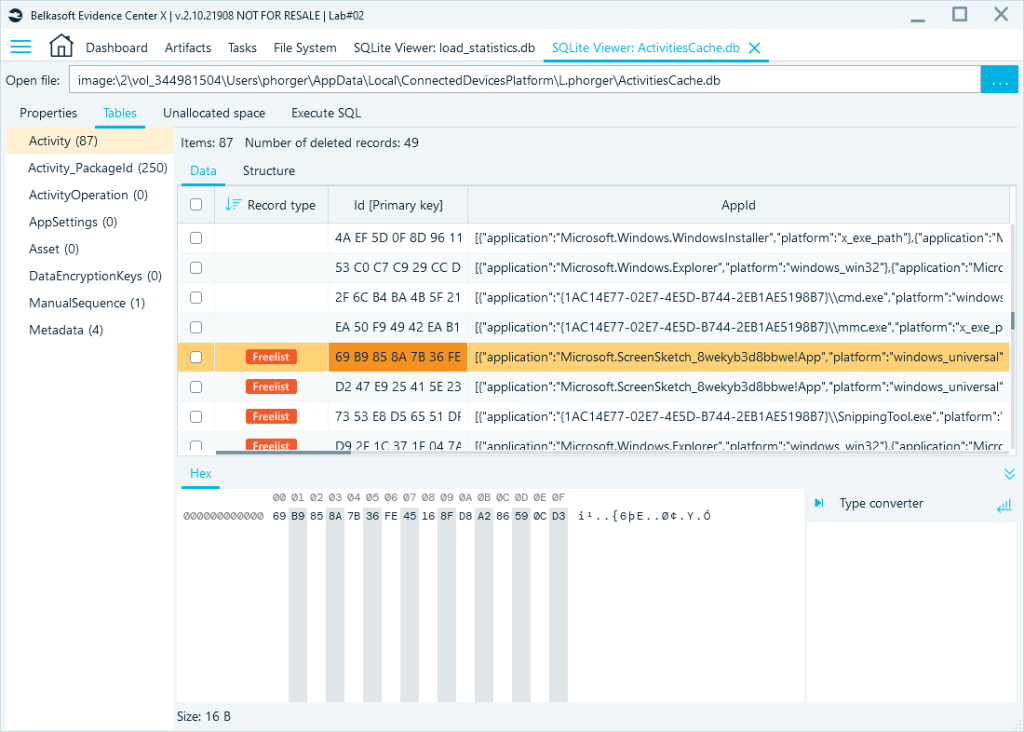
- WAL records are shown in line with main database records, with the record type marked. Belkasoft X accesses the WAL securely—no checkpoint is triggered, and no transactional files are created.
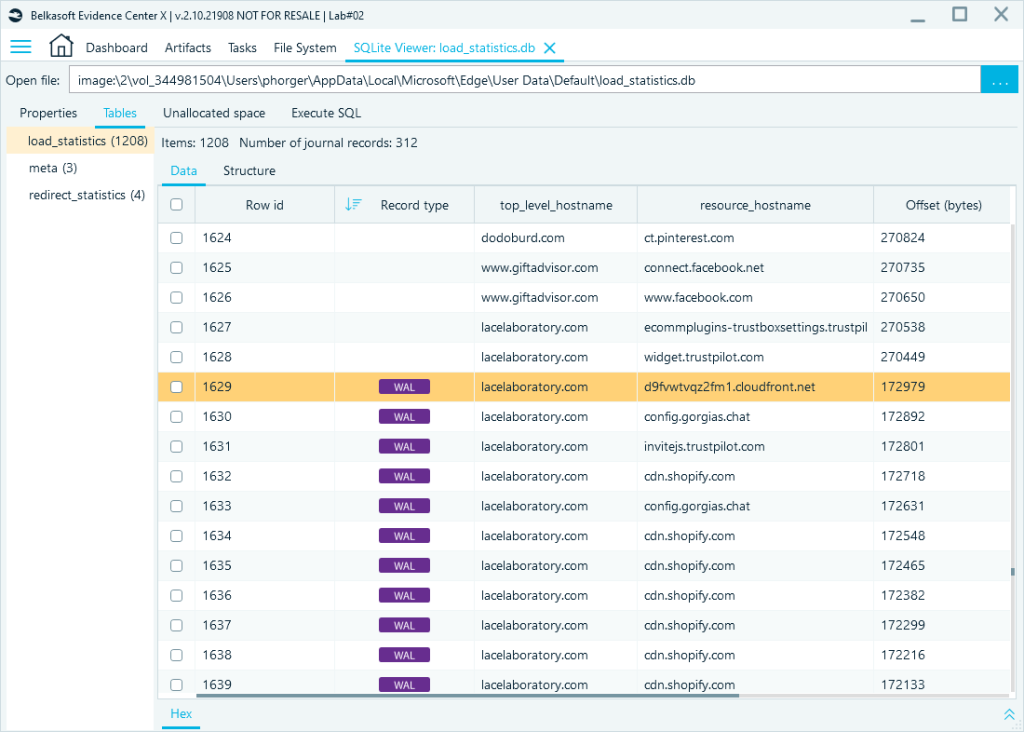
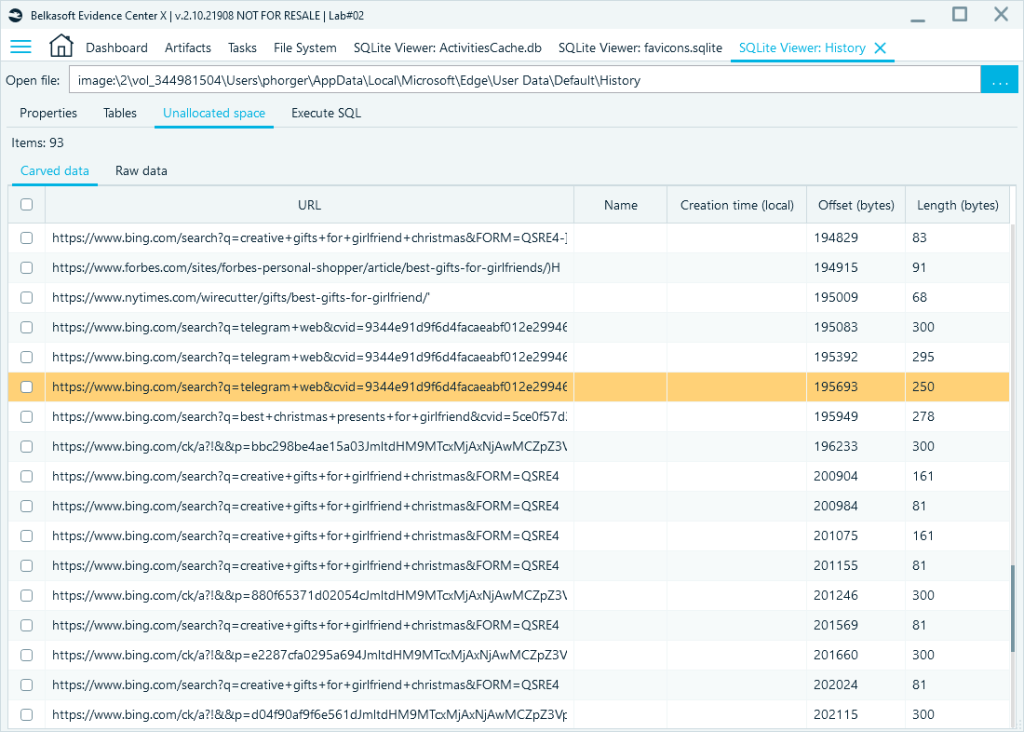
- Unallocated space within the database file is carved automatically. Fragments of partially overwritten records—such as browsing history entries—can be recovered even when the records themselves are gone.
Custom SQL Queries and Query Builder
The SQLite Viewer in Belkasoft X supports custom SQL queries. The query editor is bundled with the visual Query Builder.
As an example, the following query extracts Viber messages from Contacts.data (found at com.viber\database\Contacts.data on iOS), joining three tables to resolve contact names and phone numbers:
SELECT
datetime(ZVIBERMESSAGE.ZDATE + 978307200, ‘unixepoch’) As Timestamp,
ZABCONTACT.ZMAINNAME As “Contact Name”,
ZABCONTACTNUMBER.ZPHONE As “Phone Number”,
ZVIBERMESSAGE.ZTEXT As “Message Body”,
ZVIBERMESSAGE.ZSTATE As Status,
ZVIBERMESSAGE.ZCONVERSATION As “Chat ID”,
ZVIBERMESSAGE.belka_record_type
From ZVIBERMESSAGE
Inner Join ZABCONTACTNUMBER On ZVIBERMESSAGE.ZPHONENUMINDEX =
ZABCONTACTNUMBER.Z_PK And main.ZABCONTACT.Z_PK = ZABCONTACTNUMBER.ZCONTACT
Inner Join ZABCONTACT
Where ZVIBERMESSAGE.ZTEXT Is Not Null
As an alternative to writing the query manually, you can create it in the visual Query Builder. The interface will be familiar to anyone who has worked with SQL. You can select and join tables, set up field aliases, sorting, grouping, and WHERE criteria.
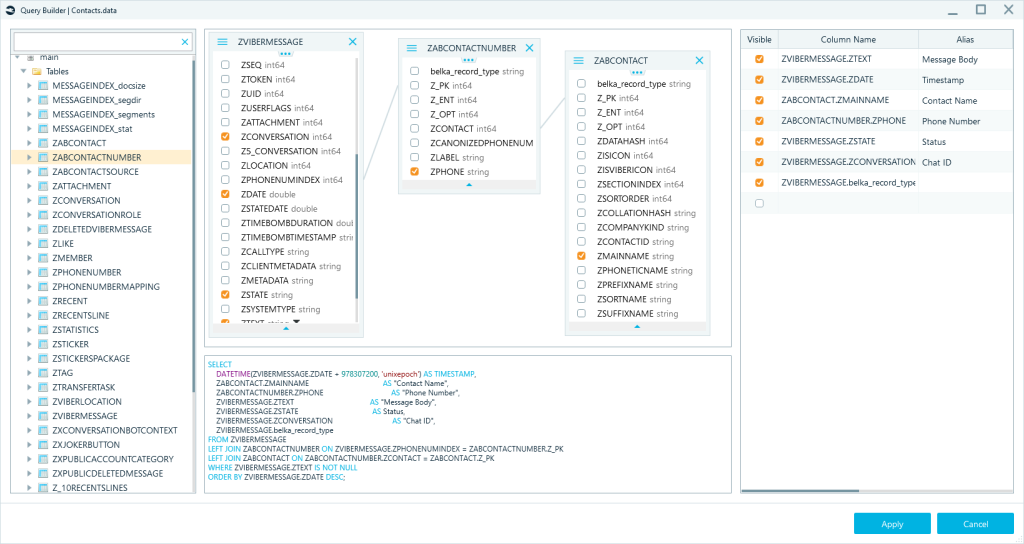
The two JOINs walk the chain from message to phone number to contact name via ZABCONTACTNUMBER as a bridge table, so that messages without a matched contact still appear rather than being silently dropped. The belka_record_type column shows the origin of each record. All we had to add manually to the query was a timestamp conversion with a datetime function.
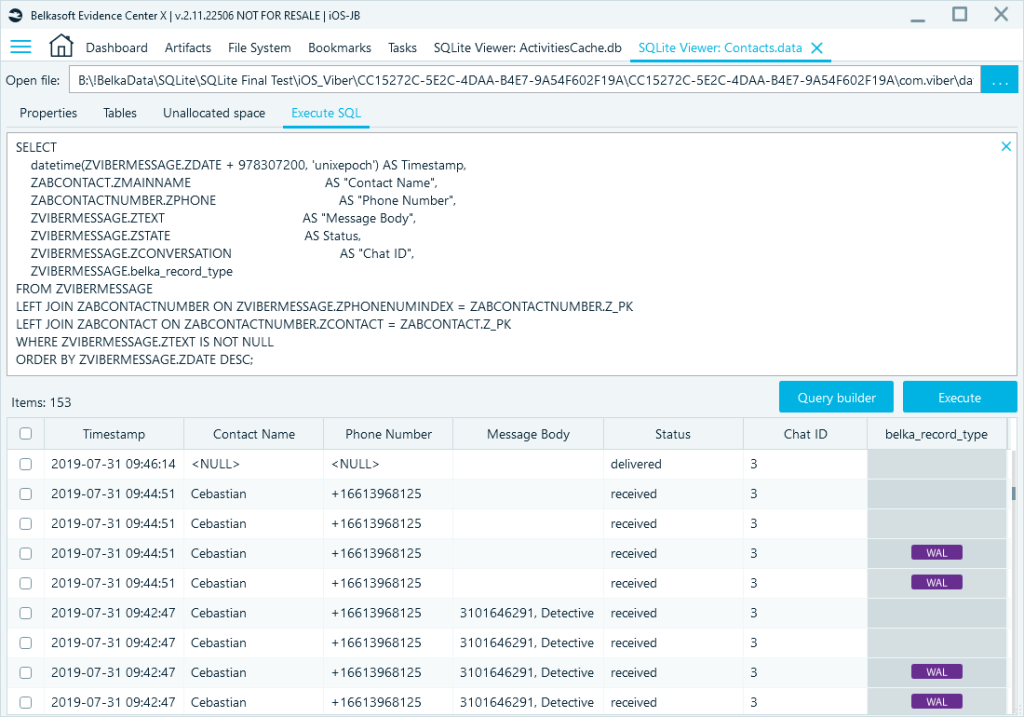
Query results draw from the full database content, including live records, WAL entries, and freelist data, all of which appear in a single result set, so you do not need to query each source separately.
Once you have your results, you can hide columns, convert values to the format you need, and sort the output. When the view is configured the way you want it, you can export it to a report in your preferred format.
Practical Examples
Automated parsing covers a broad range of applications, but not every SQLite database in a case will be recognized: a database may belong to an unsupported application, sit in a non-standard location, or carry an unexpected file name. In other cases, a parser may correctly extract the primary records but leave related data in adjacent tables or companion databases untouched. The following examples illustrate some of these situations.
Avast Firewall Logs
Firewall logs generated by Avast Antivirus are stored in the AvastFw.db file at %ProgramData%\Avast Software. This database can help you understand user and system activities by correlating network events and program paths with specific user actions.
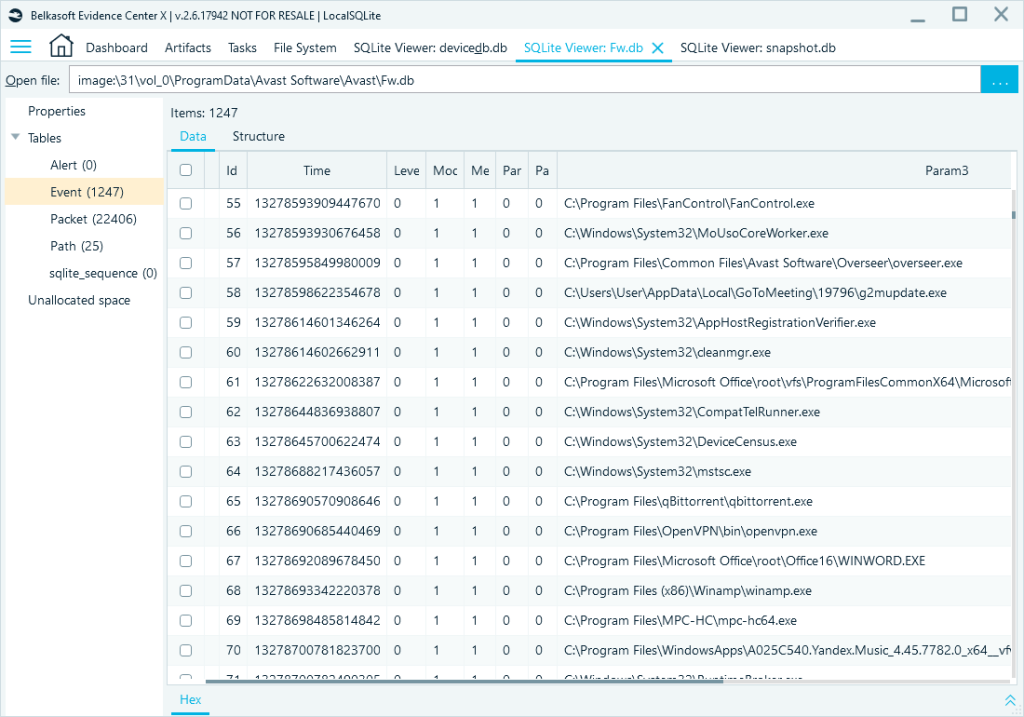
Antivirus event logs can provide insight into system activities directly related to the launch of malicious or prohibited software, yet they are often overlooked.
Microsoft Phone Link
Microsoft Phone Link is a Microsoft app that syncs phone data with your PC. Despite its ordinary appearance, it has a notable security gap: synced data is stored in an unencrypted format directly on the user’s computer. This means contacts, call history, text messages, and other data are accessible even when the phone itself cannot be seized—provided the suspect used Phone Link at least once.
Synced data is stored in a set of SQLite databases at %LocalAppData%\Packages\Microsoft.YourPhone_8wekyb3d8bbwe\LocalCache\Indexed\[device_ID]\System\Database.
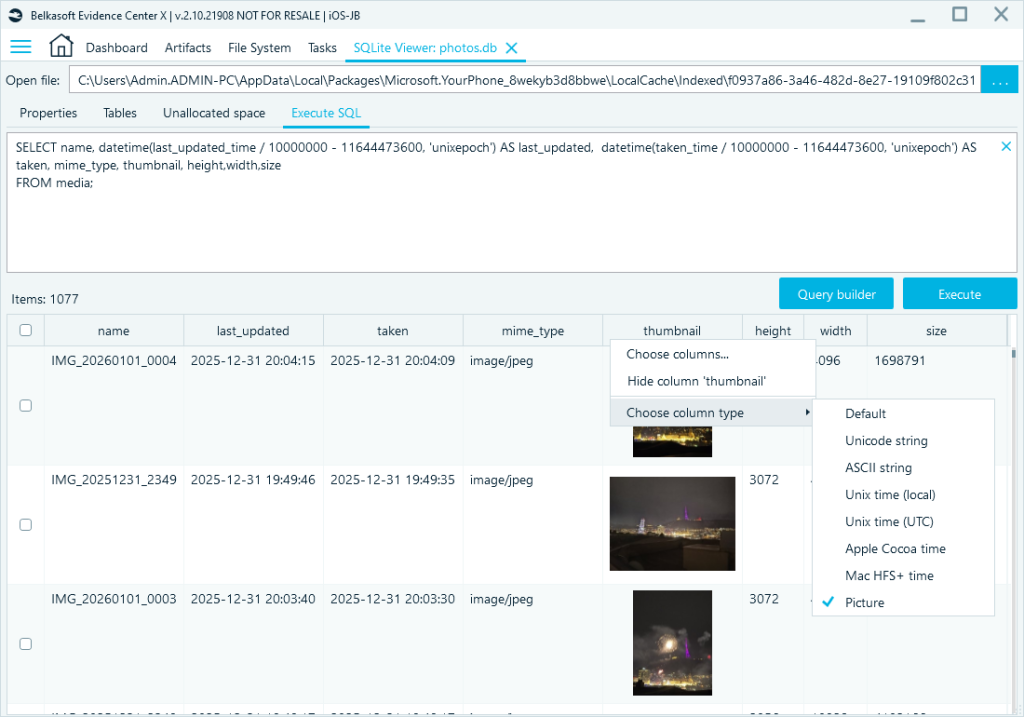
Using the SQLite Viewer, open photos.db in the application folder and run the following query:
SELECT name,
datetime(last_updated_time / 10000000 – 11644473600, ‘unixepoch’) AS last_updated,
datetime(taken_time / 10000000 – 11644473600, ‘unixepoch’) AS taken,
mime_type, thumbnail, height, width, size
FROM media;
Converting the thumbnail column to a picture view gives you a summary of all photos synced from the phone:
Google Drive
Google Drive stores its data in %LocalAppData%\Google\DriveFS\migration\bns_config\<Profile Folder>. You cannot retrieve cloud files from its temporary data, but you can access several items of interest from its technical databases.
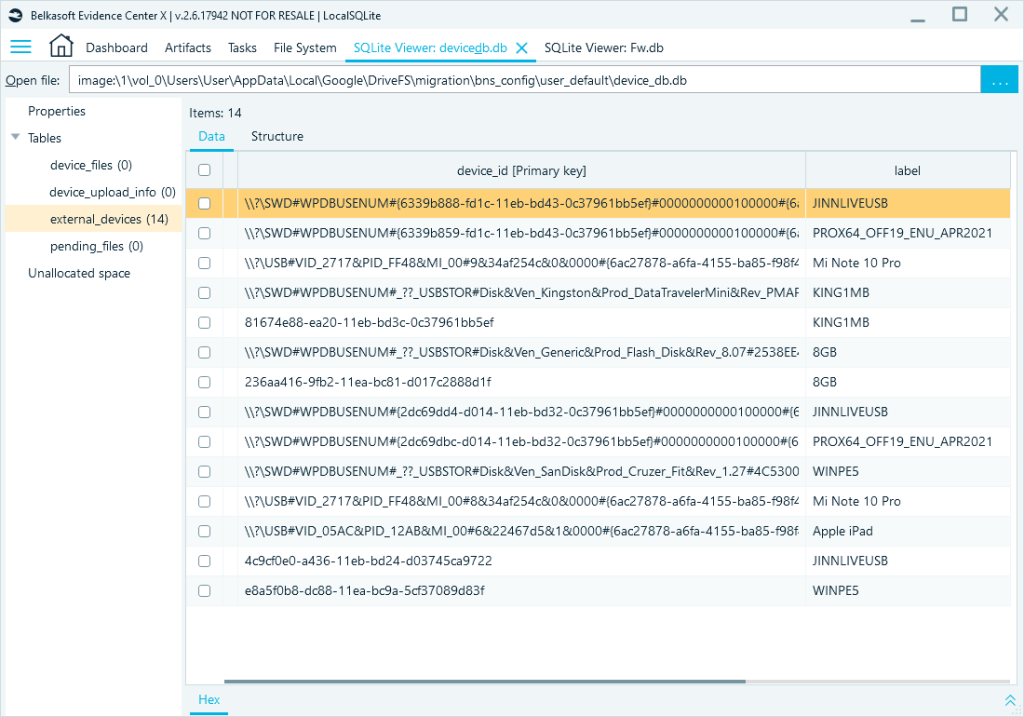
The device_db.db file stores information about external devices connected to Google Drive.
The mirror_sqlite.db database (location may vary) stores metadata about files the Google Drive desktop client has mirrored with the cloud, including file names, sizes, hashes, and pending deletions and uploads.
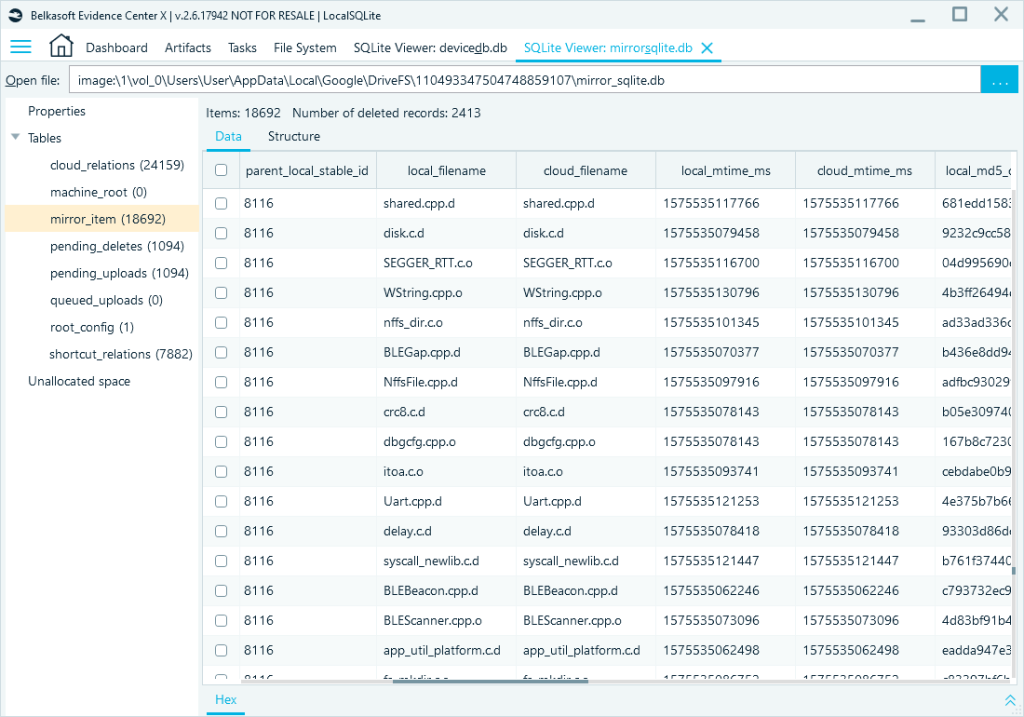
The mirror_item table in mirror_sqlite.db can help identify data synchronization events in cases where Google Drive was used to exfiltrate data—even if the files have since been removed. Although these databases do not contain the actual files, they record file names, sizes, checksums, and paths. This information helps identify transferred files and supports cross-referencing with other evidence sources.
iOS SMS Backup
Instead of relying on one tool for every task, DFIR labs use a range of forensic applications, each with its own strengths and limitations. This means that what one tool surfaces and what another misses can vary—sometimes significantly.
A notable instance occurred during a pyramid scheme investigation where three years of iTunes backups held the primary evidence. Despite being viewable on the physical device, the essential message thread failed to appear when the investigator ran an automated parse of the extracted data.
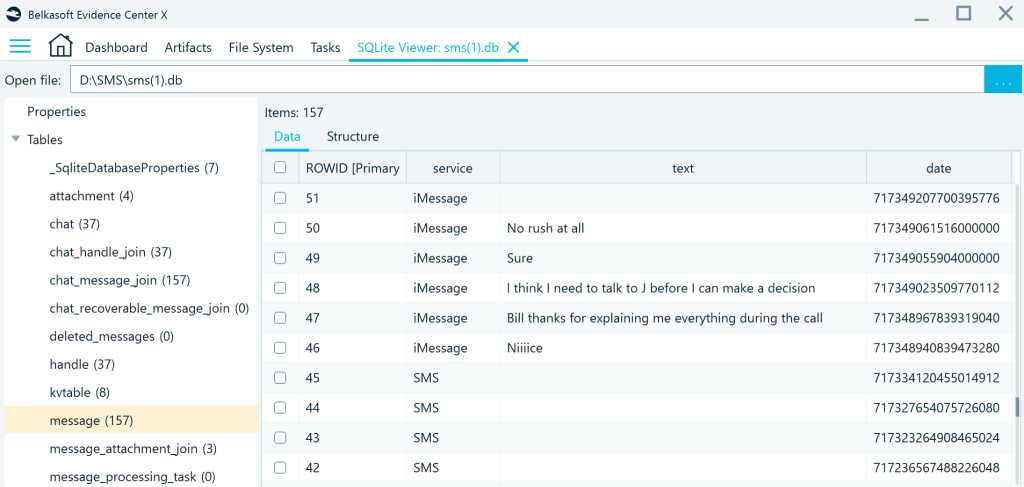
Digging into the file system, the investigator found two SMS databases: sms.db, containing current messages, and sms(1).db, created during the logical acquisition. The forensic tools had parsed only the first one. Using the SQLite Viewer in Belkasoft X, the investigator opened sms(1).db directly and retrieved the complete conversation—a detailed exchange between the suspect and the victim discussing the fraudulent activity. That conversation became the key evidence in the case and contributed directly to a conviction.
You can read the full story in the Belkasoft case study by JB Brooks
Conclusion
SQLite databases store evidence at multiple levels—active records, deleted data, WAL entries, and unallocated fragments. Knowing where to look and how to reach each layer is what separates a thorough examination from one that stops at what automated parsing surfaces.
Belkasoft X handles both sides of that work. Automated parsing covers recognized applications and presents their data with field-level interpretation. When a database falls outside parser support—or is only partially covered—the SQLite Viewer provides direct access to the full content without modifying the source files. Custom SQL queries and the Query Builder let you target specific records, join tables, and retrieve exactly what your investigation needs.
The practical cases in this article are a starting point. Firewall logs, phone sync data, cloud client metadata, or a series of SMS backups are all reachable through the same workflow. As applications update and new ones emerge, the ability to query SQLite databases directly—rather than waiting for parser support—keeps your investigation moving.