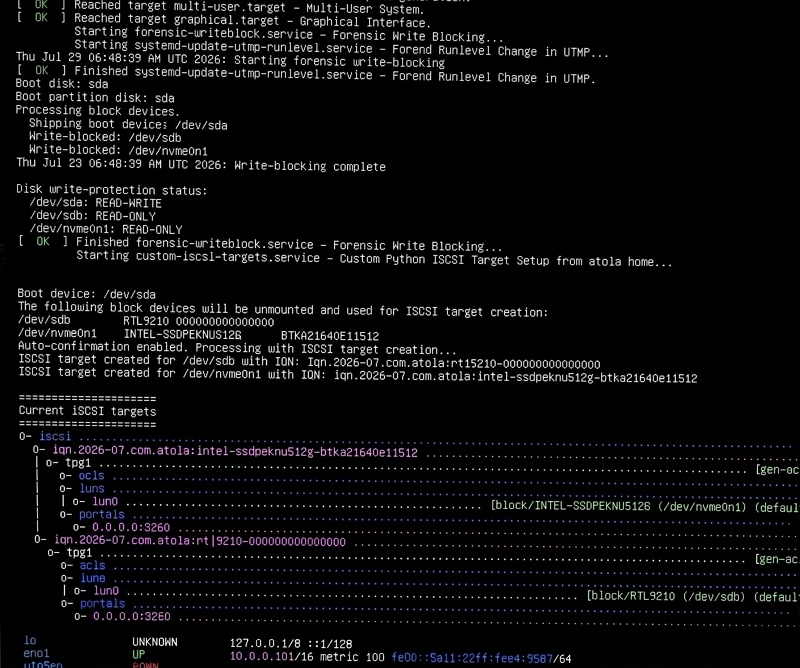
The free bootable image lets examiners access internal drives in laptops, workstations and servers as write-protected iSCSI sources.
Atola Technology has introduced Atola Boot Image, a free bootable environment designed for forensic acquisition when removing a drive from the host computer is difficult, risky or impossible. Modern storage is increasingly inconvenient to remove, and there is a growing number of all-in-one systems where dismantling the computer introduces a risk of physical damage.
Shortly after the release, one Atola customer summed up the appeal:
“This is gonna be a game changer for us. It’s one of those things I need the other devices for and now I don’t. Very happy about this!”
Another user described the workflow change in more detail:
“We run into laptops and other systems where getting the drive out is either difficult or just not worth the risk. Until now, for these cases we would switch to another tool or a bootable environment. With Atola’s Boot Image, we can leave the drive in the machine, boot it, and acquire it through TaskForce like any other source.”
A third forensic team put it even more simply:
“This was the one major capability we felt was missing from TaskForce 2. And now it’s here!”
The feedback echoes requests Atola had received before the Boot Image existed. Our customers would regularly run into laptops with soldered-in drives and wanted a way to boot the computer, connect it to a forensic system and image the internal storage. It was more than once that we were asked when Atola’s planned bootable acquisition functionality would become available.
“We kept hearing the same problem from forensic examiners: they could access the computer, but getting to the drive itself was difficult, risky, or simply not practical,” said Vitaliy Mokosiy, CTO at Atola Technology. “We wanted to make that workflow much simpler: boot the computer, write-protect its internal drives, expose the drive model and serial number, and let the examiner acquire them with the forensic imager they already use.”
Keeping the Drive Inside the Computer
With Atola Boot Image, the examiner writes the image to a USB drive and boots the target computer from it. The environment automatically write-protects the computer’s internal drives, exposes them as iSCSI targets keeping the drive model & serial in IQN, and displays the IP address needed to connect from the forensic imager.
The drives can then be selected as sources in Atola TaskForce 2, TaskForce or Insight Forensic and acquired without physically removing the storage.
Boot-based forensic acquisition itself is not new. Examiners have long used environments such as PALADIN, CAINE and WinFE when conventional drive removal is undesirable. For some, boot acquisition has become a routine workflow rather than an exceptional workaround.
Atola Boot Image takes a different approach from traditional bootable forensic environments. Rather than turning the target computer into the main forensic workstation, it exposes its protected internal drives to the examiner’s existing imaging system. Acquisition, hashing, reporting and other imaging operations therefore remain within the used external forensic imager.
Where Boot Image Fits in the Workflow
The Boot Image does not eliminate the need for traditional acquisition methods. Compatibility depends on the target computer’s ability to boot from USB and on support for its storage controller and network hardware. Encryption and some RAID configurations may also require a different acquisition strategy.
But in suitable cases, the workflow changes: instead of opening the computer to reach the evidence drive, the examiner can leave the storage in place and bring the drive to the forensic imager over the network.
Atola Boot Image is available as a free download and can also be used with other forensic imagers capable of accessing iSCSI targets. Here is a step-by-step manual to guide you.
About Atola TaskForce

Atola TaskForce is a high-performance forensic imager designed for both lab and field use. Its 18 ports support 12+ concurrent imaging, hashing, or wiping sessions, with cumulative speeds of up to 15 TB/hour. TaskForce also supports automated RAID reassembly, including arrays with a missing device, damaged-drive imaging, Express Mode for fast repeatable acquisitions, and a Web API for integrating and automating forensic workflows.
About Atola TaskForce 2

Atola TaskForce 2 is a lab-focused forensic imager built for high-volume, parallel acquisition. It features 26 ports, including four M.2 NVMe ports, and can process more than 25 drives simultaneously — including damaged media — with cumulative imaging speeds of up to 25 TB/hour. It also includes TaskForce capabilities such as automated RAID reassembly, damaged-drive imaging, Express Mode for streamlined acquisitions, and a Web API for workflow automation.
About Atola Technology

Atola Technology is an innovative company based in the Vancouver area, Canada, specializing in creating forensic imaging hardware tools for the global forensic market.

Atola’s engineers – including its founder and CEO Dmitry Postrigan – have strong expertise in storage media and data recovery, and focus on creating highly efficient and user-friendly forensic imagers.

To learn more, visit us at atola.com and find us on LinkedIn.
Marketing
Yulia Samoteykina
Director of Marketing
Sales
John Graham
Director of Sales and Business Development